
 Platform Engineering·25 September 2026·21 min read
 I wanted an app from one sentence. What I got was a specification.
Microsoft’s app-builder went generally available in September. The announcement is short: describe the app you need, and it appears — tables, forms, views, roles. Anyone working in the Power Platform reads a sentence like that with a mixture of curiosity and unease these days.
I wanted to know what actually happens. So I took an ordinary requirement, phrased the way it gets said in a corridor:
“Build me an app for managing test equipment. Technicians register a device for inspection, the inspection office records the result, quality assurance sees every inspection. An inspection must not be saved if the inspection date lies in the future. On the home page, an overview of overdue inspections per site.”
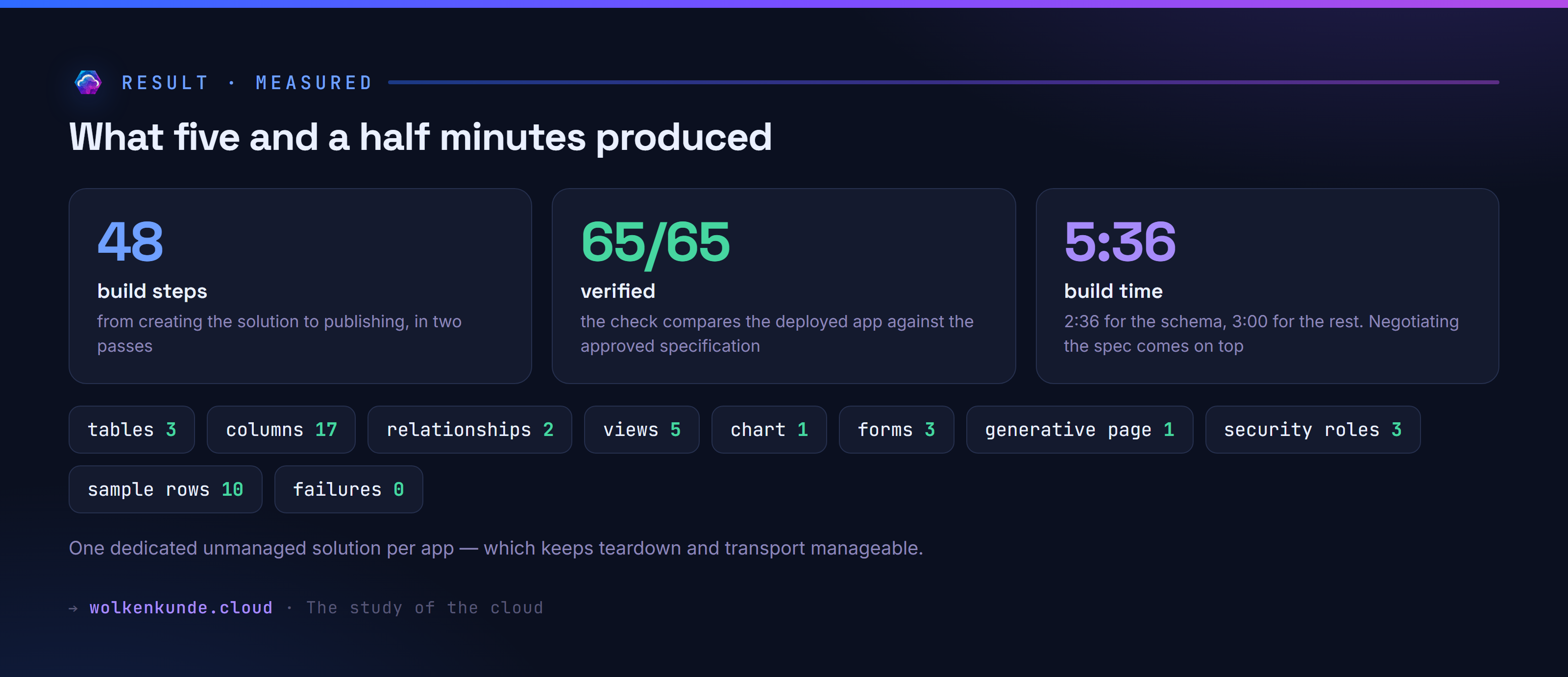
What came out was a running app: three tables, 17 columns, five views, three forms, one generative page, three security roles. Forty-eight build steps, no failures, five minutes thirty-six.
But that is not the story. The story is what happened in between: the tool would not let me through.
First surprise: the comfortable route does not exist in Europe
You read the announcement, open the maker portal and look for the feature. In a European environment you will not find it.
The in-browser experience for generative pages exists, according to the documentation, in exactly four regions: the United States, Great Britain, Australia and Singapore. There is a second sentence worth reading twice: “only US English is a supported prompting language” — in the browser you may only describe what you want in English.
The way around it is in the same documentation, and Microsoft actually recommends it as the preferred path: a plugin for an AI code generation tool. Specifically GitHub Copilot CLI or Claude Code. That runs worldwide, with whatever frontier models the tool offers, and it takes German.
For the German-speaking world that means the only practical route to the app-builder runs through the command line. That sounds like a drawback. It is the actual gain, and I will come back to why.
Three stumbling blocks before anything gets built
Installing the plugin takes two lines:
/plugin marketplace add microsoft/power-platform-skills
/plugin install model-apps@power-platform-skills
After that there is /app-builder for whole applications and /genpage for individual pages. Unspectacular so far. Then things stopped:
{"ok":false,"blocker":"whoami_401",
 "message":"Dataverse rejected the token (401). Run `az login` again to refresh.",
 "azUser":"Admin@my-company.com",
 "pacUser":"dev1@trial.onmicrosoft.com",
 "identitiesMatch":false}
The documentation asks for an authenticated Azure CLI “with the same identity used by the active PAC CLI profile” but never says why. The answer sits only in the plugin’s own instructions: the engine writes “via the Web API using an az-token HttpClient”. PAC only supplies the environment URL; the actual access comes from the Azure CLI. Anyone juggling several tenants has to switch accounts to build.
The second block followed immediately:
az login --tenant c530e80c-…
ERROR: No subscriptions found for dev1@trial.onmicrosoft.com.
A pure Power Platform tenant has no Azure subscription. The Azure CLI insists on one by default. The app-builder needs none at all — it only wants a token for Dataverse. The switch for that appears on neither Learn page:
az login --tenant <tenant> --allow-no-subscriptionsThree hurdles, all before the first line of application, none of them documented. This is exactly where people give up and conclude the tool is broken.
What the “skill” actually is
Before going on, it is worth looking inside the plugin, because the idea that some Microsoft service is off somewhere inventing apps is wrong.
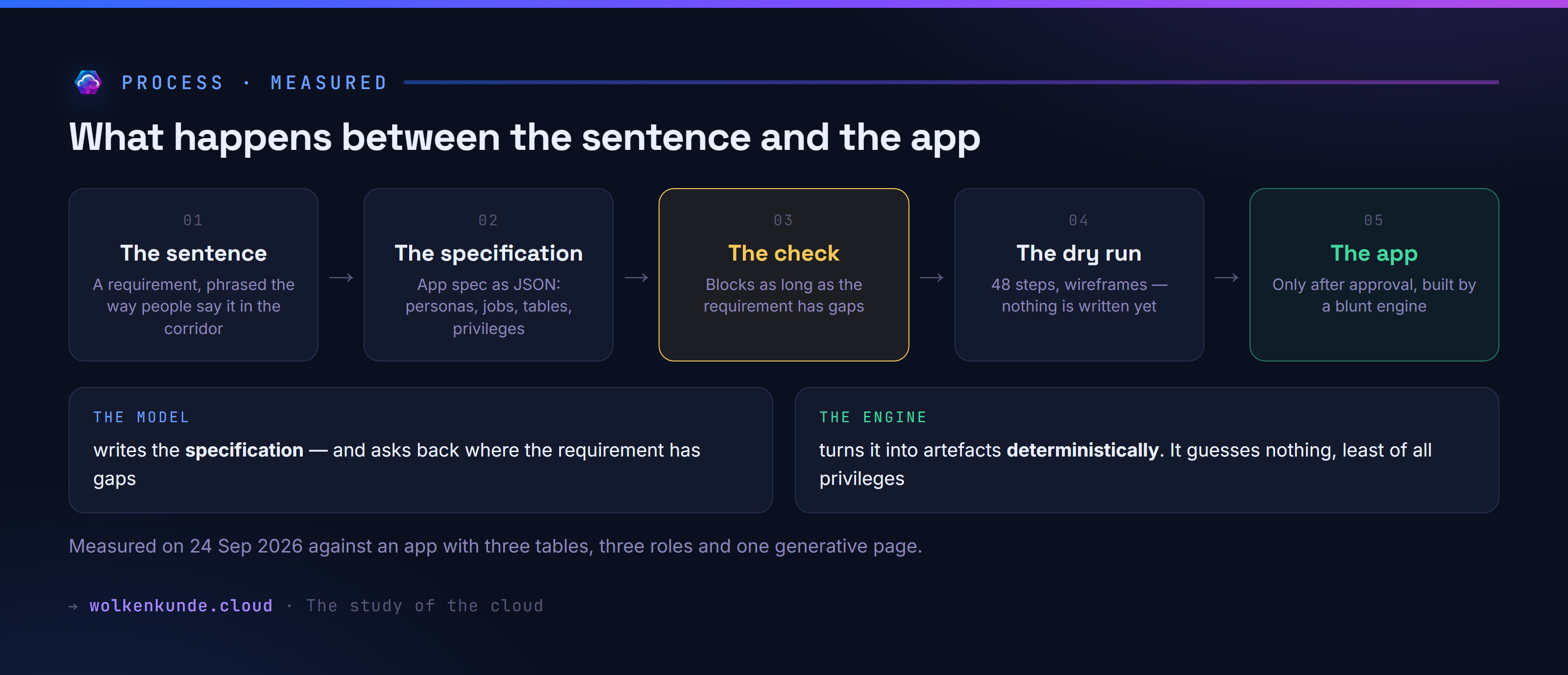
Inside there are: a long set of instructions, six specialised subagents, a schema for the intermediate format, a dozen scripts — and a bundled SDK called cds-maker-sdk. The process has three stages and every one of them is inspectable:
- The requirement becomes an app spec — a JSON file describing personas, jobs, tables, columns, relationships, views, forms, roles and pages.
- That specification is checked, rendered as wireframes and planned as a dry run.
- Only after approval does a deterministic engine turn it into artefacts.
So the language model does not write the app. It writes the specification. The building is done by a machine that invents nothing.
Count the package and the division of labour shows up in the sizes, too. The installed plugin holds 93 scripts with a good 31,000 lines of program — plus the bundled SDK at 0.7 MB — against roughly 9,200 lines of instructions for the agent. For every line of description there are three lines of executable code.
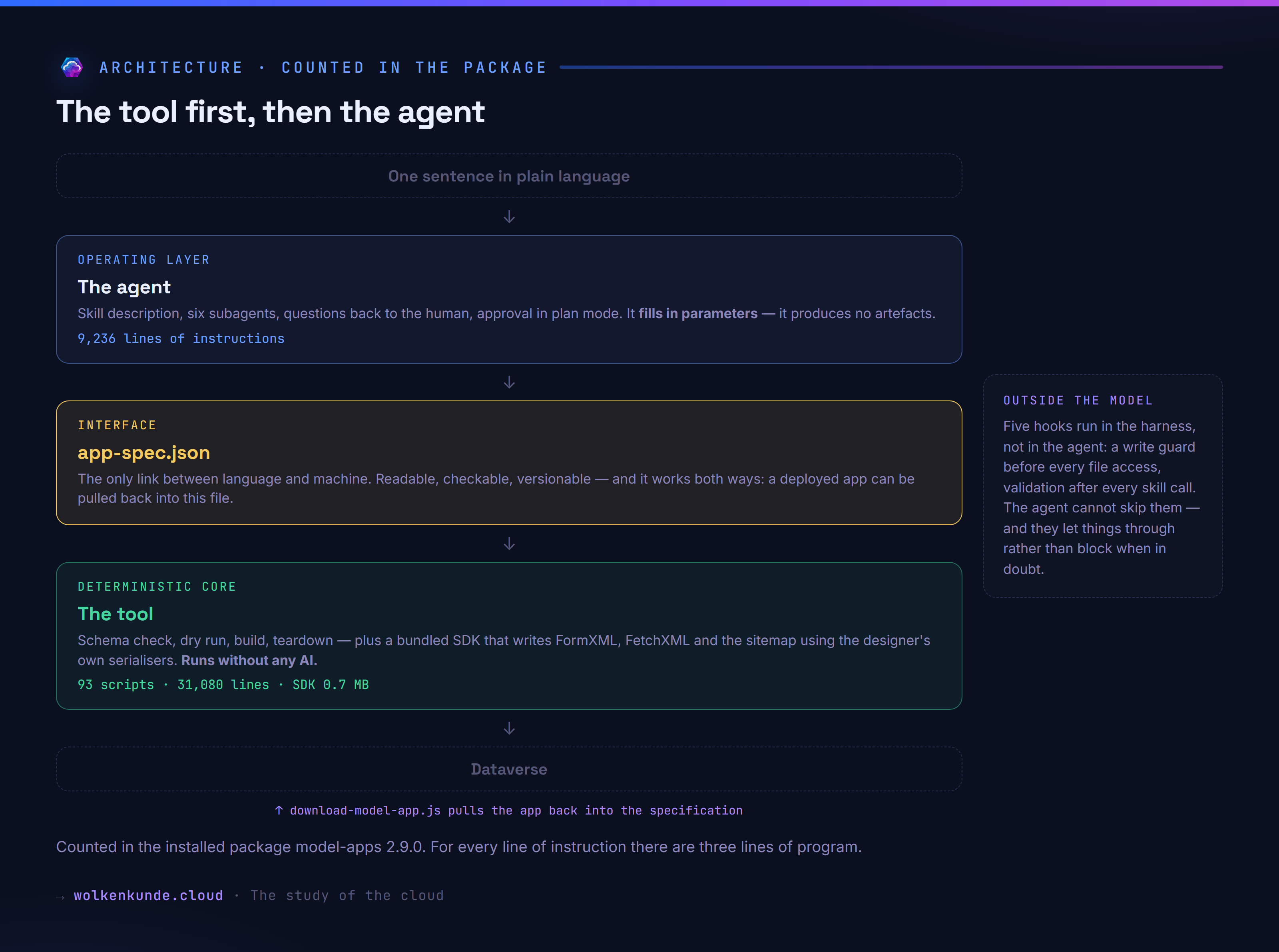
That is the actual construction, and it transfers: first a deterministic tool is built, then an agent is wrapped around it to operate it. The tool checks, plans, builds and tears down — and it runs without any language model if you write the specification by hand. The agent’s job is a different one: it translates a requirement into parameters, asks back where something is missing, and collects an approval.
Between them sits a single file, and that file is the hinge. It is readable, checkable and versionable — and it works in both directions: an app that has already been built can be pulled back into a specification, changed and rebuilt.
The moment it got interesting
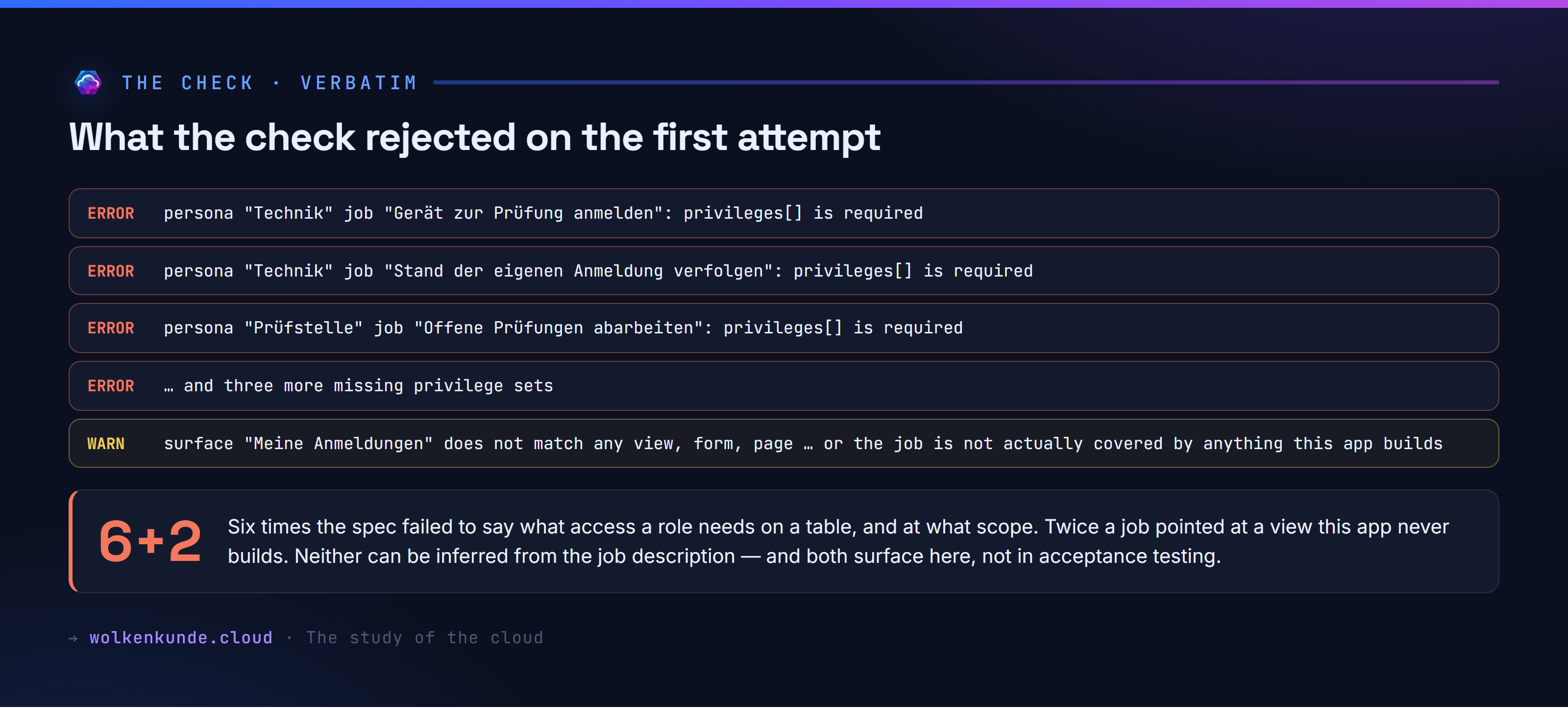
I had the specification together, wanted to move on, and ran the check. It refused:
ERROR  persona "Technik" job "Gerät zur Prüfung anmelden": privileges[] is required
ERROR  persona "Technik" job "Stand der eigenen Anmeldung verfolgen": privileges[] is required
ERROR  persona "Prüfstelle" job "Offene Prüfungen abarbeiten": privileges[] is required
ERROR  persona "Prüfstelle" job "Ergebnis eintragen": privileges[] is required
ERROR  persona "Qualitätssicherung" job "Alle Prüfungen überblicken": privileges[] is required
ERROR  persona "Qualitätssicherung" job "Überfällige Prüfungen je Standort auswerten": privileges[] is required

WARN   persona "Technik" job "Gerät zur Prüfung anmelden": surface "Meine Anmeldungen"
       does not match any view, form, page, dashboard, table or sitemap entry in this
       spec — either it names an out-of-the-box artifact (fine) or the job is not
       actually covered by anything this app builds.

FAIL [profile: design] — 6 error(s), 2 warning(s)
The six errors all concern the same place in the specification: privileges[]. For every job of every persona it must say which table it touches, with what access — read, create, write — and at what scope: only its own records, those of the business unit, or those of the whole organisation. Without that the check stops. It is not inferred from the job description, no matter how plainly that description is written.
The two warnings are about something else. In the specification you can note, for each job, which surface it is done through — a view, a form, a page. I had entered a view called “Meine Anmeldungen” for the technicians and never defined it.
That is not a syntax check. That is a design check.
I added the privileges and built the missing view. Then:
OK [profile: design] — 0 error(s), 0 warning(s)I had set out to have work taken off my hands. What came out was that I had to do my homework — only at the front, where it is cheap, instead of during acceptance testing.
Why I could not simply carry on
At this point a question arises that reaches beyond the Power Platform: why did that stop me? A language model can skim past an instruction. If a skill description says “check the specification before you build”, that is a request, not a barrier — and an agent in a hurry builds anyway.
Here it holds, for four reasons you can read in the plugin.
First, the rule lives in the program, not in the skill description. The schema check sits in scripts/lib/app-spec.js: 3,481 lines with 313 places where an error goes onto the list. The code also says why it is strict — the comment on permitted keys explains it with an example:
// Reject unknown keys so a typo fails loudly at author time instead of
// silently taking a default. WHY this matters for security: `appAcces:false`
// (typo) would leave the REAL `appAccess` absent → defaulting to true →
// the persona wrongly gets app-module read + the app association.
A typo in a key name would therefore hand out access silently. Which is why unknown keys are rejected rather than ignored.
Second, the build tool checks by itself. That is the decisive part, because it makes the quality gate impossible to bypass. You could simply never call the check command — it would not help, because the build calls the same function before it writes anything:
const v = validateAppSpec(spec, { profile: opts.profile || 'deploy' });
if (!v.ok) {
  return { ok: false, errors: v.errors };
}
The quality gate therefore does not depend on the agent’s discipline, but on the tool doing the work.
Third, strictness scales with consequence. There are several validation profiles, and which one applies is not the agent’s call but one line when the flags are read:
profile: (flags.apply === true && flags.stage !== 'data') ? 'deploy' : 'plan'As long as it is only planning, the check is lenient. The moment something is actually written, the strictest profile applies. You cannot sneak past the lenient check into a real write.
Fourth, part of it runs outside the model. The plugin ships hooks that the harness executes, not the agent. One of them sits in front of every write and checks whether the path leaves the working directory — aimed at a concurrent subagent going astray. What is remarkable is how restrained it is built: it warns instead of blocking, it only applies during an active session, and on an error of its own it lets things through.
// NON-BLOCKING by design = exit 1 … only exit 2 would block.
// We deliberately do NOT hard-block: the skill may legitimately run from an
// unusual cwd … a false positive must never stop the user's write.
…
process.exit(0); // never block on hook-side bugs
One detail is easy to miss: the rule about whether every job is covered by a surface lives in its own module (surface-resolver.js) — explicitly, the comment says, so that the two places checking it “cannot word the same finding differently”. Before the build and after the build, the same question gets the same sentence.
What to take from this for your own agents is the real lesson of this article: a quality gate that exists only in the skill description is a request. One that sits as a program in front of the writing tool is a barrier. Anyone who wants to impose a process on an agent — approvals, four-eyes, completeness of a requirement — does not write it into the agent’s description but into a program the tool itself calls. And they scale strictness with consequence: lenient while drafting, unyielding the moment something lasting happens.
What is on the table before the first write
After that the tool shows what it intends. First as a wireframe:
┌─ Prüfung ───────────────────────────────────────────────────────┐
│   Prüfung *  [____]             Prüfdatum  [date/time]          │
│   Ergebnis  [▼ select]          Prüfer  [____]                  │
│   Befund  [text area]           Status  [▼ select]              │
│   Nächste Prüfung am  [date/t…  wk_pruefmittelid  [lookup]      │
│  » Form JS ┄┄┄┄┄┄┄┄┄┄┄┄┄┄┄┄┄┄┄┄┄┄┄┄┄┄┄┄┄┄┄┄┄┄┄┄┄┄┄┄┄┄┄┄┄┄┄┄┄┄┄┄ │
│    • onsave  →  WkPruefung.onSave                               │
└─────────────────────────────────────────────────────────────────┘
Then as a dry run, step by step, marking what is new and what already exists:
▶ data-model
  [2/48] + create table wk_standort ("Standort")
  [6/48] + create table wk_pruefmittel ("Prüfmittel")
  [14/48] + create table wk_pruefung ("Prüfung")
  [21/48] + create relationship 1:N wk_standort->wk_pruefmittel
▶ security
  [45/48] ▢ security role "Technik" (2 jobs)
…
▢ dry run — 31 to create, 0 already present, 17 not probed (48 steps).
  Re-run with --apply to execute.
And only then, after explicit approval, does anything get written.
Hands-on: the whole sequence
Prerequisites are Node, the Power Platform CLI, the Azure CLI and a code tool. Then:
# 1. Sign in — both CLIs on the same identity
az login --tenant <tenant> --allow-no-subscriptions
pac auth create --environment https://<org>.crm4.dynamics.com

# 2. Check that the two match
node scripts/check-auth.js
# {"ok":true,"message":"Ready (az + pac both signed in as …)"}

# 3. Check the specification — the hard barrier
node scripts/lint-app-spec.js --spec @app-spec.json --profile design

# 4. See what is planned
node scripts/preview-app.js --spec @app-spec.json

# 5. Dry run against the real environment, without writing
node scripts/build-model-app.js --env <url> --spec @app-spec.json --sample-data --publish

# 6. Build
node scripts/build-model-app.js --env <url> --spec @app-spec.json \
     --apply --sample-data --publish
The generative home page adds an intermediate step: first the schema is created, then type bindings are generated from it, and only with those does the page builder write React code that knows real column names.
pac model genpage generate-types --data-sources "wk_standort,wk_pruefmittel,wk_pruefung" \
    --output-file RuntimeTypes.ts
What comes out is incidentally a neat piece of evidence that the environment language carries all the way into the code:
const enum wk_pruefmittel_wk_kategorie {
  "Messschieber" = 100000000,
  "Drehmomentschlüssel" = 100000001,
  "Manometer" = 100000002,
}
const enum wk_pruefung_statecode { "Aktiv" = 0, "Inaktiv" = 1 }
Schema names stay ASCII, display names and option labels are German, umlauts and all.
The build itself ran in two passes: 22 objects for the schema in 2 minutes 36, then the remaining 27 in 3 minutes. At the end:
✓ build complete — 27 created, 21 skipped, 0 failed (48 steps)
✓ verify PASS (65/65 present)
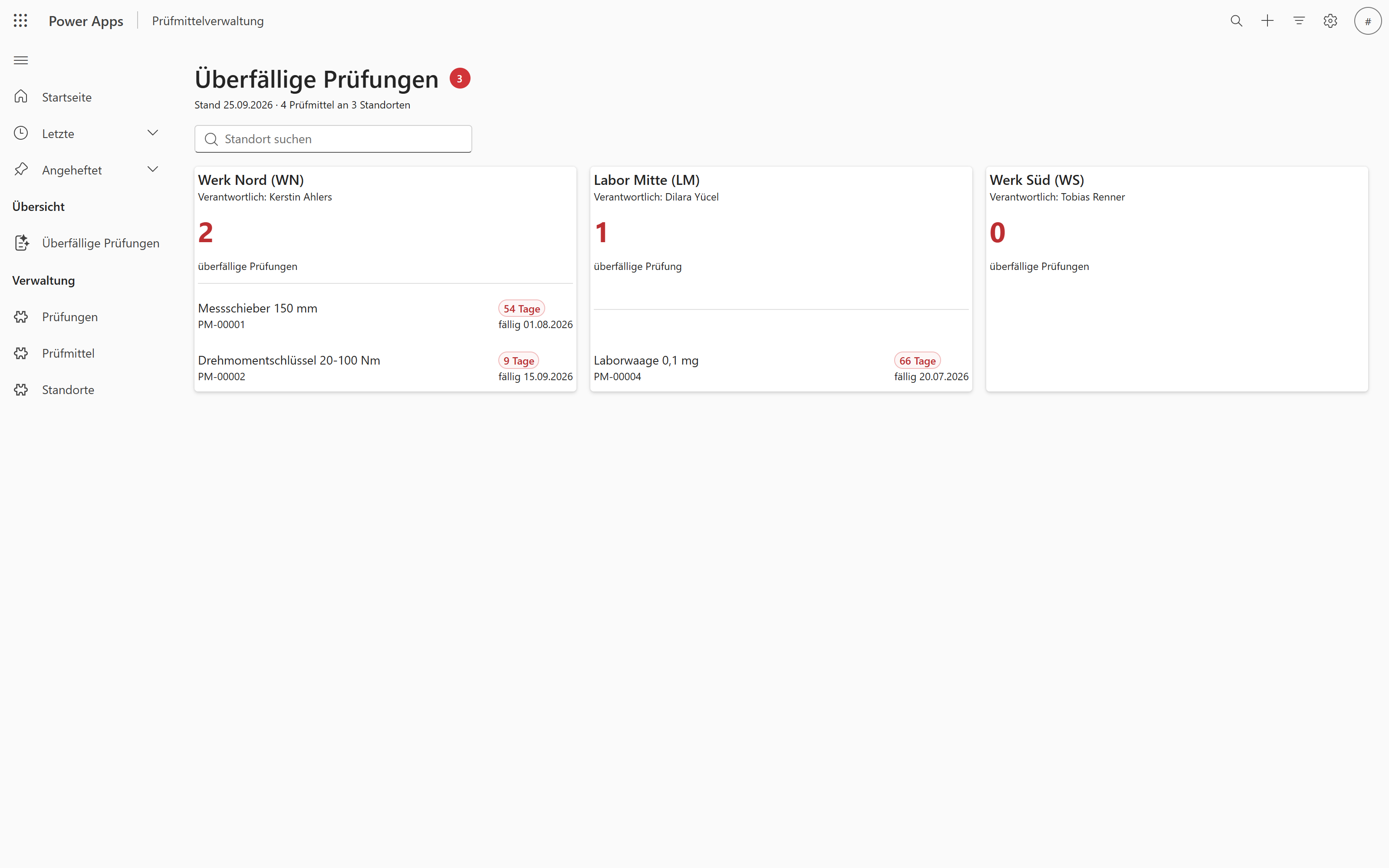
And this is what it looks like. The home page that grew out of “on the home page, an overview of overdue inspections per site”:
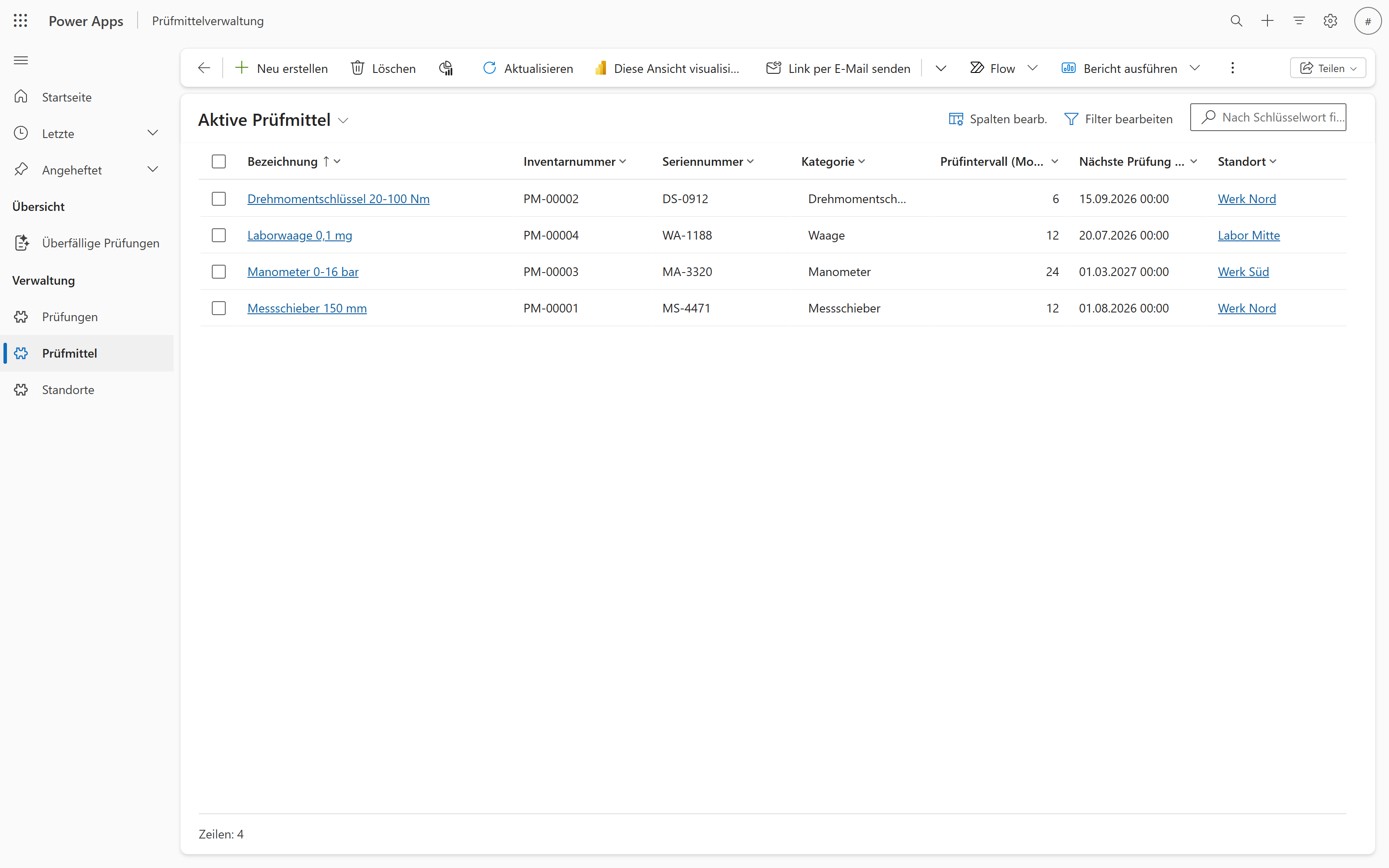
The test equipment view with the columns, lookups and German labels from the specification:
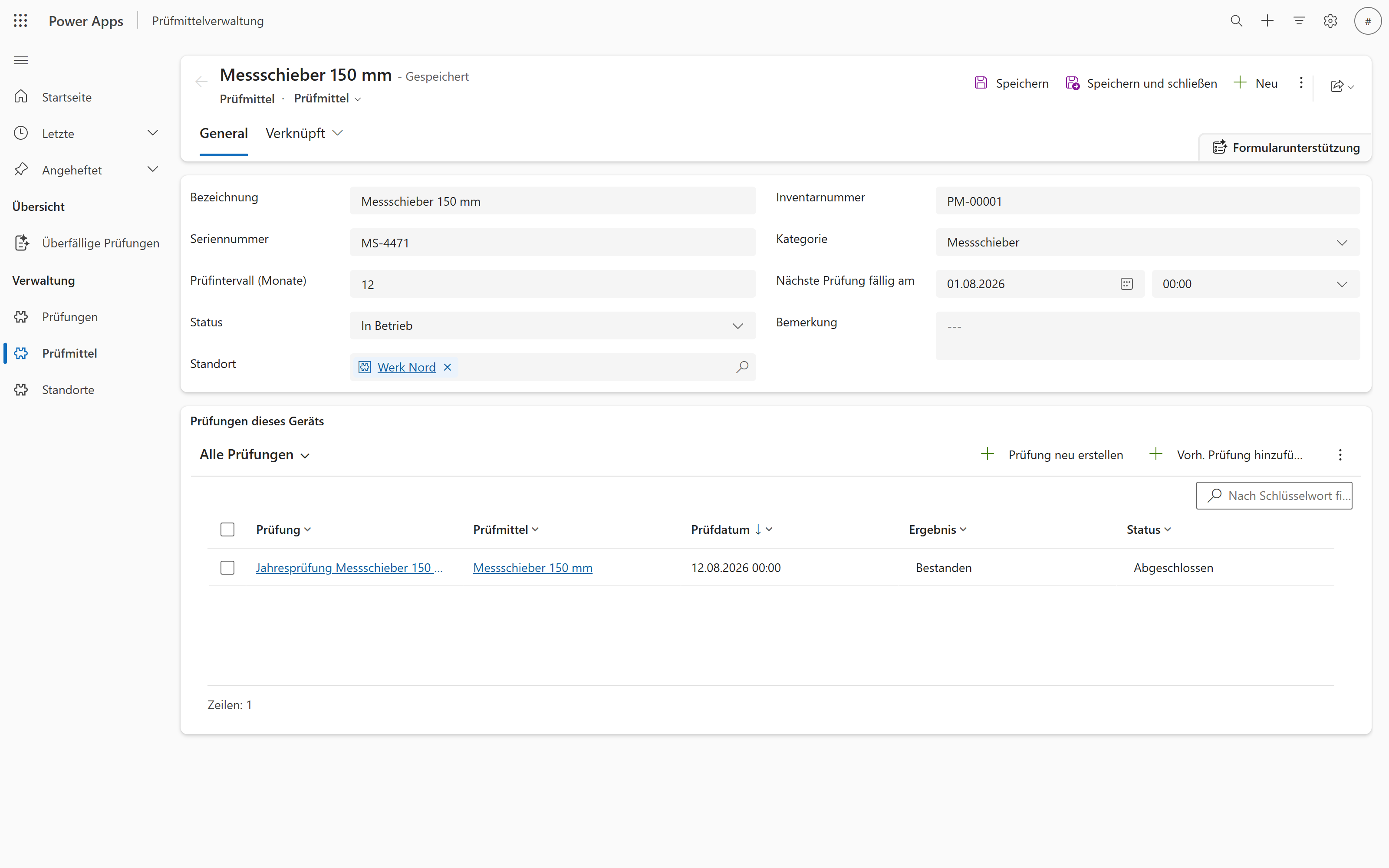
And the form that came out of “forms with subgrid”: fields in two columns, the site as a lookup, and beneath it the inspections of this device as a grid of their own.
What the roles are actually allowed to do
The point I was most sceptical about: what does a tool like this do with permissions? Hand out organisation-wide rights generously so nothing gets stuck?
The instructions are unambiguous — “the builder never infers privileges from a job’s text” — and the environment confirms it. Measured through the Web API, the roles contain exactly what I declared, plus read access to the app itself:
| Role | Privileges in Dataverse |
|---|---|
| Technik | inspection read/create/write (user), test equipment read (business unit), site read (organisation) |
| Prüfstelle | inspection and test equipment read/write (business unit) |
| Qualitätssicherung | all three tables read (organisation) |
No silent extensions. Anyone who wants graded roles has to write them down — and that is the right division of labour.
The uncomfortable parts
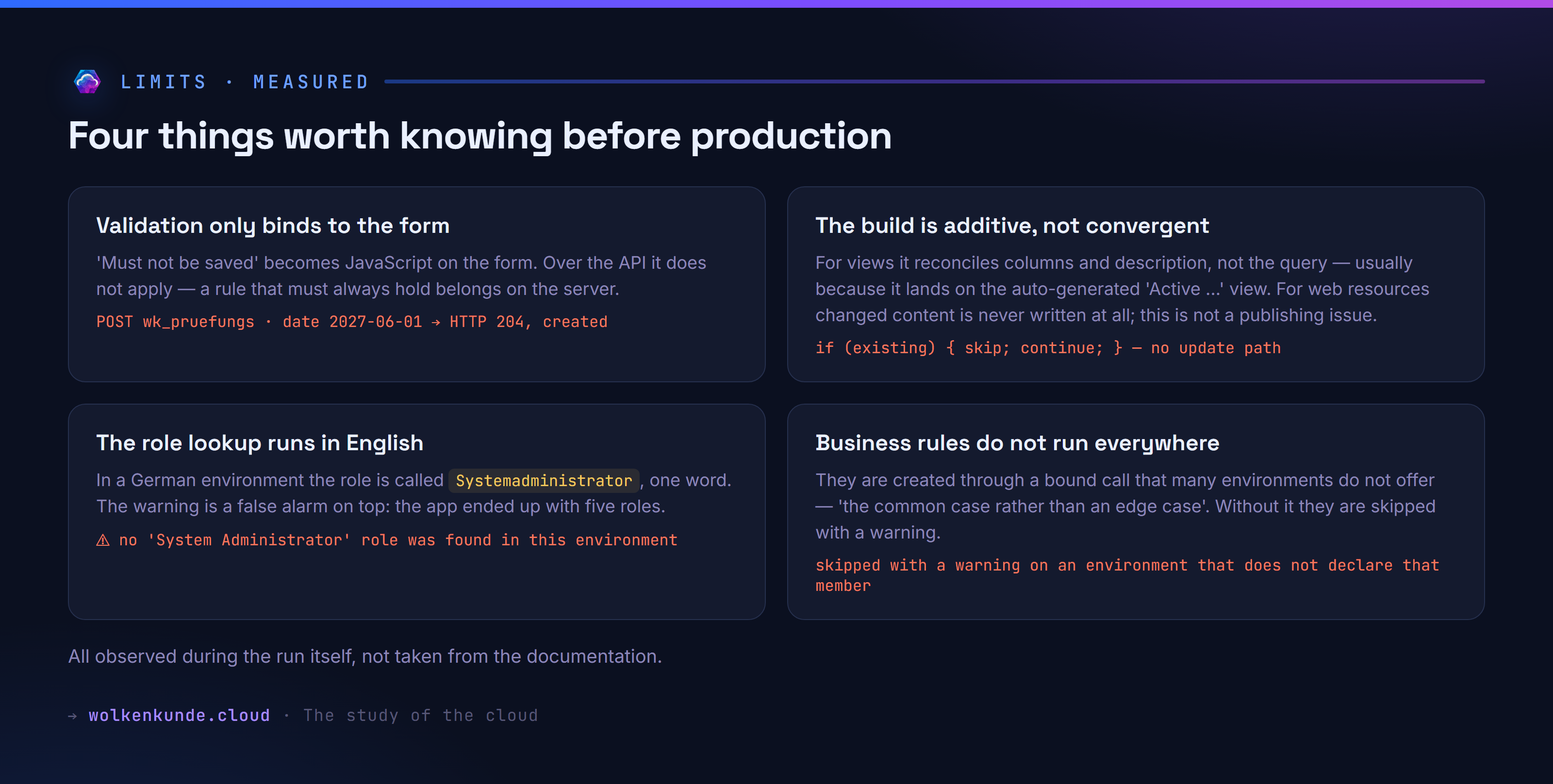
The validation rule is pure form logic. “Must not be saved if the inspection date lies in the future” became a JavaScript file bound to the form’s save event, cancelling the operation. That works when someone clicks save in the app. Anyone writing through the API bypasses it:
POST /api/data/v9.2/wk_pruefungs
{"wk_pruefungsbezeichnung":"Regeltest Zukunft","wk_pruefdatum":"2027-06-01T10:00:00Z"}
→ HTTP 204, created
In fairness, I wrote that implementation into the specification myself. So the question is whether a server-side route existed. Besides form JavaScript the app-builder also knows business rules, and with the only supported scope, Entity, those do run server-side. They still do not help here. Their operators always compare a field against a fixed value — there is no “today” — and among their actions (visibility, lock, business required, set value) there is none that cancels a save.
On top of that comes a hurdle the plugin names plainly: business rules are created through a bound call that not every environment provides — “the common case rather than an edge case”. Without it the build skips the rules with a warning and builds the rest normally.
So for a rule that truly applies to every write path, no route leads through the app-builder. It belongs where it always did: in server-side logic — a low-code rule or a plug-in.
The build is additive, not convergent — but the two cases I ran into work differently, and that matters more than the blanket statement.
For views the build reconciles columns and description, not the query behind them:
⚠ view 'Aktive Standorte' already exists — its columns and description were
  updated, but authored filters/sort are NOT reapplied to an existing view.
The trigger in my case was harmless, and the plugin’s source says so itself: I had named my view “Aktive Standorte” — exactly what Dataverse calls the view it generates automatically for every table. The build reconciled onto it instead of creating a second one. The comment there calls that “entirely benign” and explains why it is a warning and not a failure. Anyone who really needs filters and sorting gives the view a name of its own.
For web resources it is stricter — and this is not a publishing problem but intent. The phase asks whether a web resource of that name exists and then moves on:
const existing = await provision.queryRecords('webresource', { … });
if (existing && existing[0] && existing[0].webresourceid) {
  runner.skip('web-resources', `web resource ${wr.name} (exists — reuse)`);
  continue;
}
await runner.run(… provision.createWebResource(…));
There is no path that updates the content. A changed script is not written and then left unpublished — it is never written at all. To change the content you have to delete the web resource (which fails while a form or a command still references it) or tear the solution down and rebuild.
The role lookup runs in English. At the end of the build there was an alarming message:
⚠ no 'System Administrator' role was found in this environment, so the app was created
  with NO security role associated — it will not be visible or playable
In a German-speaking environment that role is called Systemadministrator, one word. The lookup comes up empty, and you can see why in the bundled SDK — the role name sits as a literal in the query:
/roles?$select=roleid&$filter=name eq 'System Administrator'&$top=1It is the only place of its kind: every other name filter receives its value as a parameter, only this one is hard-wired. That makes it a special case rather than a pattern — but one that hits every non-English environment. The real joke: the warning is wrong. Measured afterwards, the app has five roles associated, Systemadministrator among them — the platform did it by itself. Anyone reading the message still goes looking for a problem that is not there.
Business rules do not run in every environment. That is the fourth thing worth knowing, and it hits precisely the task you would need them for. The build creates a rule through a bound call that not every environment provides — the plugin explicitly calls that “the common case rather than an edge case”. Without it, the build skips all business rules with a warning and builds the rest normally. You get a working app without the rules rather than a half-built one — but you have to know the logic is missing.
A closing footnote for anyone rolling this out in a company: the plugin ships five hooks, one of which fires on every prompt and carries “telemetry” in its name. I ran it by hand. It returns immediately, writes nothing and sends nothing — the configuration says "disabled": true, and that check comes right at the start, before any payload is assembled. If the file is missing, the same applies; the code falls back to “off”. Switched on, a message would go to a collector in the United States, and tenantId is among its fields. None of that happens as shipped, and the whole group can be disabled with MODEL_APPS_DISABLE_HOOKS=1.
A checklist before anyone puts this into production
- Check the region. In Europe the in-browser variant does not exist — only the command-line route.
- Sort out sign-in. Azure CLI and PAC CLI on the same identity, with
--allow-no-subscriptionsfor trial tenants. Anyone serving several tenants sets up separate configuration directories. - Read the specification, do not wave it through. It is the actual product. Waving it through only defers the thinking.
- Take the check seriously. Its warnings are design questions, not formalities.
- Declare privileges. The engine guesses nothing. That is good, but it means: what you do not write down, you do not get.
- Build server-side rules separately. Form JavaScript is convenience, not enforcement.
- Keep the dedicated solution. Every app gets its own unmanaged solution — which keeps teardown and transport manageable.
- Assess the telemetry hook before the plugin lands on work machines.
What I take away
The real finding is not in the app but in how it is built.
Microsoft could have pointed a language model straight at the Dataverse API: create tables, write forms, grant roles, all in conversation. The opposite was done. First a deterministic tool is built that does the work entirely on its own — check, plan, build, verify, tear down — and only then is an agent wrapped around it to operate it. The tool runs without any language model if you write the specification by hand. The weighting shows in the sizes: for every line of instruction for the agent there are three lines of executable code.
Between them sits a single file, and that file is the contract. Everything the agent contributes has to pass through it: readable, checkable, versionable, usable in both directions. What it cannot fill in surfaces during the check, not during the build — and what it does fill in, a human can read first.
That is the transferable lesson, and it is less comfortable than it sounds: the work still sits in the tool. The agent does not make it redundant, it makes it operable. It translates a requirement into parameters, asks back where something is missing, and collects an approval. Turn the order around and hand the actual work to the model, and you get results nobody can trace and nobody can repeat — and no place where a quality gate could be attached in the first place.
So anyone building something agentic for their team does not start with the agent. They build the tool that does the job deterministically, define a format the task is written in, put the checks in front of the writing end — and only then wrap an agent around it that pulls the parameters out of language.
That the comfortable click-through route does not exist here is no loss at all. In the terminal you see the specification. In the browser it would have appeared invisibly in the background.
See also
- Does Power Fx replace the C# plug-in? A measurement across 1,000 rows — where server-side rules belong when form JavaScript is not enough
- The release waves are ending. Where will the news be from November? — why finding out about changes like this is about to get harder
- Claude Code as a marketplace: sharing skills and agents across a team — how the same plugin mechanics work for your own tooling
Measured on 24 September 2026 in a German-language test environment (base language German, LCID 1031) with model-apps@power-platform-skills 2.9.0. Every output comes from the run, every figure from the environment rather than from the announcement. The sequence was followed according to the plugin’s own instructions and run with its own scripts.