
 Analytics & Monitoring·19 July 2026·7 min read
 Azure App Registration Monitor: Client Secrets in view before Prod breaks
It happens silently. A client secret on an App Registration expires — no alarm, no email, no banner in the portal. You only notice when authentication breaks in production: the nightly job, the integration, the service that has been running quietly for months. And then, under time pressure, you go hunting through a tenant with dozens of App Registrations for the one secret that was valid yesterday and isn’t anymore.
The problem isn’t that secrets expire — they’re supposed to. The problem is that Entra gives you no tenant-wide overview of which ones are due when. That’s exactly what the Azure App Registration Monitor (AARM) delivers.
What you see first
The typical story: a year ago someone created an App Registration in the portal, generated a client secret, picked “24 months” and moved on. No ticket, no calendar entry. Twelve or twenty-four months later the outage is on the table — and nobody knows off the top of their head how many secrets even exist in the tenant, who owns them and when the next one is due. The Entra portal shows secrets only per app, never as a complete picture.
What AARM actually does
AARM reads out all App Registrations in your tenant via Microsoft Graph, including their client secrets and certificates, scores the risk by remaining lifetime (Info → Critical) and turns that into a searchable, sortable overview. The tool comes in three flavors that share the same foundation:
- the
aarmCLI — reads Graph, checks permissions (preflight) and outputs stable JSON (perfect for the CI gate), - the desktop app (WinUI/Blazor) — with Local Mode (calls the bundled CLI) or Cloud Mode (talks to an Azure Function),
- the Azure Function — as a cloud scan engine with scheduled scans, blob storage for results and Teams notifications.
This article shows the desktop app; the pure CLI route — including installation without any Azure infrastructure — is in the aarm CLI article.
The obvious but insufficient solution
The reflex is a calendar reminder “renew secret X” or an Excel list. Both break in practice: reminders don’t survive a role change, and the list is already outdated the day after you create it. What you need isn’t a manually maintained artifact, but a view that pulls the actual state from Graph — anytime, for the whole tenant.
The robust solution: AARM at a glance
The dashboard sums up the essentials per tenant: number of App Registrations, total number of secrets, how many have already expired and how many are due in the next 30 or 90 days. One glance is enough to know whether this tenant is calm or on fire.
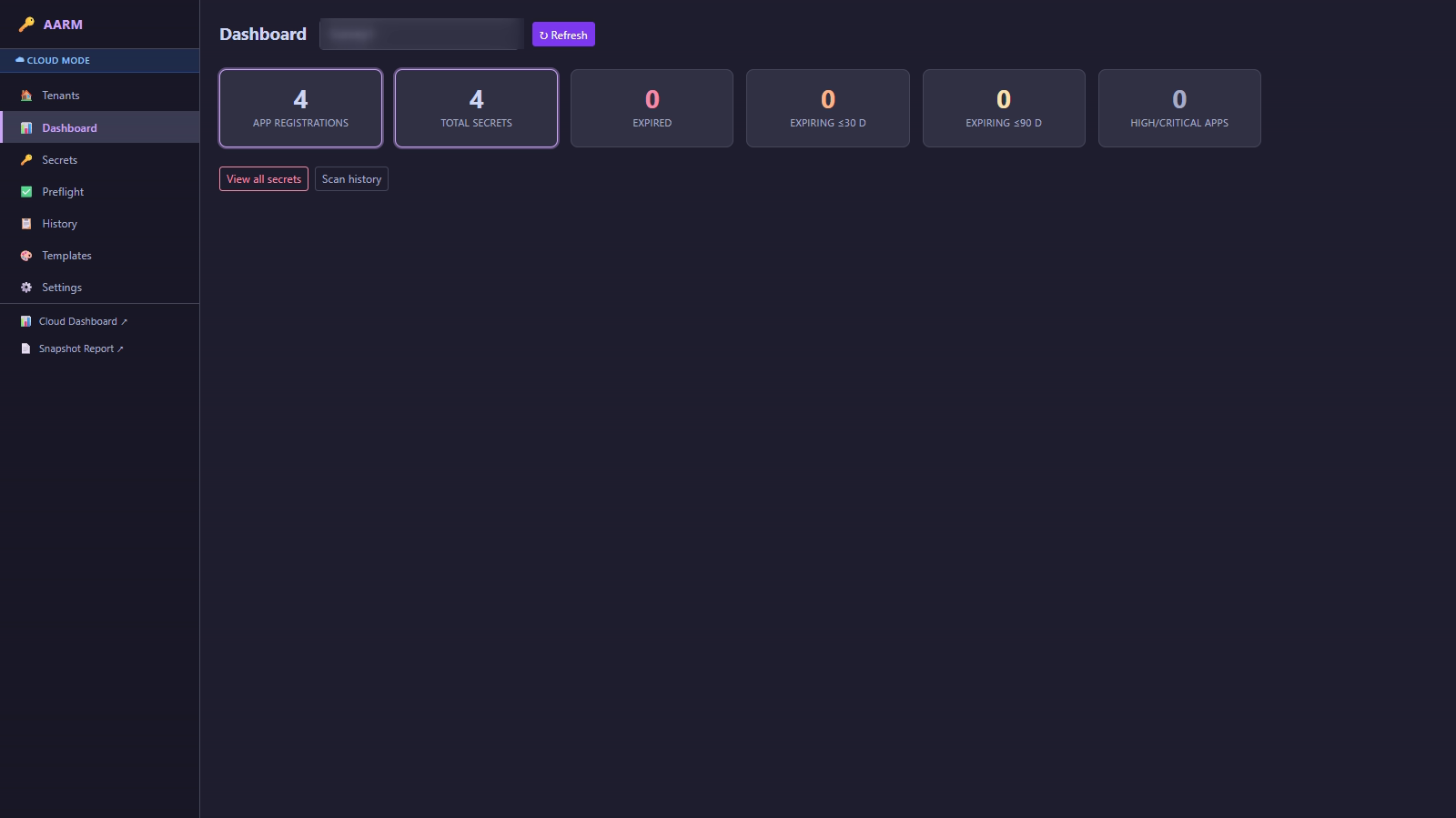 The dashboard condenses a tenant’s secret status into a handful of key figures.
Secrets & expiry dates
The secrets list is the heart of it: each row a secret with risk (Info/Low/…), the associated app, expiry date, remaining lifetime in days and status. Sortable and filterable by risk, so the critical ones sit at the top first. Important: AARM shows metadata — when something expires — never the secret value itself.
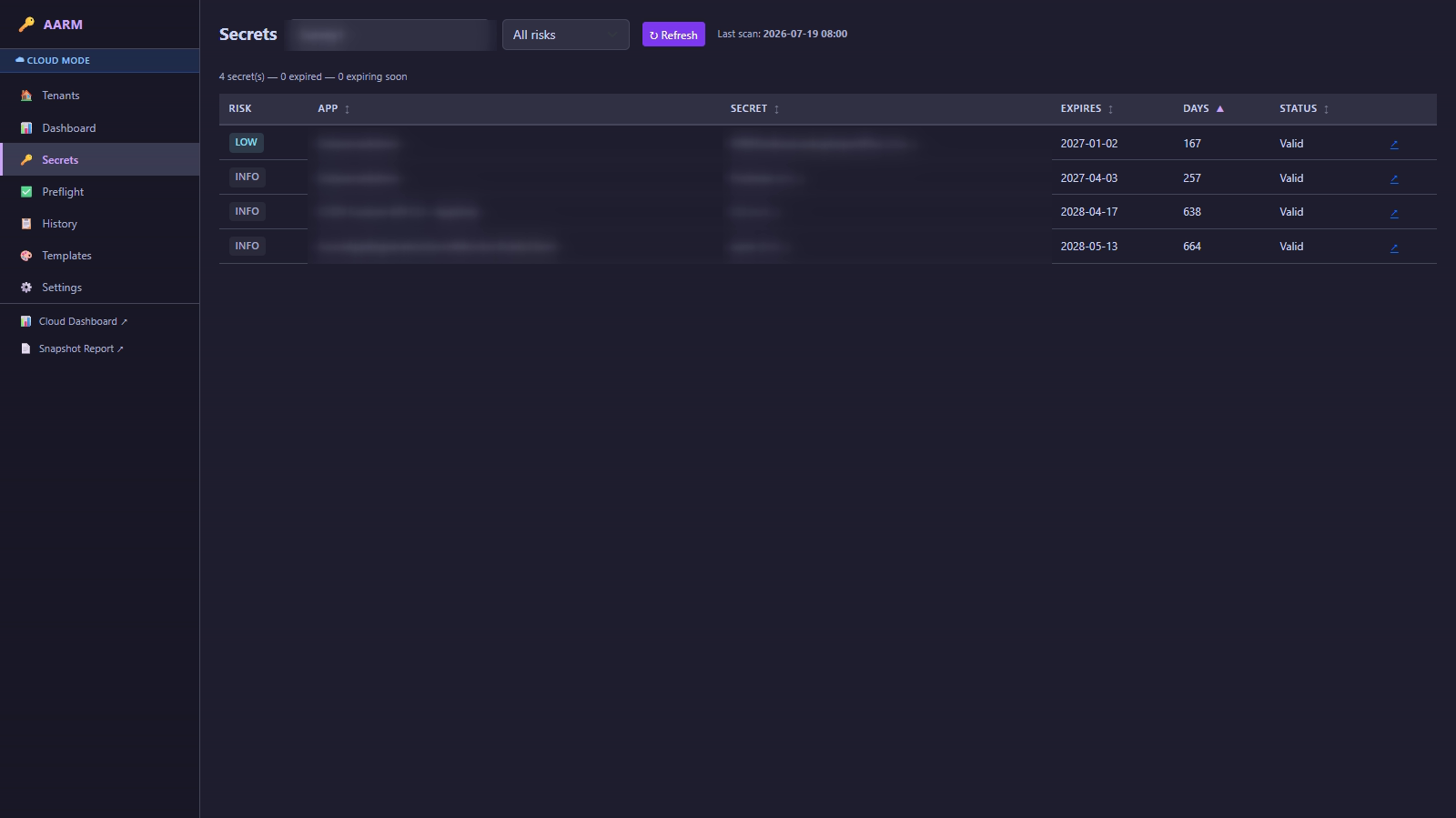 The secrets list sorted by remaining lifetime — the app and secret names are redacted for this article.
Preflight: first check whether Graph is even allowed
Before a scan delivers reliable numbers, it has to be clear what the service principal in use is allowed to do in Graph. The preflight check tests the capabilities individually — canReadApplications, canReadApplicationSecrets, canReadServicePrincipals and others — and transparently shows which are available and which still need a permission plus admin consent. That way you know whether an empty list means “really no secrets” or “missing permission”.
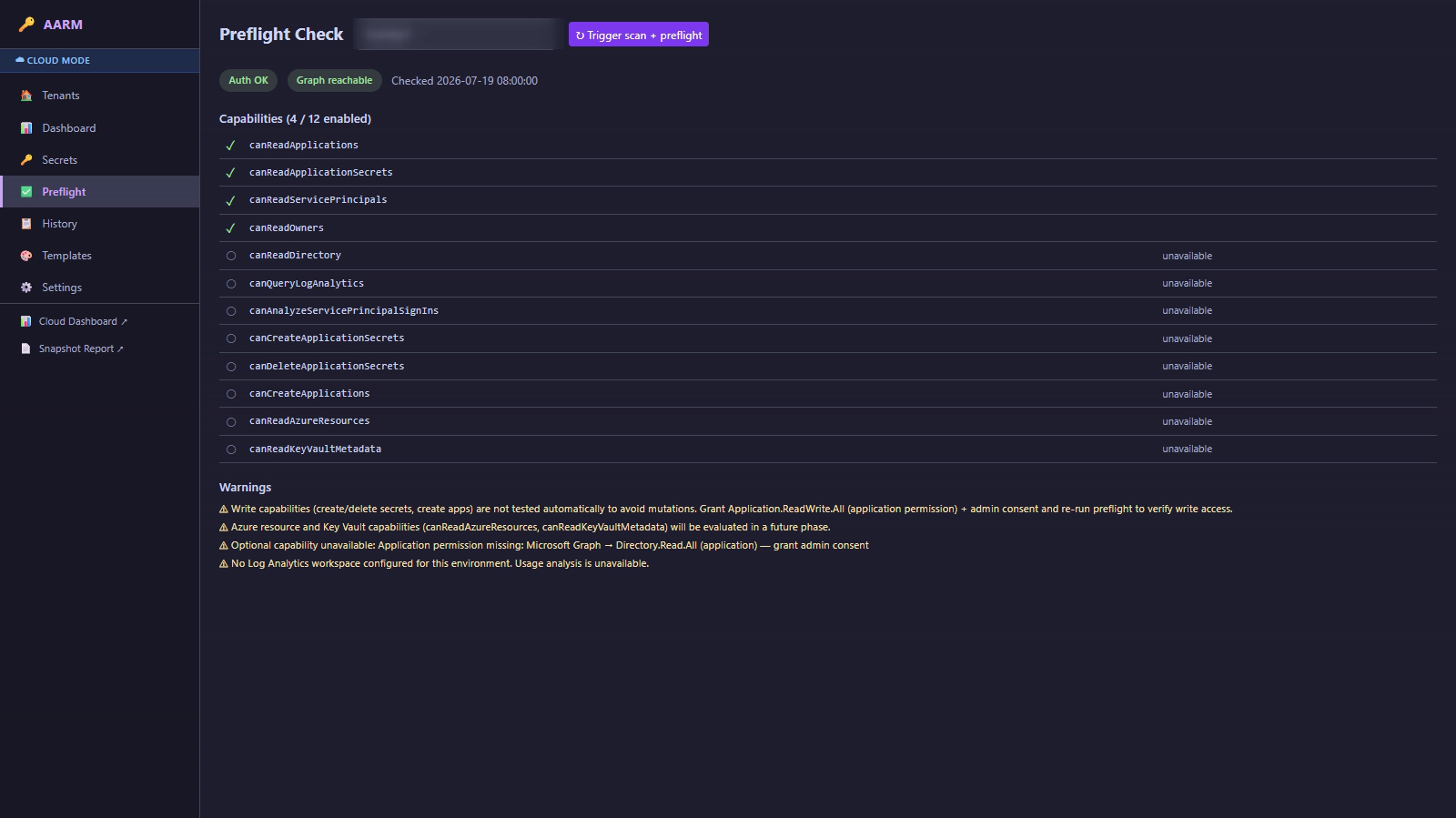 Preflight makes visible which Graph permissions are missing — instead of puzzling over an empty list.
Notifications via template
To turn the overview into action, AARM knows notification templates — for instance for Teams messages when a secret slips into a defined window. That way the warning lands where the team is already looking, instead of in a dashboard nobody opens.
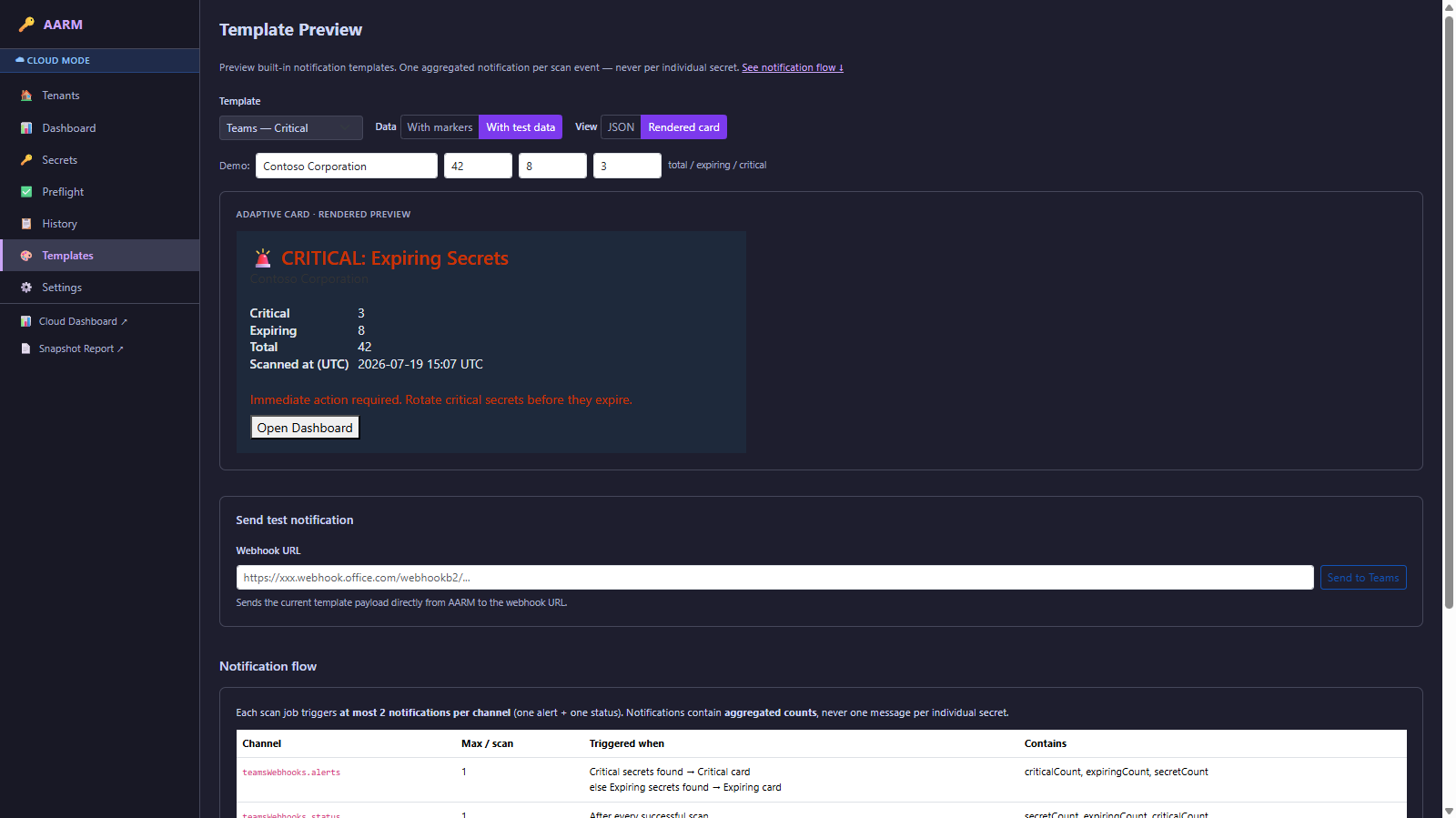 Templates turn the expiry overview into timely notifications.
Hands-on: the same scan via CLI
What the desktop app shows visually works headless just the same — ideal for the CI gate:
# install globally, once
npm install -g @brunsforge/aarm

# register a tenant (client ID/secret or service principal)
aarm tenants add

# first check what Graph allows
aarm preflight run --tenant "Contoso PROD"

# list secrets expiring in the next 3 months
aarm secrets expiring --months 3 --output json
The --output json envelope is stable — a pipeline step that turns red as soon as a secret has expired (or is due soon) is a three-liner with it. Details on all auth modes are in the aarm CLI article.
Local Mode without Azure, Cloud Mode with infrastructure
One point that decides the effort: Local Mode needs no Azure infrastructure. The desktop app then calls the bundled CLI locally — all you need is an account or a service principal with the appropriate Graph permissions (which preflight checks). For ad-hoc checks on your own machine that’s fully sufficient.
Cloud Mode, by contrast — scheduled scans, Teams notifications, a shared browser dashboard, several tenants centrally — runs on Azure infrastructure that you roll out once. That’s exactly what the demo above shows too (the “Cloud Mode” badge). The included Bicep template (infra/main.bicep) creates everything needed: a Function App (Flex Consumption) as the scan engine, a Storage Account (job configurations + scan results), a Key Vault (scan credentials for the target tenants), Log Analytics + Application Insights for telemetry and a user-assigned Managed Identity with the appropriate role assignments.
# 1) Roll out resource group + full infrastructure (Bicep)
az group create --name aarm-dev-rg --location westeurope
az deployment group create -g aarm-dev-rg \
  --template-file infra/main.bicep \
  --parameters infra/main.bicepparam \
  --name aarm-deploy

# 2) Publish the function code
cd apps/azure-function && npm install && npm run build
func azure functionapp publish <functionAppName> --node
From the deployment outputs you mainly need the functionAppHostname — you enter that in the desktop app’s Cloud Mode settings. The scan credentials per tenant sit in the Key Vault and are referenced as the Function App setting AARM_SECRET_<JOB>; the script infra/setup-tenant.ps1 helps with tenant setup. All steps — including role assignments, jobs.json upload and teardown — are laid out in detail in the repo README under infra/.
In short: if you just want to quickly check your own tenant, stay in Local Mode (no Azure needed). If you need scheduled scans and team notifications across several tenants, roll out the cloud infrastructure once — and then you have exactly the dashboard from the video, server-side and shared.
Limits and the honest parts
- No permission, no data. AARM is only as good as the service principal’s Graph permissions. That’s exactly what preflight is for — but you have to grant the rights, including admin consent, up front.
- Read-only is the safe default. Write capabilities (creating/deleting secrets) are not tested automatically, so as not to trigger unwanted mutations.
- Optional analyses need more. Usage analysis via Log Analytics requires a configured workspace; if there isn’t one, that part simply stays empty instead of guessing.
In short: the silent secret expiry isn’t fate, it’s a question of visibility. Whoever pulls the tenant-wide state from Graph regularly — via the desktop app or as a CI gate via CLI — is never again surprised by “Prod breaks because a secret expired”.