
 AI & Agents·22 August 2026·10 min read
 Share skills and agents across your team — with your own Claude Code marketplace
Sound familiar? A colleague built a really good Claude Code skill for your deploy checklist. Another has a subagent that reviews pull requests against your coding standard. And you yourself have three slash commands nobody else knows about. Everything lives locally in some ~/.claude/ folders — shared via Slack snippets, copy-paste and “send me your SKILL.md”.
That’s not distribution, that’s decay. The moment two people need the same capability, the copies drift apart. The clean way is the Claude Code plugin marketplace: a git repo with two small JSON files that bundles skills, subagents, slash commands, hooks and MCP servers as plugins — and, via a checked-in settings file, is automatically known and active for everyone on the team. This article shows the notation and the path there, with real JSON.
First, separate the two terms cleanly
Almost all confusion comes from mixing up “marketplace” and “plugin”. They’re two levels:
- A plugin is the package that holds the actual capabilities — one or more skills, subagents, slash commands, hooks, an MCP server. Defined by
.claude-plugin/plugin.json. - A marketplace is just a catalog that points to plugins. Defined by
.claude-plugin/marketplace.json. It doesn’t necessarily host the plugins itself — it can point to subdirectories in the same repo or to entirely different repos.
Marketplace (catalog: marketplace.json)
  ├── Plugin A   → ./plugins/deploy-kit          (same repo)
  ├── Plugin B   → github: team/pr-reviewer      (other repo)
  └── Plugin C   → git URL: gitlab.com/…/mcp     (self-hosted)
So the team flow is two-stage: you make Claude Code aware of a marketplace and install plugins from it. Both can be automated later — more on that below.
The plugin: what it bundles and how it’s built
A plugin is a directory with a fixed structure. The components live in conventional folders, the manifest in the .claude-plugin/ subfolder:
deploy-kit/
├── .claude-plugin/
│   └── plugin.json          # the manifest
├── skills/
│   └── deploy-checklist/
│       └── SKILL.md         # a skill
├── agents/
│   └── pr-reviewer.md       # a subagent
├── commands/
│   └── release.md           # a slash command
├── hooks/
│   └── hooks.json           # hooks
└── .mcp.json                # an MCP server
Important: the component folders live in the plugin root, not in .claude-plugin/. Only the manifest belongs in .claude-plugin/.
The manifest is surprisingly lean. A name alone is the minimum:
{
  "name": "deploy-kit"
}
With nothing else, Claude Code finds the standard folders (skills/, agents/, commands/, hooks/, .mcp.json) automatically. A realistic manifest adds metadata and — if needed — non-standard paths:
{
  "name": "deploy-kit",
  "version": "1.2.0",
  "description": "Deploy checklist, PR-review agent and release command",
  "author": { "name": "Platform Team", "email": "platform@example.com" },
  "homepage": "https://github.com/example/team-plugins",
  "keywords": ["deploy", "review", "alm"]
}
The components themselves are the familiar building blocks, just packaged:
- Skill —
skills/deploy-checklist/SKILL.mdwith frontmattername+description. In a plugin it gets a namespace:/deploy-kit:deploy-checklist.--- name: deploy-checklist description: Runs the team deploy checklist before every release --- Before deploying, check: migration scripts, feature flags, rollback plan … - Subagent —
agents/pr-reviewer.mdwith frontmattername,descriptionand optionallytools/model.--- name: pr-reviewer description: Reviews pull requests against our coding standard tools: Read, Grep, Glob --- You are a PR reviewer. Watch for naming conventions, test coverage … - Slash command —
commands/release.mdbecomes/release. - Hooks —
hooks/hooks.json, e.g. aPostToolUsehook that runs a format script after everyEdit. - MCP server —
.mcp.jsonwithcommand/args(stdio) orurl(HTTP).
For paths in hooks and MCP config there’s the variable ${CLAUDE_PLUGIN_ROOT} — it points to the plugin’s install directory, wherever it lands locally. That keeps script and server paths portable:
{
  "hooks": {
    "PostToolUse": [
      {
        "matcher": "Write|Edit",
        "hooks": [
          { "type": "command", "command": "${CLAUDE_PLUGIN_ROOT}/scripts/format.sh" }
        ]
      }
    ]
  }
}
The marketplace: the catalog that points to the plugins
Now the catalog. It lives as .claude-plugin/marketplace.json in the root of the marketplace repo. At minimum it needs a name, an owner and a plugin:
{
  "name": "wolkenkunde-tools",
  "owner": { "name": "Wolkenkunde Team" },
  "plugins": [
    { "name": "deploy-kit", "source": "./plugins/deploy-kit" }
  ]
}
The name is the marketplace ID — it later shows up as @wolkenkunde-tools in the install commands. The interesting part is the per-plugin source field, because that decides where a plugin lives:
- Relative path — the plugin is in the same repo:
{ "name": "deploy-kit", "source": "./plugins/deploy-kit" } - GitHub repo — the plugin is elsewhere:
{ "name": "pr-reviewer", "source": { "source": "github", "repo": "example/pr-reviewer", "ref": "v2.0.0" } } - Git URL — for GitLab, Bitbucket or self-hosted:
{
  "name": "secrets-mcp",
  "source": { "source": "url", "url": "https://gitlab.com/example/secrets-mcp.git", "ref": "main" }
}
So a marketplace can be a central entry point that pulls plugins together from various team repos — without forcing everything into one monorepo. That’s the real strength of the notation: one catalog, many sources.
The manual way — once, to understand it
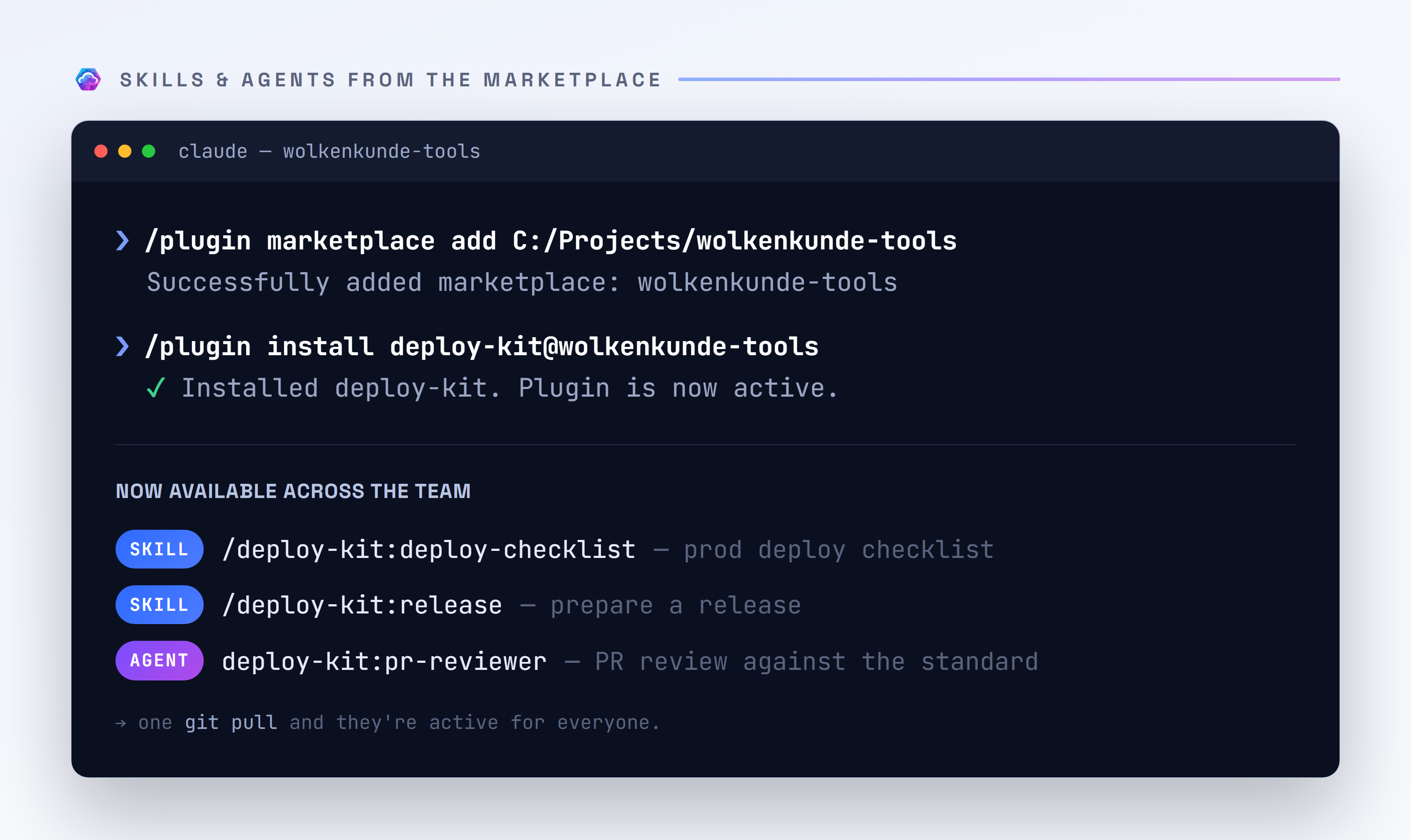
Before we automate it, it’s worth seeing the two steps that happen behind the scenes. In the terminal you make the marketplace known and install from it:
/plugin marketplace add example/team-plugins
/plugin install deploy-kit@wolkenkunde-tools
/plugin marketplace add takes a GitHub owner/repo, a git URL or a local path. /plugin install then references the plugin as plugin-name@marketplace-name. The pure UI variant — browse marketplaces, toggle plugins on/off — opens with the /plugin command.
Tried it right away: the shared agent finds real bugs
That’s exactly what we did for this article — the marketplace above is real. The moment deploy-kit was installed, we pointed its bundled pr-reviewer subagent at the freshly created marketplace repo itself: “review the manifests and the README against our standard.”
And that was the real proof of the point: the agent didn’t just run, it found two genuine inaccuracies — both in our own README:
- A skill was annotated like a slash command (
/deploy-kit:deploy-checklist), even though plugin skills are model-invoked via theirdescription. - A command was written as
/releaseinstead of the correctly namespaced/deploy-kit:release.
We fixed and committed both right away. That’s the heart of the whole exercise: a shared agent brings the team standard with it — and applies it without anyone having to keep the rules in their head. Not “nice, it’s installed”, but useful immediately.
That works — but up to here it’s manual: everyone on the team would have to run both commands themselves, and new colleagues don’t even know the marketplace exists. That’s exactly what we solve now.
The real point: roll it out across the team automatically
The two manual steps above can be written into the team repo’s checked-in .claude/settings.json. Then the marketplace is automatically known to everyone who checks out the repo — and the desired plugins are active without anyone typing a command.
Two fields carry this:
extraKnownMarketplaces— makes marketplaces known (replaces the manual/plugin marketplace add).enabledPlugins— activates specific plugins (replaces the manual/plugin install).
{
  "extraKnownMarketplaces": [
    {
      "name": "wolkenkunde-tools",
      "source": { "source": "github", "repo": "example/team-plugins" }
    }
  ],
  "enabledPlugins": {
    "deploy-kit@wolkenkunde-tools": true,
    "pr-reviewer@wolkenkunde-tools": true
  }
}
The key in enabledPlugins follows the pattern plugin-name@marketplace-name, the value is true (active) or false. Because this file lives in git, it applies to everyone in the repo: git pull, start Claude Code — the team skills and agents are there. The first time a new marketplace source is added, Claude Code asks once about trust (more on that shortly); after that it runs quietly.
The settings scope hierarchy matters, so it’s clear what belongs where:
| Scope | File | For whom |
|---|---|---|
| User | ~/.claude/settings.json | only you, all projects |
| Project | .claude/settings.json | everyone in the repo (checked in) |
| Local | .claude/settings.local.json | only you, this project (gitignored) |
For the team rollout, Project is the right level: checked in, versioned, the same for everyone. Whoever wants an extra private plugin locally adds it in settings.local.json without disturbing the rest.
A clean bundle: a plugin that only has dependencies
Once several plugins belong together (“everything a backend developer needs”), not everyone has to enable each one individually. A plugin can declare dependencies and thus serve as a curated bundle:
{
  "name": "backend-standard",
  "version": "1.0.0",
  "description": "Standard set for backend developers",
  "dependencies": [
    "deploy-kit",
    "pr-reviewer",
    { "name": "secrets-mcp", "version": "^1.0" }
  ]
}
Whoever enables backend-standard gets the three bundled plugins with it. The team enabledPlugins then has one line instead of many — and the bundle grows centrally, not in each settings file individually.
Versioning and governance — the honest part
A few things worth knowing before going to production:
- Versions come from the
versionfield (semver) inplugin.jsonor the marketplace entry. For git-based sources you can pin viaref(branch/tag) and optionally an exactsha— that’s the most reliable way to keep the team on a defined state. Without a pin you pull the default branch, i.e. a moving target. - Updates are checked and pulled via the
/pluginUI. There’s no forced auto-update; a pinnedref/shastays stable until you deliberately bump it. - Trust: a marketplace is, ultimately, third-party code that brings hooks, commands and MCP servers into your setup. On first add, Claude Code asks. For organizations there are also central managed settings (
managed-settings.json), with which an admin can restrict allowed marketplaces to an allowlist — then team members can only add approved sources. - Private repos: if your marketplace points to a private repo, local git authentication needs access (e.g. via
gh auth setup-gitor a token in the git credential helper). Without access, making it known fails silently.
And two honest caveats: the plugin notation evolves quickly — some source types and fields (e.g. npm or archive sources, or finer governance options) are new and vary in maturity by Claude Code version. When in doubt, the linked reference wins, not this article. And: a marketplace catalog itself isn’t versioned like a plugin — versioning sits on the individual plugin sources.
The path in brief
- Create a marketplace repo with
.claude-plugin/marketplace.json(name,owner,plugins[]). - One directory per plugin with
.claude-plugin/plugin.jsonand the component folders (skills/,agents/,commands/,hooks/,.mcp.json). - Keep paths in hooks/MCP portable via
${CLAUDE_PLUGIN_ROOT}. - In the team repo, fill the checked-in
.claude/settings.jsonwithextraKnownMarketplaces+enabledPlugins. - Pin versions via
ref/sha; update deliberately via/plugin. - For larger organizations, restrict marketplaces to an allowlist via
managed-settings.json.
Bottom line: sharing skills and agents across a team isn’t a copy-paste problem, it’s a distribution problem — and the plugin marketplace solves it cleanly. Two JSON files in a git repo, two fields in the checked-in settings file, and scattered lone-wolf scripts become a maintained, versioned team workbench that’s simply there on every checkout.
State: August 2026. The Claude Code plugin and marketplace notation is continuously expanding; field names and source types may differ by version — when in doubt, check the linked official reference.
Official sources
- Create plugins — plugin structure, components,
${CLAUDE_PLUGIN_ROOT}. - Plugin marketplaces —
marketplace.json,sourcetypes,/plugin marketplace add. - Plugins reference — full schema of
plugin.jsonandmarketplace.json. - Settings reference —
extraKnownMarketplaces,enabledPlugins, scope hierarchy. - Managed settings — central governance / allowlist for organizations.
- Skills · Subagents · Slash commands · Hooks · MCP — the building blocks a plugin bundles.
See also
- Power Automate without portal clicking: build, test and fix flows autonomously with Claude — an official Microsoft plugin from a marketplace in practice.