
 Platform Engineering·18 September 2026·25 min read
 Does Power Fx replace the C# plug-in? A measurement across 1,000 rows
There is a handful of jobs that eventually get written in C# in every Dataverse project. Two of them come up again and again: a field changes on one row and the value has to travel to another row — that calls for a plug-in. Or something has to be calculated and handed back — that calls for a custom API with a plug-in behind it. Ten lines of logic each, wrapped in a Visual Studio project, a signed assembly, the Plugin Registration Tool and a solution to carry it all.
For a while now Microsoft has been promising a shorter route for both: Power Fx instead of C#. The question here is not “can it be done?” but: is it the better route — measured by runtime, by ALM, and by what it is like to write?
I built both, put the C# equivalent next to each, and measured them against one another. One finding contradicts the official formula reference. A second one ends the most common custom API scenario before it begins.
Two things with similar names
Search for the topic and you find two features that are easily confused:
| triggered by | replaces | |
|---|---|---|
| Dataverse Functions (formerly instant low-code plug-ins) | a call, manually | custom APIs |
| Automated low-code plug-ins | create / update / delete | classic plug-ins |
Most blog posts show the functions — they are the prettier half, because you can watch them run. But for “something should happen because someone saved” you need the other kind.
This article takes on both, the automated plug-ins first, then the functions. If you only want to know which jobs you can solve with this today, jump to the list of user stories.
Microsoft lists both as preview. That is not a formality, as you will see.
Both need the Dataverse Accelerator, a solution from the catalog. The documentation says new environments get it automatically — in my trial environment it was not there. The Power Fx runtime, on the other hand, had been sitting in the environment for six months. Only the authoring surface was missing.
The setup
Everything below comes from a trial environment with German as its base language — which matters, because at one point the language joins the conversation. The Accelerator was at version 1.0.5.41.
Worth noting straight away: installing it needs no portal.
POST https://api.powerplatform.com/appmanagement/environments/<env>/applicationPackages/DataverseAccelerator_Anchor/install?api-version=2022-03-01-previewUnder five minutes later the status reads Installed. Everything after that needs nothing but an access token from the Azure CLI:
az account set --tenant <tenant-id>
az account get-access-token --resource https://<org>.crm4.dynamics.com --query accessToken -o tsv
Part 1: replacing the plug-in
The core question: does a rule know the old value?
A plug-in that does not know what a row looked like before cannot answer the one question that matters: did the field actually change? Without it the logic fires on every save, even when someone only corrected a phone number. In C# you solve this with a PreImage.
Is there an equivalent in Power Fx? The official formula reference names ThisRecord. A few community blogs write about OldRecord and NewRecord. Those names appear nowhere in the documentation.
The test bench for this is unremarkable: create a real rule for each name and watch whether the platform accepts it. The important part is to test each name on its own — if a formula contains one unknown name, its error hides everything else.
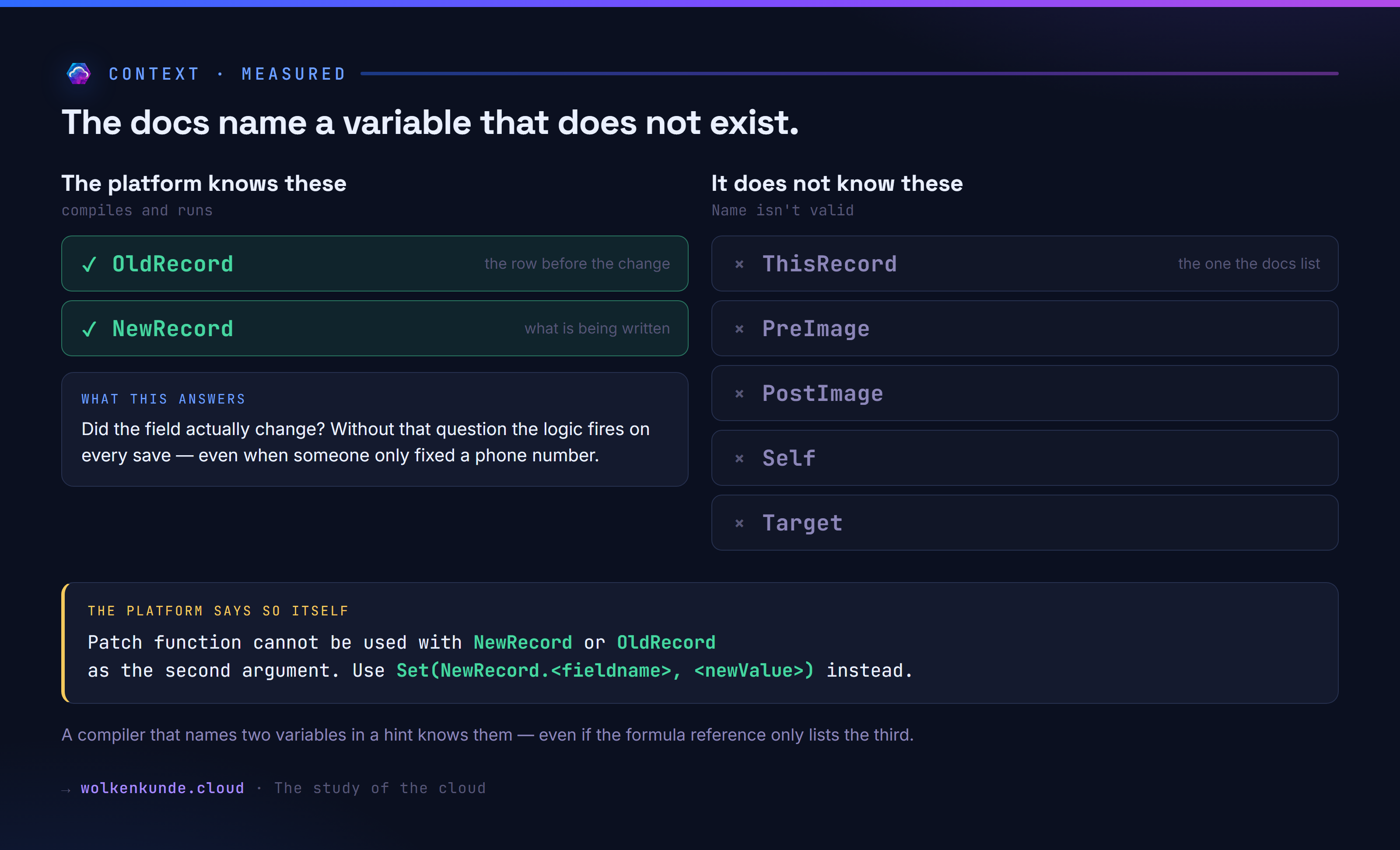
So it is exactly the other way round from the documentation. The community is right.
It shows most clearly in an error message the platform produces itself when you use Patch incorrectly:
Patch function cannot be used with NewRecord or OldRecord as the second argument.
Use Set(NewRecord.<fieldname>, <newValue>) instead.
A compiler that names two variables in a single hint knows them. And it gives away the correct syntax while it is at it.
The proof
Compiling is not the same as working. So, a rule on account / Update / stage 20:
If(OldRecord.name <> NewRecord.name,
   Set(NewRecord.description, "before=" & OldRecord.name & " after=" & NewRecord.name))
Create an account called “WK Proof OLD”, then rename it to “WK Proof NEW”. Afterwards the description reads:
before=WK Proof OLD after=WK Proof NEWThe counter-test is the actual proof: an update that does not touch the name — only telephone1 — leaves the description alone. So OldRecord really does carry the state before the change, not a second view of the new one.
That clears the way for replacing a C# plug-in at all.
By the way, you never register the fields you need. The platform works out from the formula what it has to load and stores that with the rule:
{"RequiredEntityAttributeMap": {"contact": ["jobtitle", "parentcustomerid"],
                                "account": ["description"]}}
That is the most pleasant difference to a C# plug-in: no forgotten PreImage attribute that only surfaces in production.
Creating rules without opening the app
The Accelerator ships a canvas app for clicking rules together. For ALM that is the wrong layer. But it also ships custom APIs, and those are the real find:
| Endpoint | Purpose |
|---|---|
GenerateAutomatedPlugin | creates the rule and the sdkmessageprocessingstep |
UpdateAutomatedPlugin | changes an existing rule |
DeleteAutomatedPlugin | removes rule and step |
ExecuteFxExpression | runs an expression free-hand |
That makes a rule scriptable:
curl -s -X POST \
  -H "Authorization: Bearer $TOKEN" \
  -H "Content-Type: application/json" \
  -d '{
    "Name": "wk_position_to_account",
    "EntityLogicalName": "contact",
    "MessageName": "Update",
    "Stage": 20,
    "Expression": "If(OldRecord.jobtitle <> NewRecord.jobtitle, Patch(account, AsType(OldRecord.Firmenname, account), {description: \"Position: \" & NewRecord.jobtitle}))"
  }' \
  "https://<org>.crm4.dynamics.com/api/data/v9.2/GenerateAutomatedPlugin"
The response carries an FxExpressionId. That pluginid comes back as null looks like a failure but is not one — the processing step is created regardless.
One detail that cost me half an evening: the rules live in the fxexpression table, not in powerfxrule. Go by the name and you write into the wrong table. The insert succeeds, the row sits there afterwards — and nothing happens. No compiled expression, no processing step.
So what is powerfxrule for?
You can only work that out from the environment, because the documentation never mentions the table. Both come from the same solution, msft_PowerfxRuleSolution. Their columns match except for one — expression, compiledexpression, messagename, entitylogicalname, parameters and dependencies exist in both; only fxexpression also has context.
The difference is not in the structure but in what hangs off it:
| processing steps | rows in my environment | |
|---|---|---|
fxexpression | eight — create, update, delete, plus a permission check and ExecuteFxExpression | all the rules |
powerfxrule | none | none |
All the machinery hangs off fxexpression: RuleAuthoringPlugin compiles the formula and creates the processing step, ConnectorProviderPermissionPlugin checks permissions. None of that is attached to powerfxrule. Which makes the table exactly what it looks like: the predecessor, left standing after the rebuild. Write to it and you file a row in a dead archive.
Deleting an fxexpression row, on the other hand, takes the processing step with it.
You can also read back what you created without opening the app:
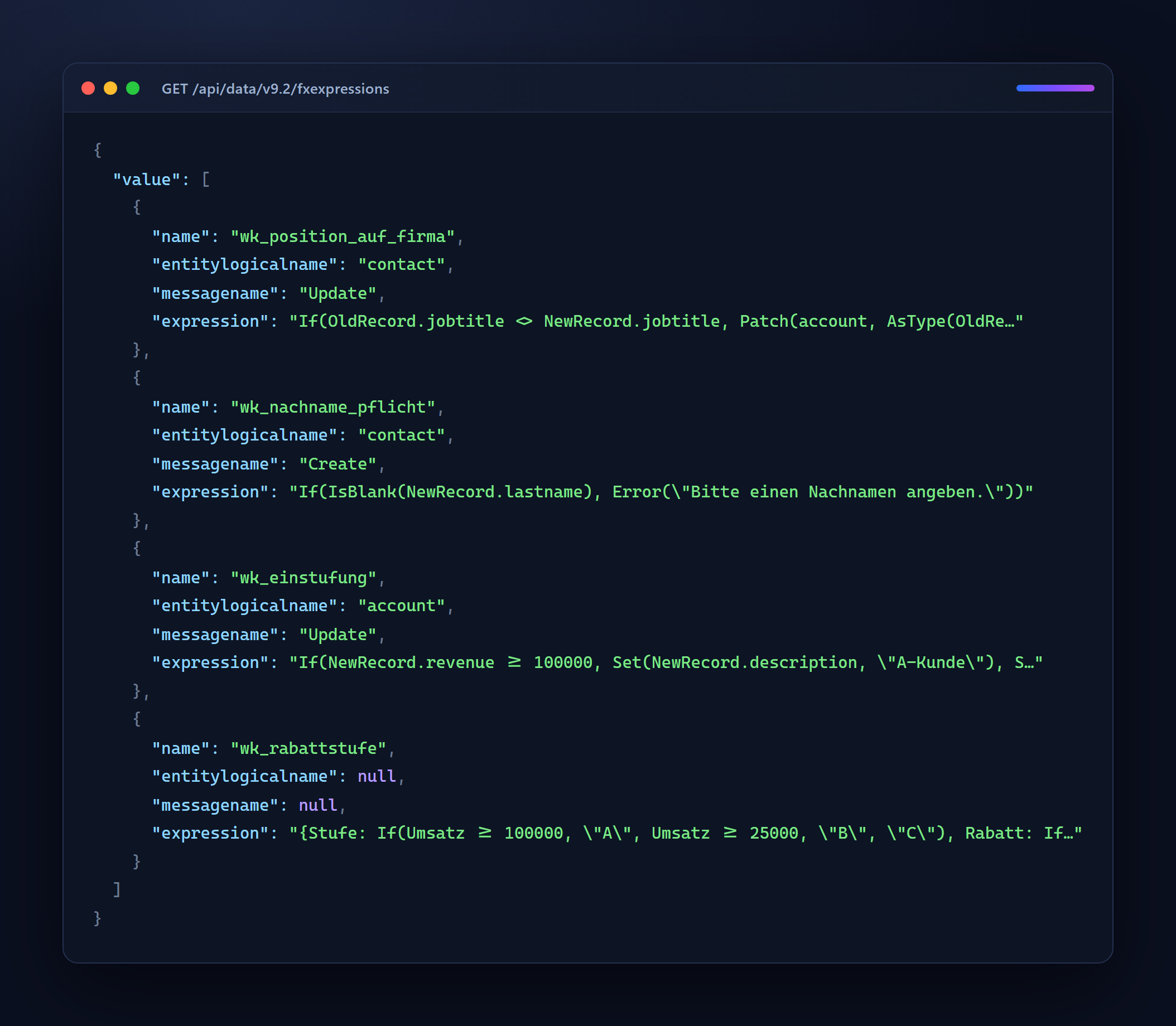
The fourth row is the function from part 2. It has neither a table nor a message, because it waits for no save — it gets called.
What looks configured and still does nothing
This is where the preview shows. Same rule, only the pipeline stage varies:
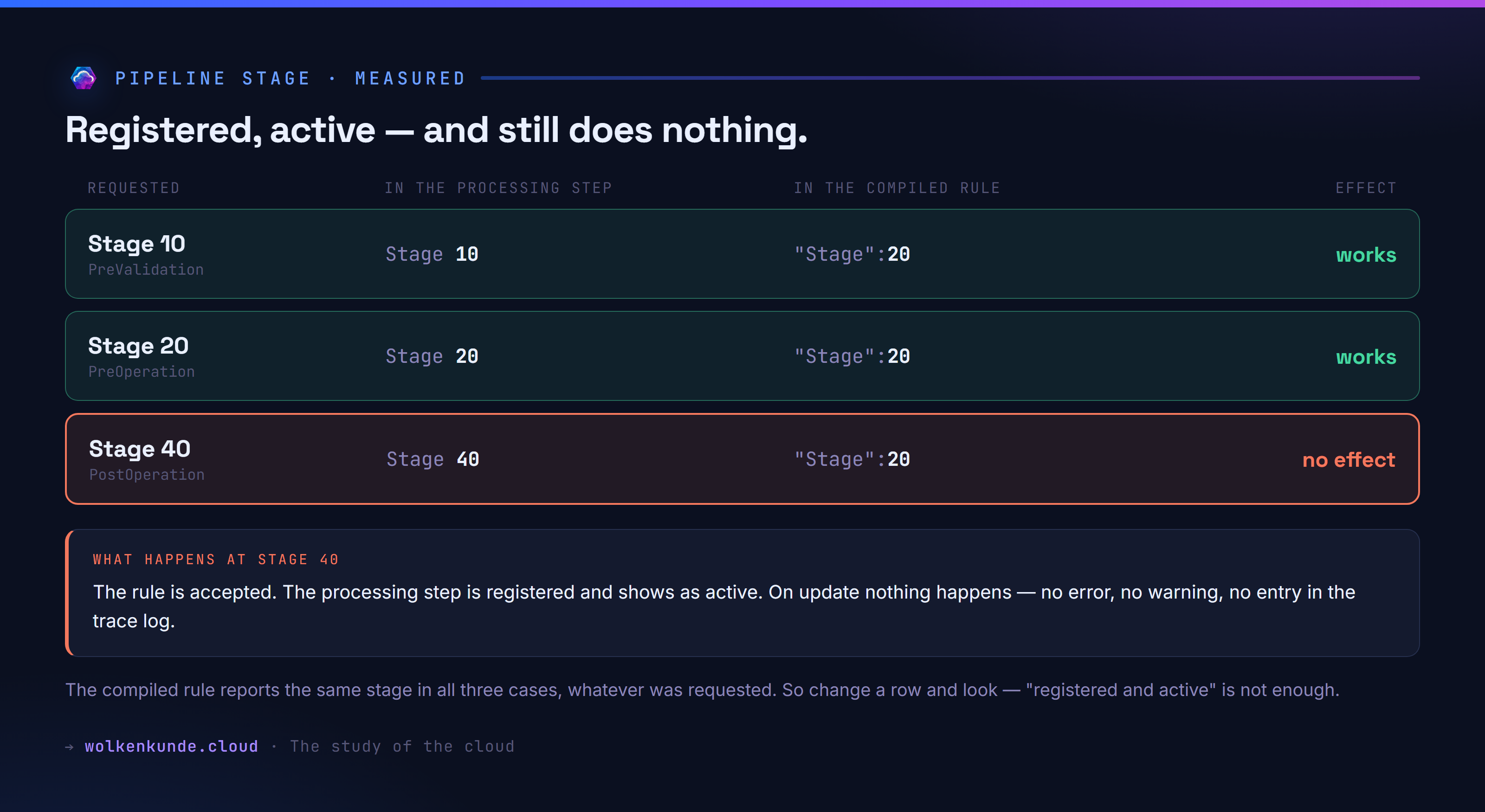
At stage 40 the rule is accepted, the step is registered, statecode says active — and on update nothing happens. No error, no warning, no entry in the trace log, even though the environment was set to full logging.
Note the third column: the compiled rule reports "Stage":20 in all three cases. The requested value only ends up in the processing step, not in the compiled rule.
In practice: after creating a rule, check that it actually does something. “Registered and active” is not enough.
Child to parent: not the route you would expect
Back to the original scenario. A contact’s job title changes and the value should land on the related account. The obvious route fails again and again:
| Attempt | Result |
|---|---|
NewRecord.accountid | isn't recognized |
NewRecord.Firma (its display name) | isn't recognized |
NewRecord.AccountId (the schema name) | isn't recognized |
NewRecord.Firmenname (= parentcustomerid) | recognized, but Invalid argument type (Polymorphic) |
AsType(OldRecord.Firmenname, account) | works |
IsType(NewRecord.Firmenname, account) | Expecting a UntypedObject value |
Two things are hiding in there.
contact.accountid is visible in the data model but not in Power Fx. The field is derived — Dataverse fills it from parentcustomerid when that points at an account. The formula language does not show it. See it in the table, fail to find it in the formula, and you go looking in the wrong place.
Polymorphic lookups need AsType. parentcustomerid can point at an account or at a contact, and Patch refuses to work with that. AsType pins the type down. The usual safeguard — check with IsType first, then cast — is not available. So you pin the type without being able to check it first.
The version that works:
If(OldRecord.jobtitle <> NewRecord.jobtitle,
   Patch(account, AsType(OldRecord.Firmenname, account),
         {description: "Position: " & NewRecord.jobtitle}))
The opponent
The measurement needs a C# plug-in that does the same thing — genuinely the same thing, or you are comparing apples and oranges. It sits on the same table, the same message, the same stage, and gets a PreImage over jobtitle and parentcustomerid: exactly the fields the platform hands the rule on its own.
public class PositionAufFirma : IPlugin
{
    public void Execute(IServiceProvider serviceProvider)
    {
        var context = (IPluginExecutionContext)serviceProvider.GetService(typeof(IPluginExecutionContext));

        if (!(context.InputParameters.Contains("Target") && context.InputParameters["Target"] is Entity target))
            return;
        if (!context.PreEntityImages.Contains("vorher"))
            return;

        var before = context.PreEntityImages["vorher"];
        if (!target.Contains("jobtitle"))
            return;

        var newValue = target.GetAttributeValue<string>("jobtitle");
        var oldValue = before.GetAttributeValue<string>("jobtitle");
        if (string.Equals(oldValue, newValue, StringComparison.Ordinal))
            return;

        var account = before.GetAttributeValue<EntityReference>("parentcustomerid");
        if (account == null || account.LogicalName != "account")
            return;

        var factory = (IOrganizationServiceFactory)serviceProvider.GetService(typeof(IOrganizationServiceFactory));
        var service = factory.CreateOrganizationService(context.UserId);

        service.Update(new Entity("account", account.Id) { ["description"] = "Position: " + newValue });
    }
}
Incidentally, registering it needs no tool with a user interface either. Assembly, type, processing step and PreImage can all be created over the web API — pluginassembly takes the signed DLL as base64, sdkmessageprocessingstepimage adds the PreImage. If you want a deployment chain without manual steps, you can skip the Plugin Registration Tool here too.
Reading the result back works the same way:
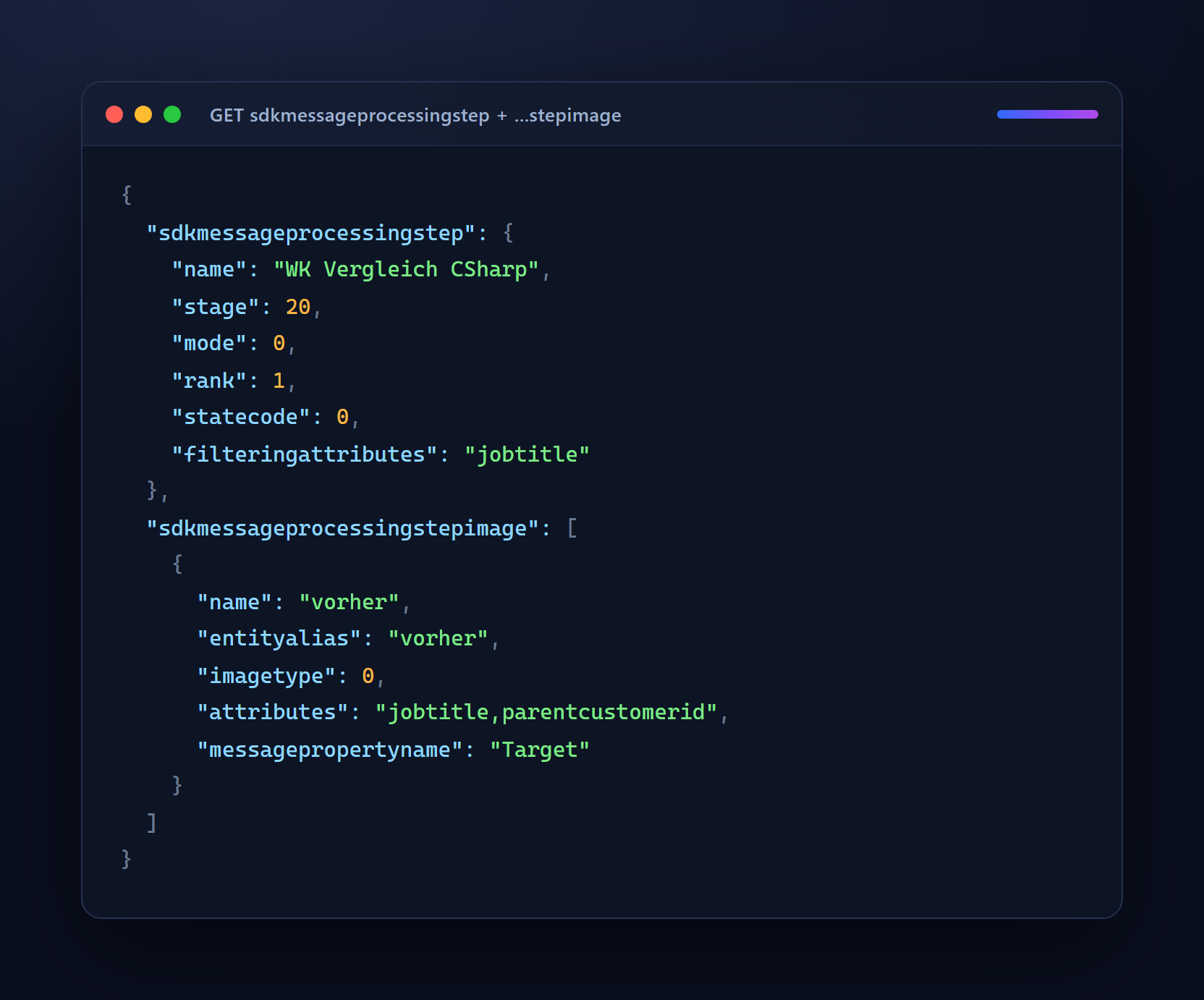
stage 20 is PreOperation, mode 0 synchronous, imagetype 0 a PreImage. The filteringattributes entry makes sure the step only runs when jobtitle changes — the counterpart to the If condition in the formula.
Before every measurement a short test run confirms that both versions write the same thing into the description. Skip that and you may be measuring two different things.
The measurement
The setup: every contact gets its own account. If all contacts wrote to the same account, you would be measuring lock contention on one row rather than the logic. Switching between the two happens through the processing step’s statecode, not by creating and deleting — otherwise the rule recompiles on every switch and skews the first runs. Every run contains its own baseline with no logic at all.
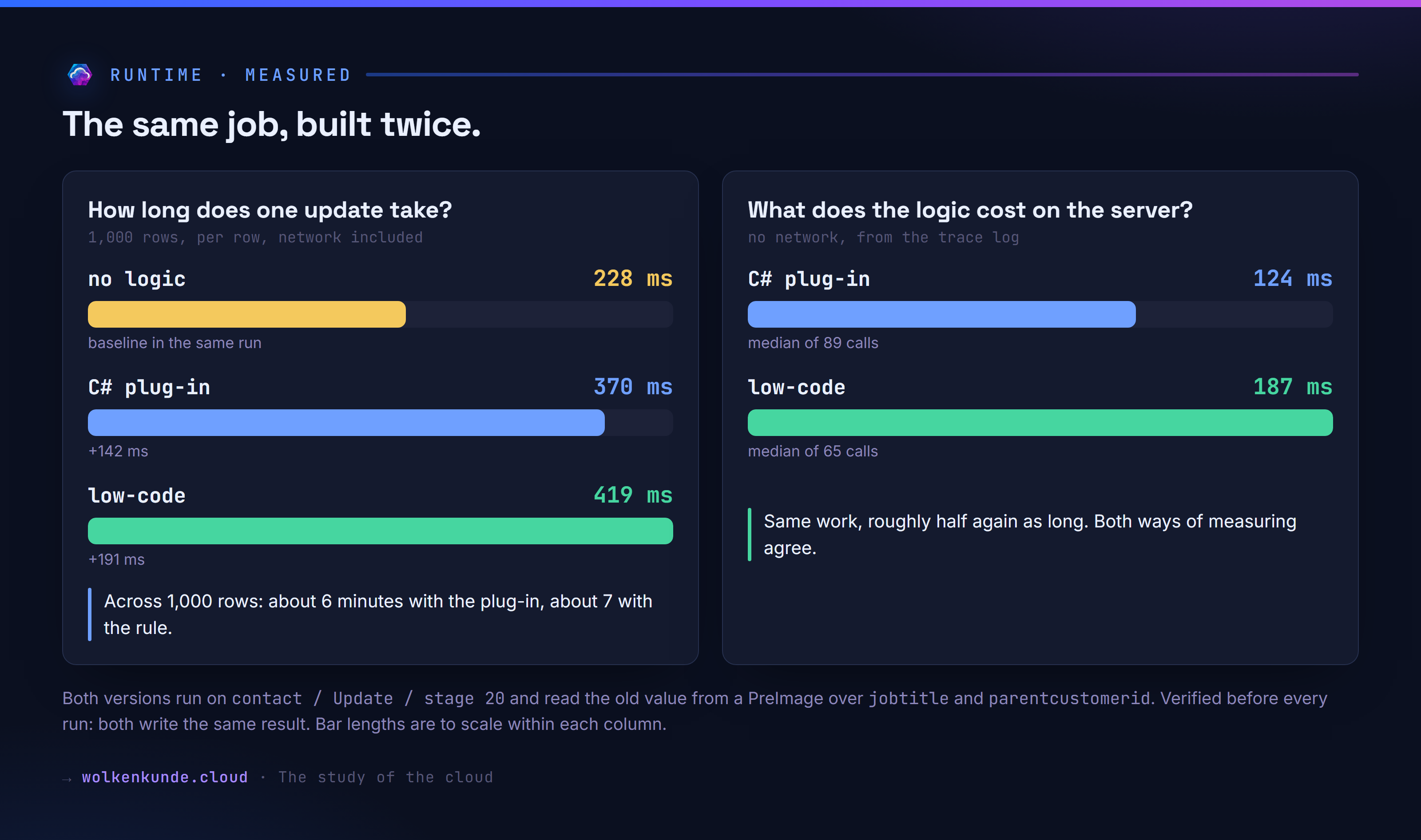
| Run | Rows | no logic | C# plug-in | low-code | overhead C# | overhead rule |
|---|---|---|---|---|---|---|
| 1 | 100 | 223 ms | 372 ms | 427 ms | +149 ms | +204 ms |
| 2 | 100 | 229 ms | 362 ms | 400 ms | +133 ms | +171 ms |
| 3 | 1,000 | 239 ms | 363 ms | 437 ms | +124 ms | +198 ms |
| 4 | 1,000 | 228 ms | 370 ms | 419 ms | +142 ms | +191 ms |
These are wall-clock times per row, measured from a development machine, so the network is included. The distance between the numbers is what counts, not the absolute value.
Across 1,000 records:
| duration | |
|---|---|
| no logic | about 4 minutes |
| with the C# plug-in | about 6 minutes |
| with the low-code rule | about 7 minutes |
The plug-in’s overhead is stable across all runs; the rule’s sits above it throughout. The gap moves between 38 and 74 ms per row — which is why I give an order of magnitude rather than a precise figure: roughly 50 ms per row, about a third more overhead. A trial environment without a performance guarantee does not support anything tighter.
Without the network
The 220 ms round trip to the data centre masks the actual difference. But the server records its own duration per call in the trace log:
| median | min | |
|---|---|---|
| C# plug-in | 124 ms | 93 ms |
| low-code rule | 187 ms | 156 ms |
63 ms difference per call — which lines up with the 38 to 74 ms from the wall-clock measurement. The rule takes about half again as long for the same work.
Two traps when measuring
The first run was unfair, and it was unfair to the rule. The platform logs a low-code rule on its own; a C# plug-in only when it writes something itself. So the rule was carrying a cost the plug-in did not have. With logging turned down, its overhead dropped from 204 to 171 ms — meaning the logging alone costs around 17 ms per call.
In production that is not purely a downside. You get traceability for free that a plug-in needs its own code for. For the server-time measurement above I therefore used a second plug-in class with a trace call, so both sides carry the same cost.
The second trap: plugintypestatistic, the table of execution statistics per plug-in type, stays empty in online environments. The obvious route to an unbiased server time leads nowhere.
What happens to ALM
This is where my expectation was most wrong. Power Fx speaks display names in Dataverse — in a German environment account is called Firmen. That sounds like a trap when moving a solution between environments in different languages.
It is not. Two things defuse it:
The logical name always works. What fails is the English display name in a German environment — in other words a formula copied from an English blog, not the language as such.
Names are normalised on creation. All three spellings
If(OldRecord.Firmenname <> NewRecord.Firmenname, Set(NewRecord.Beschreibung, "x"))
If(OldRecord.name       <> NewRecord.name,       Set(NewRecord.description,  "x"))
If(OldRecord.name       <> NewRecord.Firmenname, Set(NewRecord.description,  "x"))
end up identical in the row:
If(OldRecord.name <> NewRecord.name, Set(NewRecord.description, "x"))So what gets stored is language-neutral. The transport itself I did not test — that stays open.
Three points from the data structure worth knowing before you decide:
OwnershipType: UserOwned— every rule has an owner. A registered assembly does not. What happens when that person leaves the company is untested.IsAuditEnabled: False— changes to rules are not logged. Edit a formula and you leave no trace.- Driving everything through
GenerateAutomatedPluginand its two siblings makes rules scriptable. For a deployment chain that is worth more than the canvas app.
One broken rule brings the whole table down
I did this to myself, which is why it is written down. A test rule with no stop condition:
Patch(account, LookUp(account, true), {description: "x"})It writes to a row, which triggers an update, which triggers the rule again. After that every update on account failed:
Plugin wk_iso_ohnekontext failed with: … This low-code plugin's execution
was cancelled because the plugin logic caused a …
Until the rule was deleted, no account could be changed at all. The guard against recursion has to go into the formula by hand — in the examples above it is the If condition, which no longer matches on the follow-up update.
A C# plug-in has the same problem. The difference is who writes the thing: an assembly is built by someone who knows about plug-in depth and recursion. A formula might be typed by someone who has never heard of either.
Part 2: replacing the custom API
The other half. A function is not triggered by a save; it is called — by an app, a flow, an external system. Exactly what you would otherwise build as a custom API with a plug-in behind it.
Here too the user interface is optional:
| Endpoint | Input |
|---|---|
GenerateInstantPlugin | Name, Description, Expression, optionally Parameters |
UpdateInstantPlugin | the same, addressed through FxExpressionUniqueName |
DeleteInstantPlugin | just FxExpressionUniqueName |
Parameters is a JSON string. The type keys are the same as for custom API parameters: 2 for decimal, 7 for integer, 10 for string.
{"InputParameter":[{"name":"Umsatz","type":2}],
 "OutputParameter":[{"name":"Stufe","type":10}]}
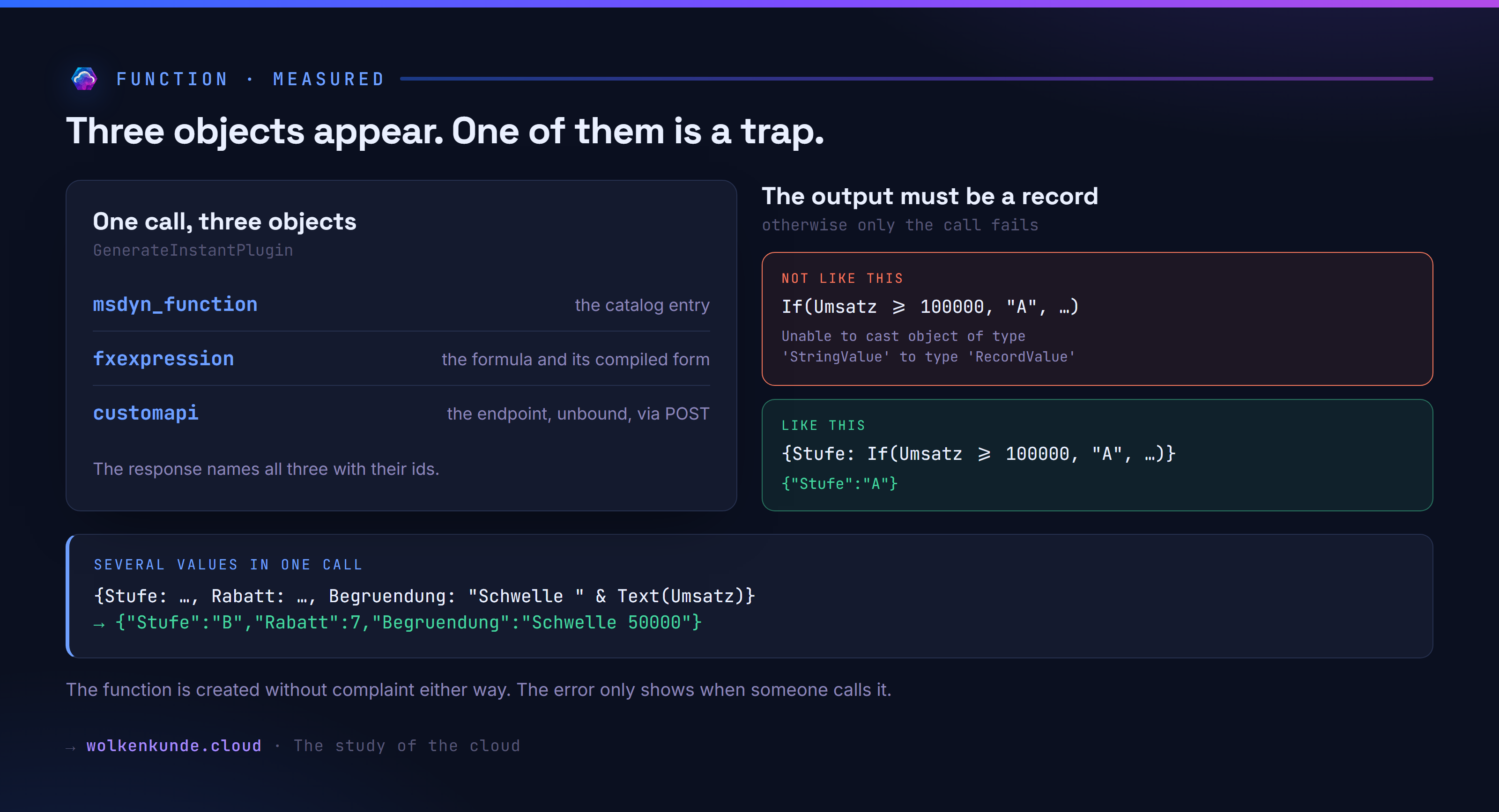
One call produces three objects at once — the response names all of them:
{"msdyn_functionid": "8f6fdb21-…", "FxExpressionId": "4869db1b-…", "CustomApiId": "4a69db1b-…"}The custom API that appears is called new_<name>, is unbound, and is not an OData function but an action. So you call it with POST.
The output must be a record
The one that held me up longest. With named output parameters the runtime expects a record, not a single value:
| Expression | on call |
|---|---|
If(Umsatz >= 100000, "A", …) | Unable to cast object of type 'Microsoft.PowerFx.Types.StringValue' to type 'Microsoft.PowerFx.Types.RecordValue' |
{Stufe: If(Umsatz >= 100000, "A", …)} | {"Stufe":"A"} |
The message names the type but not the fix. And it only appears on the call — the function is created without complaint either way. Create it, consider it done, and you find out when someone uses it.
Several output values in one call are where the real value sits:
{Stufe: If(Umsatz >= 100000, "A", Umsatz >= 25000, "B", "C"),
 Rabatt: If(Umsatz >= 100000, 15, Umsatz >= 25000, 7, 0),
 Begruendung: "Schwelle " & Text(Umsatz)}
Calling it with Umsatz = 50000:
{"Stufe":"B","Rabatt":7,"Begruendung":"Schwelle 50000"}Table access works too: {Anzahl: CountRows(Filter(contact, jobtitle = Position))} returns {"Anzahl":1}.
What does not work: calling the outside world
The single most common custom API scenario — query an external web API and hand the result back for display or further processing — cannot be built as a function.
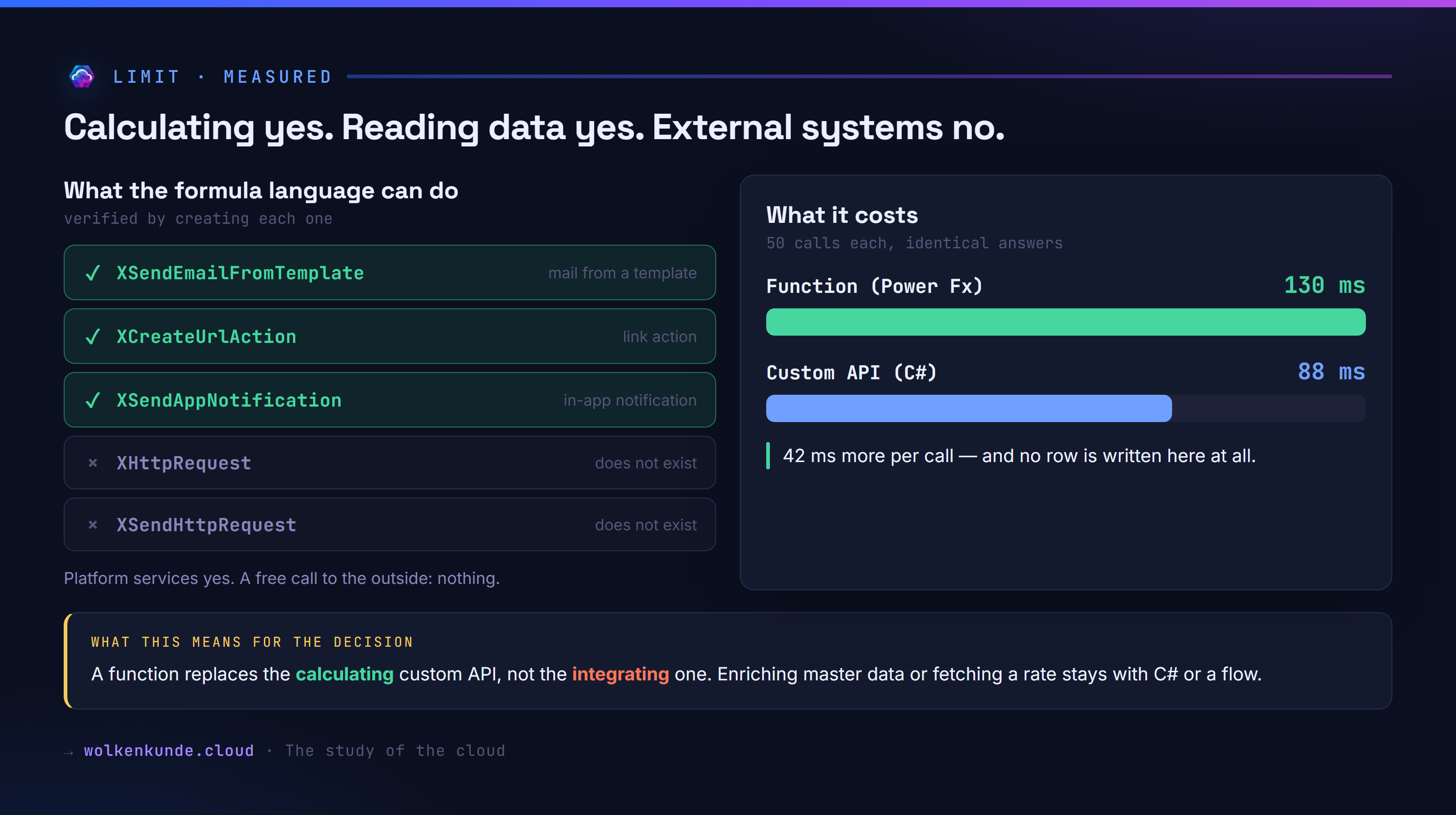
| Function | Result on creation |
|---|---|
XHttpRequest | unknown |
XSendHttpRequest | unknown |
XSendEmailFromTemplate | accepted |
XCreateUrlAction | accepted |
XSendAppNotification | recognized |
The X functions cover platform services: mail from a template, an in-app notification, a link action. For a free HTTP call there is nothing.
The context field on every rule has slots for ConnectionReferences, TabularConnectionReferences and ActionConnectorConnectionReferences. So the route outwards runs through connectors, not through the formula language. I did not test that — it needs a connection, and a connection is not something you create over the API.
For the decision that means: a function replaces the calculating custom API, not the integrating one. Concretely:
| What the custom API should do | Function? |
|---|---|
| Work out a discount tier, a commission, a check digit, a due date | yes |
| Format an address, assemble text | yes |
| Return a count from Dataverse | yes |
| Hand back several values at once, JSON included | yes |
| Fetch an exchange rate, a credit check, an address validation | no |
| Have an external system produce a document | no |
Enrich data and you stay with C# or a flow. Calculate, and you can switch.
Runtime against a custom API with a plug-in
The same calculation, both unbound, both with three output values, both called over POST. Verified beforehand: the answers are character for character identical. 50 calls each after a warm-up:
| median | min | max | |
|---|---|---|---|
| Function (Power Fx) | 130 ms | 119 ms | 273 ms |
| Custom API (C#) | 88 ms | 77 ms | 281 ms |
42 ms difference per call — the same order of magnitude as in part one. Here it weighs more heavily: no row is written, network latency is the only other item, and the formula still takes half again as long.
The unsupported list is only half right
Something that turned up along the way: two documentation pages contradict each other. One carries a list of unsupported functions, the other lists the same functions as available.
Runs, despite being listed as unsupported: JSON, AddColumns, DropColumns, ShowColumns, RenameColumns, SortByColumns, Search, Weekday, IsEmpty, PlainText
Genuinely blocked: GroupBy, Concurrent, Notify, UpdateIf, RemoveIf, ClearCollect — each with recognized but not supported. UTCNow is simply unknown.
The platform draws a clean line between “I do not know this” (unknown) and “I know it and do not support it” (recognized but not supported). The documentation lumps the two together, and does so with functions that have been working for a while. So rather than reading the list, try the expression.
A word of caution on that: ExecuteFxExpression, the free-hand test route, is not reliable for it. It reports ThisRecord as unknown although rules exist that run on it, and XSendAppNotification likewise — although a rule shipped with the same environment uses exactly that function. What counts is creating a real rule or function.
Which user story works today?
The real question before a decision is not what the technology can do in principle, but which requirement you can satisfy tomorrow. So I took a stack of typical requirements and sent each one at the platform individually. What follows was created, not looked up.
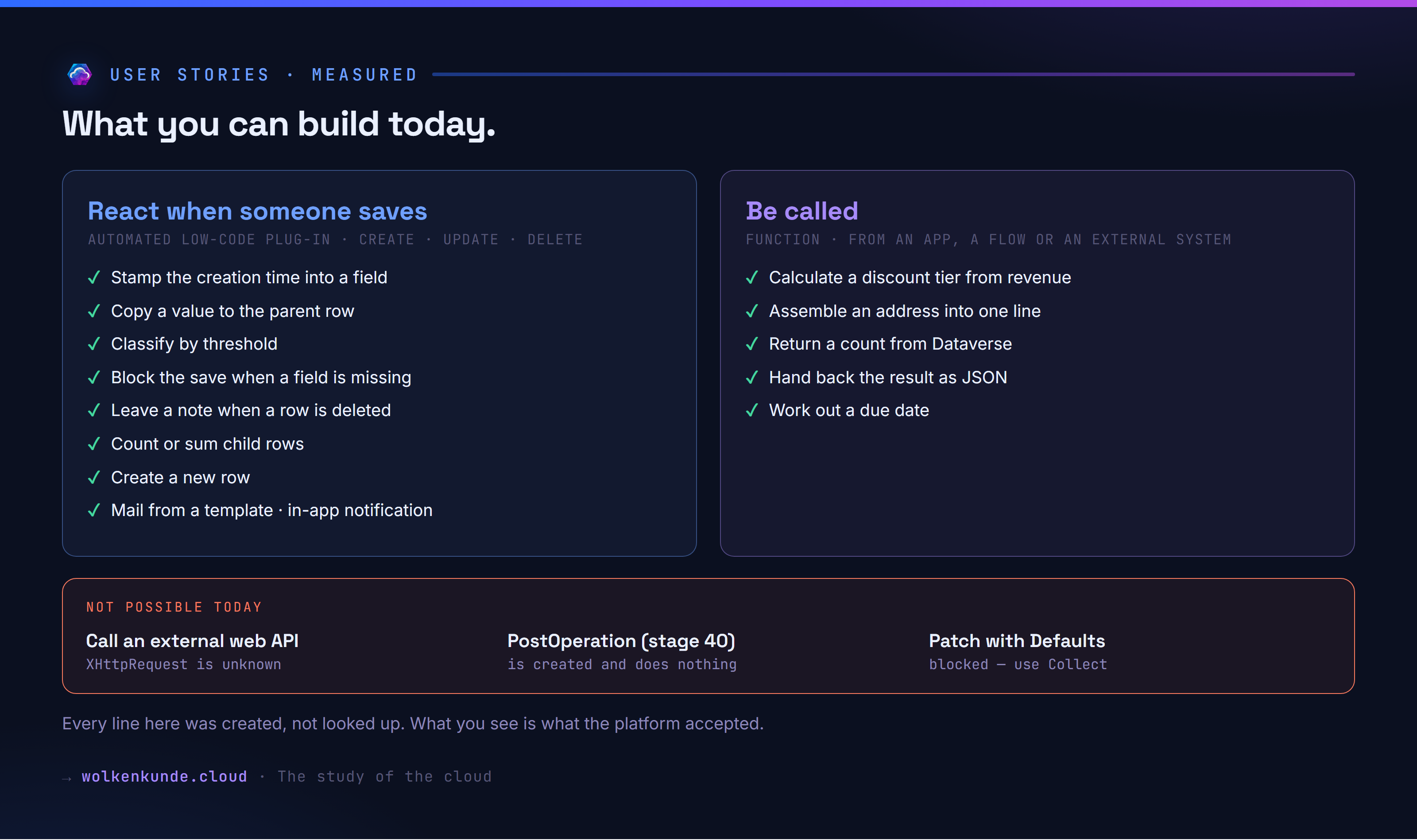
React when someone saves
| Requirement | Trigger | Formula |
|---|---|---|
| Stamp the creation time into a field | contact / create / 20 | Set(NewRecord.description, "Created " & Text(Now())) |
| Copy a value to the parent row | contact / update / 20 | If(OldRecord.jobtitle <> NewRecord.jobtitle, Patch(account, AsType(OldRecord.Firmenname, account), {…})) |
| Classify by threshold | account / update / 20 | If(NewRecord.revenue >= 100000, Set(NewRecord.description, "A"), Set(NewRecord.description, "Standard")) |
| Block the save | contact / create / 20 | If(IsBlank(NewRecord.lastname), Error("Please provide a last name.")) |
| Leave a note when a row is deleted | contact / delete / 20 | Patch(account, AsType(OldRecord.Firmenname, account), {description: "Contact removed"}) |
| Count child rows | contact / create / 20 | … Text(CountRows(Filter(contact, Firmenname = NewRecord.Firmenname))) |
| Sum child rows | contact / update / 20 | … {revenue: Sum(Filter(contact, Firmenname = OldRecord.Firmenname), annualincome)} |
| Create a new row | account / create / 20 | Collect(contact, {lastname: "To be filled", description: "Placeholder"}) |
| Send mail from a template | account / update / 40 | XSendEmailFromTemplate(…) |
| Push an in-app notification | account / update / 20 | XSendAppNotification(title, recipient) |
Create, update and delete are all three confirmed as triggers.
The validation genuinely works
This is the story worth the most, so I did not just create it, I triggered it. A rule on contact / Create / stage 20 with Error(), then a contact without a last name:
Plugin wk_val failed with: Bitte einen Nachnamen angeben.The row is not created. A contact with a last name is created normally. Your own message reaches the caller — carrying the technical prefix Plugin <name> failed with: in front of it. For a surface that end users see, that is not pretty; usable it still is.
Be called
| Requirement | Formula |
|---|---|
| An app asks for the discount tier | {Stufe: If(Umsatz >= 100000, "A", Umsatz >= 25000, "B", "C")} |
| A flow needs the address as one line | {Zeile: Concatenate(Strasse, ", ", Text(Plz), " ", Ort)} |
| An external system asks for a count | {Anzahl: CountRows(Filter(contact, jobtitle = Position))} |
| Hand the result back as JSON | {Daten: JSON({stufe: If(Umsatz >= 100000, "A", "B"), umsatz: Umsatz})} |
| Work out a due date | {Faellig: Text(DateAdd(Stichtag, 30, TimeUnit.Days))} |
What does not work
| Route | Message |
|---|---|
XHttpRequest, XSendHttpRequest | unknown or unsupported function |
Patch(contact, Defaults(contact), {…}) | 'Defaults' is a recognized but not supported function |
Patch(contact, {…}) without a target row | Dependency check failed |
So creating a row does work — just not the way you know it from canvas apps: Collect instead of Patch with Defaults.
Of the four requirements that failed in the first round, only one turned out to be a genuine limit on closer inspection: the call to the outside. The other three were down to my own formulas — a misplaced bracket, XSendAppNotification called with three arguments where it takes two or four, and the attempt with Defaults. So read an error message twice before writing off a feature.
The decision
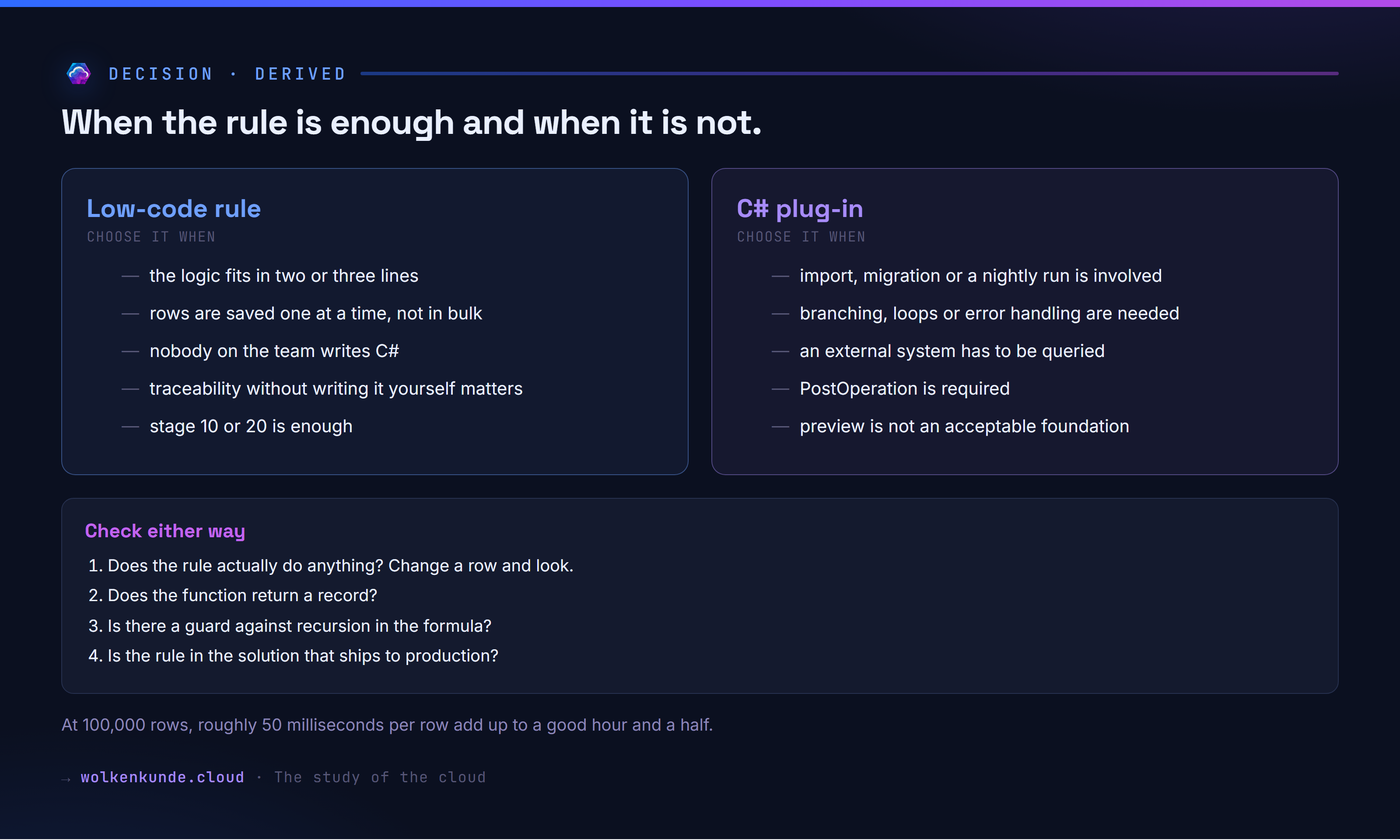
Choose Power Fx when
- the logic fits in two or three lines: compare a field, move a value, calculate a value
- the number of rows involved is modest — on a single save in a form, 50 ms goes unnoticed
- nobody on the team writes C# and the alternative is not solving it at all
- you want traceability without programming it
- stage 10 or 20 is enough
Choose C# when
- bulk processing is involved: import, migration, a nightly run. At 100,000 rows, 50 ms each turns into a good hour and a half
- an external system has to be queried — the formula language has nothing for it
- the logic needs branching, loops or error handling
- you depend on PostOperation
- polymorphic lookups need a real case distinction — without
IsTypethat gets unpleasant in Power Fx - the solution carries production weight and preview is not an acceptable foundation
Check either way
- Does the rule actually do anything? Change a row and look — “registered and active” is not enough.
- Does the function return a record? Otherwise the call fails, not the creation.
- Is there a guard against recursion in the formula?
- Who owns the rule, and what happens when that person leaves?
- Is the rule in the solution that ships to production?
The uncomfortable parts
Both are preview, and it shows. Stage 40 can be created, reports itself as active, and does nothing — and that is not an edge case but the stage a large share of classic plug-ins run on. IsType is missing. The documentation names a context variable that does not exist and stays quiet about the two that do.
Then there is the runtime. Half an order of magnitude slower goes unnoticed in a form and very much shows in a migration. Start with low-code today and process bulk data a year from now, and you write the logic a second time.
What remains: for replacing plug-ins the hardest hurdle is cleared — OldRecord and NewRecord exist, change detection works, and every requirement I tested could be built. For replacing custom APIs that only holds halfway: calculating yes, reading data yes, external systems no. For the ten lines of logic that come up in every project, that is enough. For anything beyond it, look at the clock.
See also
- Dataverse Custom API Toolkit: building custom APIs straight from VS Code — the same idea for custom API definitions: out of the portal, into the code
- Git integration in Power Platform: your solution as readable code in the repo — where rules and assemblies end up once the solution lives in a repo
- “Who gets to push this to prod?” — Git-first with Dataverse environments in a team — the deployment chain around it
- Prompt Columns in Dataverse: AI right in the table — without code — another piece of logic that moves into the table without code