
 Platform Engineering·03 October 2026·14 min read
 Model-driven app inside, code site outside
In part 1, one sentence turned into an application for managing test equipment: three tables, five views, three forms, three security roles, built in five minutes thirty-six. A model-driven app by the book — for your own staff.
Except test equipment is rarely checked by your own staff. Contractors do that. They have no Power Apps licence, they are not going to get one, and they have no business being in your tenant. What they need is narrow: a page listing the devices they are responsible for, and a form to report a result.
That is what Power Pages code sites are for: a single-page application — React, Vue, Angular or Astro — that runs on the Power Pages runtime and talks to Dataverse directly. No connector, no Azure Function in between, no second copy of the data.
This article builds such a portal on the same three tables from part 1 and ends by saying which one to pick when. Every number comes from this one run.
First, the distinction — otherwise we talk past each other
Three things have similar names and are not the same:
- Power Pages code site — an SPA on the Power Pages runtime, for people outside the organisation. Sign-in via Entra ID, Entra External ID, local accounts or partner providers. That is what this article is about.
- Power Apps code app — an SPA inside Power Apps, for licensed users in the tenant.
- Classic Power Pages portal — Liquid templates, assembled in the studio. The older route.
The template that it does not become
The template catalogue lists exactly one template for code sites: a US-style citizen services portal. For a test-equipment portal in a German plant it contributes nothing but sample code you then have to clear out. So, generate your own — which is less dramatic than it sounds:
pruefmittel-portal/
  package.json            React 19, react-router, Vite 6
  vite.config.ts
  tsconfig.json
  index.html
  powerpages.config.json  ← the only Power Pages specific part
  src/
powerpages.config.json is the entire connection to the platform:
{
  "siteName": "Pruefmittel-Portal",
  "compiledPath": "dist",
  "defaultLandingPage": "index.html"
}
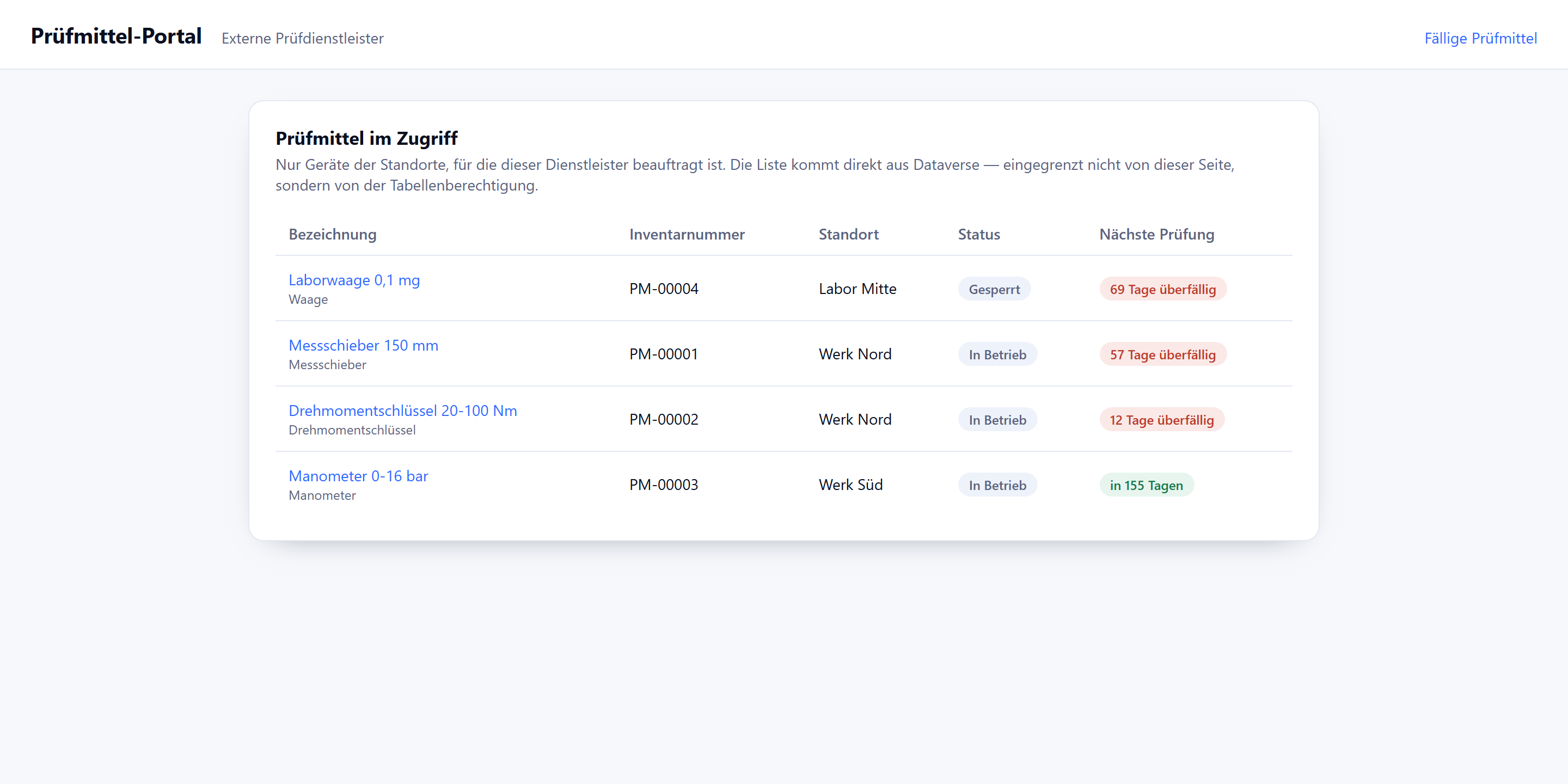
npm install pulls 73 packages in 12 seconds, the build takes 0.9 seconds for 45 modules. The finished interface comes to 540 lines: a list with a due-date indicator, a detail page with a reporting form and inspection history, the data access layer and a stylesheet.
Reaching Dataverse
Inside the portal the Dataverse Web API sits at /_api. The session cookie carries authentication; for writes the runtime additionally wants an anti-forgery token from /_layout/tokenhtml.
let token: string | null = null;

async function getToken(): Promise<string> {
  if (token) return token;
  const response = await fetch('/_layout/tokenhtml');
  const html = await response.text();
  const match = html.match(/value="([^"]+)"/);
  token = match ? match[1] : '';
  return token;
}

async function request<T>(path: string, init: RequestInit = {}): Promise<T | null> {
  const headers = new Headers(init.headers);
  headers.set('Accept', 'application/json');
  headers.set('Prefer', 'odata.include-annotations="OData.Community.Display.V1.FormattedValue"');
  if (init.method && init.method !== 'GET') {
    headers.set('Content-Type', 'application/json');
    headers.set('__RequestVerificationToken', await getToken());
  }
  const response = await fetch(`/_api/${path}`, { ...init, headers });
  // …
}
Two things here are more convenient than you might expect. There is no Authorization header and no key anywhere in this code — the session is enough. And the paths are exactly those of the Dataverse Web API:
const data = await request<{ value: TestEquipment[] }>(
  `wk_pruefmittels?$select=${FIELDS}&$orderby=wk_naechstepruefungfaellig asc`
);
If you know OData for Dataverse, you know this. The Prefer header saves you from resolving option sets client-side: wk_status@OData.Community.Display.V1.FormattedValue returns “In Betrieb” instead of 100000000.
The column list is an authorisation
For /_api to answer at all, every table needs two settings:
Webapi/wk_pruefmittel/enabled = true
Webapi/wk_pruefmittel/fields  = wk_pruefmittelid,wk_bezeichnung,wk_inventarnummer,…
The second line is not a convenience and not a shorthand for a $select. It is an authorisation, and it applies to every operation: reads, filters, ordering, aggregation and writes. What is not in the list does not come out and does not go in — regardless of what the table permission allows. The two have to line up: the permission says who may touch the table, the column list says which columns are in play at all. A * wildcard is no longer intended; there is a dedicated migration path for legacy values.
The catch sits with lookups, and it caught me out. A single lookup has three spellings, and the authorisation needs the one that actually appears in the call:
| For what | Identifier | In this project |
|---|---|---|
| the column itself | LogicalName | wk_pruefmittelid |
| reading and filtering | _<LogicalName>_value | _wk_pruefmittelid_value |
writing via @odata.bind | navigation property, case-sensitive | wk_PruefmittelId |
The navigation property cannot be derived from the column name. It lives in the relationship:
GET EntityDefinitions(LogicalName='wk_pruefung')/ManyToOneRelationships
    ?$select=ReferencingAttribute,ReferencingEntityNavigationPropertyName

ReferencingAttribute:                    wk_pruefmittelid
ReferencingEntityNavigationPropertyName: wk_PruefmittelId
My first version listed only wk_pruefmittelid — neither of the two identifiers the code actually uses. Same story for the location lookup. And in the client I had written wk_pruefmittelid@odata.bind in lower case while the navigation property is wk_PruefmittelId. Three mistakes on a single relationship.
None of it would have surfaced until the portal: the location column would have stayed empty, the history filter would have found nothing, the insert would have failed. Locally everything worked, because the development bridge talks to the Dataverse Web API directly — and that one knows nothing about an authorisation list. If you develop locally, check this list against the calls you actually make before wondering why a column stays blank.
Roles and permissions are files — that is the real gain
On the first upload attempt the CLI creates .powerpages-site/ locally: 200 files, each with a fixed GUID — 60 web pages, 51 site settings, 26 web templates, 22 content snippets, 16 web files, three web roles, two publishing states. The complete website model as a folder tree.
Alongside it you write your own. A web role:
anonymoususersrole: false
authenticatedusersrole: false
description: External inspection contractors — see the equipment assigned to them
  and report inspection results.
id: 32e7e978-59a6-425c-b32d-23fec5ba009d
name: Externe Prüfdienstleister
And the permissions, through a script shipped with the plugin rather than by hand:
node create-table-permission.js --projectRoot . \
  --permissionName "Pruefungen melden" --tableName wk_pruefung \
--webRoleIds "32e7e978-…" --scope Global --read --createadx_entitypermission_webrole:
- 32e7e978-59a6-425c-b32d-23fec5ba009d
entitylogicalname: wk_pruefung
entityname: Pruefungen melden
read: true
create: true
write: false
delete: false
scope: 756150000This is the difference from the classic portal, and from the model-driven app too: who may do what sits in the repository next to the code, goes through the same review and the same deployment. You see it in a diff instead of in a dialog.
And it holds server-side. Without a matching web role the portal Web API is explicit:
GET /_api/wk_pruefmittels?$select=wk_bezeichnung&$top=1

403
{"error":{"code":"90040120",
  "message":"You don't have permission to read the wk_pruefmittel…"}}
Not a silently empty result, but a named refusal, before a single line of page code has run. Anonymous access gets nowhere either: the landing page redirects to sign-in, /_api answers 302.
What this permission does not do: it decides whether someone may write to a table — not what counts as a valid value. The business rule from part 1 (no inspection date in the future) is exactly as bypassable here as it was there: anyone with create on wk_pruefung can POST a record dated 2027 to /_api/wk_pruefungs. Where such rules belong so that nobody can route around them is covered in a separate article — in the data layer, as a plug-in or a custom API.
Server logic: the convenience gain
For the write path there is server logic — server-side JavaScript on the Power Pages runtime, stored in the same folder tree:
.powerpages-site/server-logic/pruefung-melden/
  pruefung-melden.js
  pruefung-melden.serverlogic.yml
The metadata file binds the logic to web roles; the endpoint is /_api/serverlogics/pruefung-melden. Exactly five top-level functions are allowed — get, post, put, patch, del — and each must return a string. No fetch, no setTimeout, no npm packages.
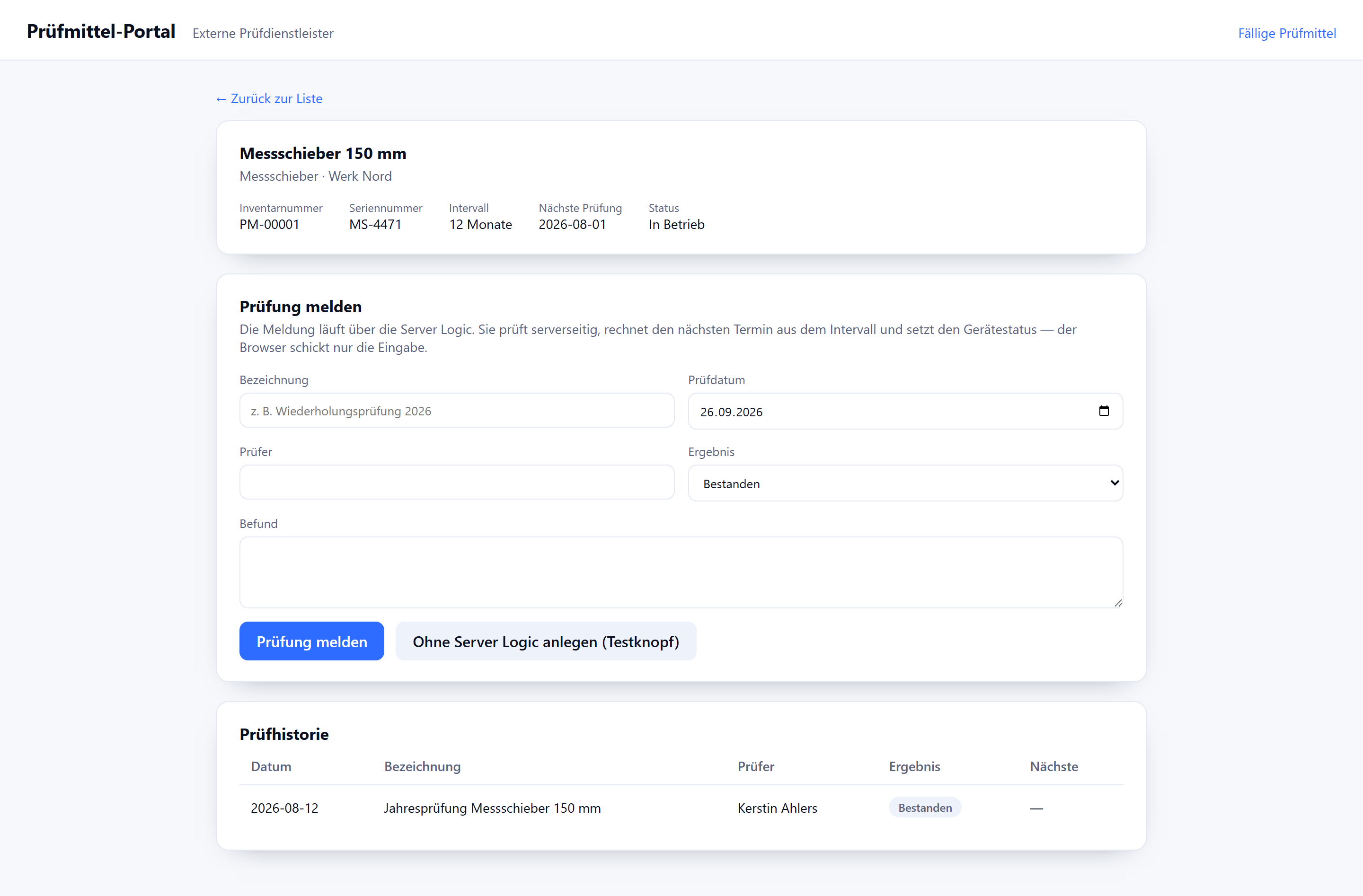
The gain is not security, it is scope. Reporting an inspection involves four steps: validate the input, create the inspection, calculate the next due date from the interval, and lock the device when the result is a failure. Without server logic the browser makes four calls and has to know the calculation. With server logic it is one:
function post() {
    try {
        Server.Logger.Log("pruefung-melden POST called");
        var input = JSON.parse(Server.Context.Body);

        // Read the current state from Dataverse rather than trusting the client's view.
        var device = Server.Connector.Dataverse.RetrieveRecord(
            "wk_pruefmittel", input.pruefmittelId,
            "?$select=wk_bezeichnung,wk_pruefintervallmonate,wk_status"
        );
        // … create the inspection, calculate the next date from the interval,
        //     lock the device when the result is a failure
    } catch (err) {
        Server.Logger.Error("pruefung-melden POST failed: " + err.message);
        return JSON.stringify({ ok: false, message: err.message });
    }
}
Two points worth knowing at design time. First: Server.Connector.Dataverse does not bypass table permissions, it runs with the rights of the web role — without permission it quietly returns zero records. Second, and this follows: once the role may write, the browser can perform the same write directly. Server logic keeps code and secrets away from the browser and bundles several steps into one call. It is not a write guard.
Whether the server logic actually runs on the runtime I could not verify — that would have required signing in to the portal, and that was the snag. More on it shortly.
What the route costs
| Step | Duration |
|---|---|
| Survey the environment (tables, columns, option sets) | 7 min |
Scaffold, npm install, first build | 3 min |
| First upload attempt — aborted at the block list | 1 min |
| Web role, three table permissions, seven site settings | 4 min |
| Write the server logic | 5 min |
| Running locally against real data | 8 min |
| Project ready | 28 min |
pac pages upload-code-site (140 records, 48 entities) | 28 s |
| Activation until the address responded | 84 s |
How this was measured: these are timestamps from the work log of this run, noted at every phase change — wall-clock time of an agent working in a terminal, reading, writing and thinking included. It excludes the wait for the file extension to be unblocked, which fell overnight. Type it yourself and you will get different numbers; what carries over is the ratio between the phases — half the time went into the survey and the local run, not into writing the interface.
Comparing this with part 1 is tempting, but putting the two numbers side by side is misleading. The 5 minutes 36 of the model-driven app were the engine’s run time — schema build plus full build. Negotiating the specification, two validation rounds with fourteen complaints, and the rework came on top; that was the real effort there, and I never timed it. The 21 minutes here are the whole time the application took to come into being — surveying the columns, writing the components, checking against real data. On the machine level the code site sits at roughly two minutes: 0.9 seconds build, 28 seconds upload, 84 seconds activation.
One more thing not to confuse: both interfaces were generated, neither was typed by hand. The difference is what did the generating. For the model-driven app there is a tool — the agent fills in a specification, and a deterministic engine turns it into tables, views and forms. For a code site there is no such tool: the agent writes the code itself, component by component, and the plugin only supplies the edges such as table permissions and site settings.
What can honestly be said: both routes get you there in a morning, and neither is the fast one. The model-driven app takes the design work off your hands, the code site gives you control over it.
Five places where it jams:
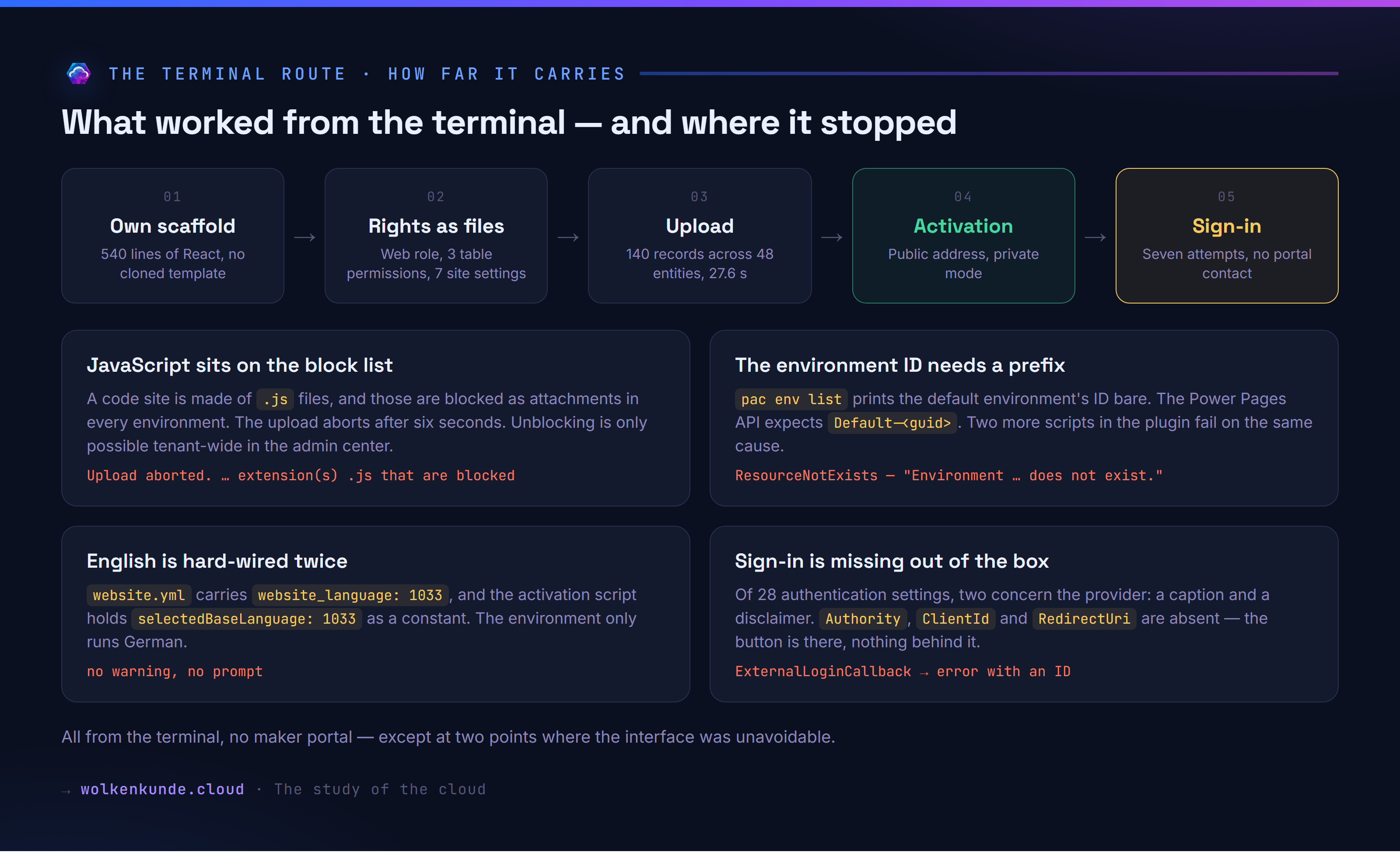
JavaScript sits on the block list. A code site is made of .js files, and those are blocked as an attachment type in every environment. The upload aborts after six seconds:
Error: Upload aborted. Your site data contains file(s) with extension(s) .js
that are blocked in this environment, so no changes were uploaded.
The list holds 96 entries and applies to the whole environment, not to the website. Unblocking is only possible in the admin center under Privacy + Security. If you are not allowed to do that, you get nowhere — worth clarifying before the first appointment.
The environment ID needs a prefix. pac env list and pac admin list print the default environment’s ID bare. The activation API answers:
{"status":"Failed","statusCode":404,"errorCode":"ResourceNotExists",
 "error":"Environment c530e80c-… does not exist."}
It wants Default-c530e80c-…. The same cause disables two more scripts, which quietly report Websites API call failed or HTTP 404.
English is hard-wired twice. website.yml carries website_language: 1033, and the activation script holds selectedBaseLanguage: 1033 as a constant. The environment only runs German (1031) — the website was created as an English site anyway, without a warning.
The permission script checks the wrong thing. create-table-permission.js aborts with “The site must be deployed at least once…”. In fact it only checks whether the folder table-permissions/ exists. One mkdir and it runs.
The landing page stays the default page. After activation / serves the stock Power Pages template; your own application lives at /index.html. A second upload does not change that.
And under the Enhanced Data Model everything sits elsewhere: adx_webroles is empty; web roles, table permissions, site settings and server logic all live in powerpagecomponents, distinguished by a type code — 129 entries for this site. Query the old adx_ tables and you will conclude the deployment failed.
Plan for the sign-in
/SignIn carries a “Microsoft Entra ID” button. It leads into a server error.
The reason is countable: of 28 Authentication/* settings on the site, exactly two concern the provider — the caption and a disclaimer. Authority, ClientId and RedirectUri are absent. A code site created from the CLI has the sign-in button but no sign-in behind it.
A fair amount can be retrofitted: create an app registration, set the three settings, add the permissions, grant consent. After that the flow reaches the callback and ends there in a generic error page with a reference number; no portal contact is created.
The practical lesson: if you are setting up a code site for production, create the website once in the design studio — that wires up sign-in — and work from the terminal afterwards. The pure terminal route carries you from scaffold to a reachable address, but not across the sign-in threshold.
Two side observations that save time when rebuilding this: the provider’s edit form in the design studio has no fields for application ID or tenant — only a caption, two claims mappings and four switches. And on save it creates new entries rather than changing the existing ones; afterwards the environment held duplicates with opposing values:
Authentication/OpenIdConnect/AzureAD/RegistrationEnabled          = false
Authentication/OpenIdConnect/AzureAD/RegistrationEnabled          = true
Authentication/OpenIdConnect/AzureAD/AllowContactMappingWithEmail = false
Authentication/OpenIdConnect/AzureAD/AllowContactMappingWithEmail = true
Which one wins is undefined.
Which one to pick
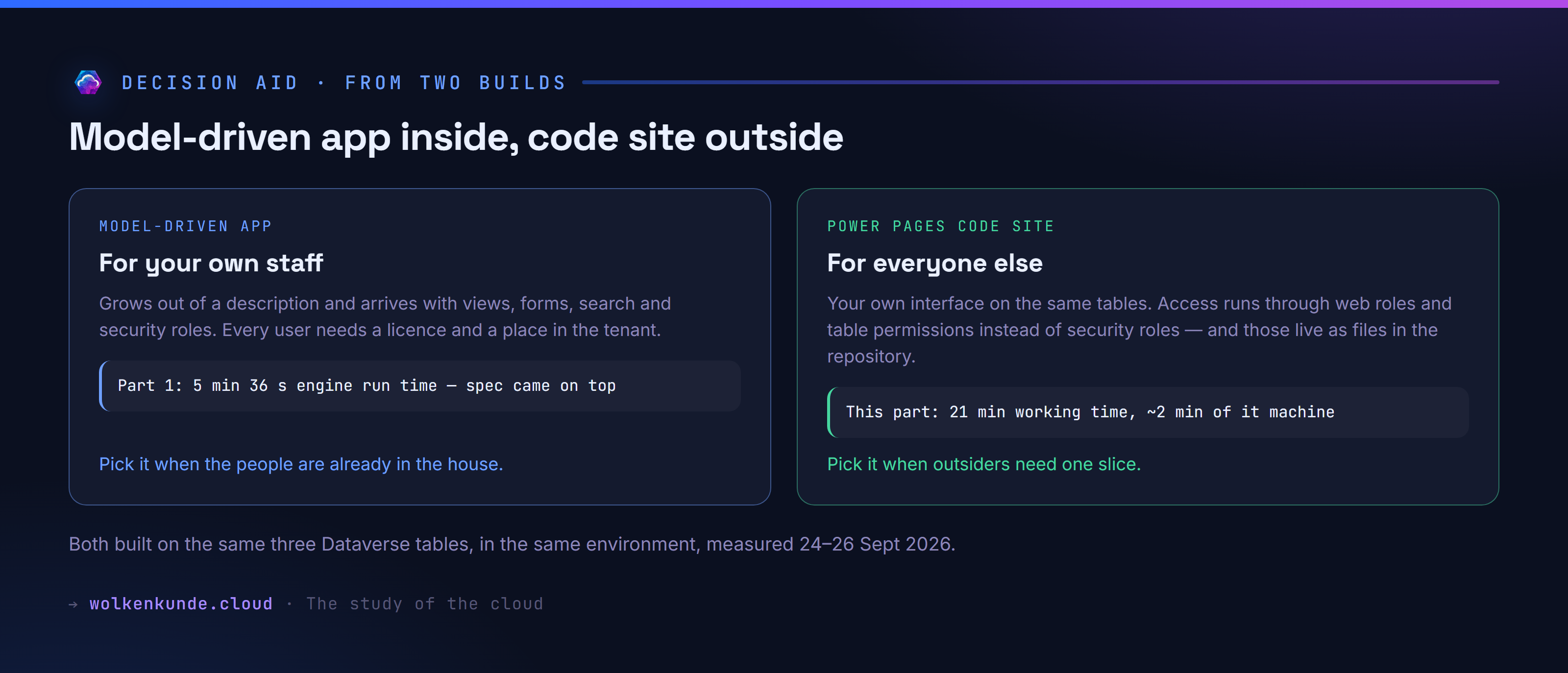
Both routes sit on the same three tables, in the same environment. The question is not which is better, but who uses the interface.
Model-driven app, when the people are already in the house. It grows out of a description and arrives with views, forms, search, charts and security roles, and you design nothing. The price: every user needs a licence and an account in the tenant, and they see the application the way the platform builds it.
Code site, when outsiders need one slice. The price is that no ready-made tool exists for it: the interface comes into being line by line — 21 minutes here, proportionally more for a larger one. In exchange you get three things the model-driven app does not offer: an interface that shows exactly that slice and nothing else; access rights as versioned files instead of a click path; and users who need no place in the tenant.
Three things worth settling up front, because they drive the schedule. Who may unblock .js in the environment. Who creates the website so that sign-in works. And where the business rules should live — because neither the model-driven app’s form nor the code site’s table permission enforces that a value is plausible. That stays the job of the data layer, identically in both worlds.
See also: I wanted an app from one sentence. What I got was a specification. · Does Power Fx replace the C# plug-in? A measurement across 1,000 rows