
 Platform Engineering·04 October 2026·24 min read
 One agent, two tenants, one file
Everyone is talking about how autonomously agents work these days. Several threads side by side, each on its own task, none waiting for a confirmation.
What rarely comes up: they share the login state.
I noticed this in my own work when a Key Vault access suddenly failed with AKV10032: Invalid issuer, ten minutes after the same call had worked. Another process had switched the Azure context in between. That was not a bug in the script — that was a bug in the assumption that “my” context belongs to me.
This is not a run of bad luck, it is homework that is due right now. Process chains are being moved onto their own harnesses everywhere — no longer a human asking an agent something, but chains that run overnight: pull data, import a solution, activate a flow, file a report. Anyone building that is also moving the security question along with it. It does not get smaller, it only gets less visible.
And the next step is the same on every roadmap: get the threads off your own machine — into the cloud, onto a build agent, into a container. That sounds like a fix, and wherever each session really gets its own environment, it is one. Except that “elsewhere” is not the same as “separate”: several sessions on the same rented machine share one user profile directory and therefore one login state — as before, only without anyone reading the output. A session mixed up with another will then go unnoticed by everybody. It leaves no error behind, just a result from the wrong environment.
This article measures how often that happens and shows what a deterministic hook does about it. With code that runs, and with the limits I found while building it.
One file, one flag, no lock
The Azure CLI keeps its state in ~/.azure/azureProfile.json. It holds a list of subscriptions, and exactly one of them carries isDefault: true:
isDefault=false  c530e80c-…  dev1@…onmicrosoft.com      (trial, subscription entry)
isDefault=true   c530e80c-…  dev1@…onmicrosoft.com      (trial, tenant level)
isDefault=false  0d797863-…  Admin@…                    (brand)
No process scope, no lock, no guard. Whoever runs az account set writes into that file — and thereby moves the context of every other process on the machine, including one in the middle of its work.
For an agent this is trickier than for a human at a terminal. Between “set the context” and “run the command” there is always something in an agent’s way: a file access, a model call, an answer being written. That gap is not a millisecond, it is seconds.
The measurement
Two threads, built the way two agents would work. Thread A works in subscription A and does three things each round: set the context, briefly do something else, then the actual command — once without naming a subscription, once with. Thread B switches to subscription B in between, because it has its own job.
async function threadA(log) {
  for (let i = 1; i <= ROUNDS; i++) {
    await az(['account', 'set', '--subscription', A.sub])
    await wait(150)   // the time between two tool calls

    // How most commands run: without a subscription, on the active context.
    entry.without = await az(['account', 'show', '--query', 'id', '-o', 'tsv'])
    // The same command, stated explicitly.
    entry.with    = await az(['account', 'show', '--subscription', A.sub,
                              '--query', 'id', '-o', 'tsv'])
  }
}
The result of the first run:
  Round   without --subscription    with --subscription
      1   58072c83 WRONG            c530e80c ok
      2   c530e80c ok               c530e80c ok
      3   58072c83 WRONG            c530e80c ok
      4   58072c83 WRONG            c530e80c ok
      5   58072c83 WRONG            c530e80c ok
Three runs, twelve rounds each. Ten out of 36 commands hit the wrong subscription. With --subscription in the command: none. With a separate AZURE_CONFIG_DIR per thread: none either.
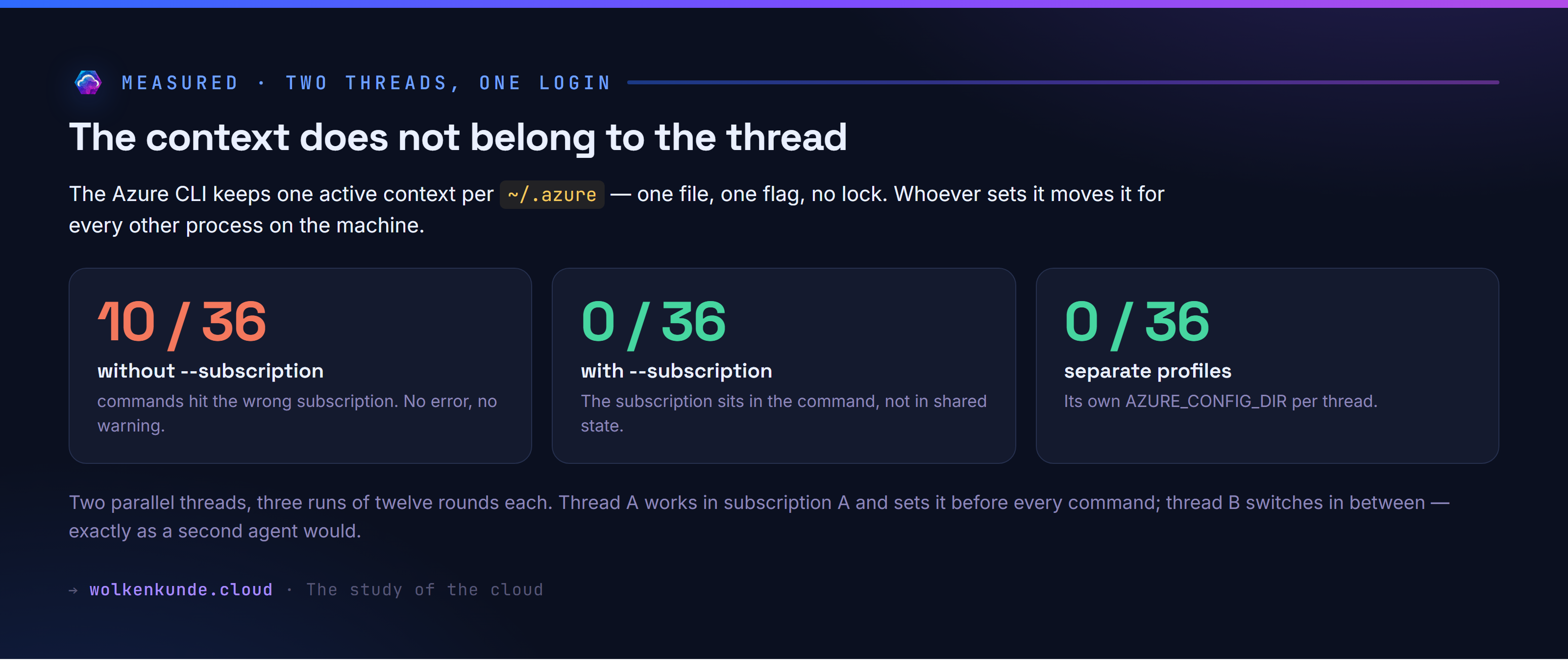
The uncomfortable part is not the rate. It is that nothing happens: no error, no warning, no hint. The command runs, just somewhere else. On a read that means wrong data, on a write it means damage in the wrong environment.
One trap on the side that can quietly ruin a test setup: --subscription wants the subscription ID, not the tenant ID. Give it the tenant ID and the command fails silently — and a test run that does not check for this will falsely report “all good”. That is why my first pass showed zero misses.
Judgement or law
In the same working week, my harness’s built-in safety mechanism stopped me four times: trying to remove a file extension from an environment’s block list, uploading a configuration with anonymous read access, a DELETE on components, and az ad app permission grant. Every time with a category and a reason. Every one of those decisions was right.
Still, that is something different from what this article is about. A built-in protection judges at runtime. A hook is code: it knows your allowed subscriptions, compares, and decides the same way every time. You can read it, review it, version it, and see in the diff when someone changes it.
Both have their place. But anyone running a harness unattended should know which of the two they currently have.
What a hook sees of the conversation
Before we get to rules, the question to settle first: what does such a hook actually get to see? The documentation answers this, but I wanted it measured. That takes no effort at all — a hook that decides nothing and only writes things down:
const parts = []
for await (const chunk of process.stdin) parts.push(chunk)
const raw = Buffer.concat(parts).toString('utf8')

const j = JSON.parse(raw || '{}')
fs.writeFileSync(path.join(TARGET, `${Date.now()}-${j.tool_name}.json`),
                 JSON.stringify(j, null, 1))
process.exit(0)   // writing nothing means: let it through
Registered with "matcher": "*" it fires on every tool. What came out of it are eleven fields — here from a real Bash call in this session:
{
  "session_id":      "f4869369-b10c-4…",
  "transcript_path": "…/projects/…/f4869369-….jsonl",
  "cwd":             "C:\\Daten\\source\\wolkenkunde_root",
  "scratchpad_dir":  "…\\Temp\\claude\\…\\scratchpad",
  "prompt_id":       "38fdebd4-ac65-4…",
  "permission_mode": "auto",
  "effort":          { "level": "high" },
  "hook_event_name": "PreToolUse",
  "tool_name":       "Bash",
  "tool_input":      { "command": "…", "description": "…" },
  "tool_use_id":     "toolu_017je3XXoN…"
}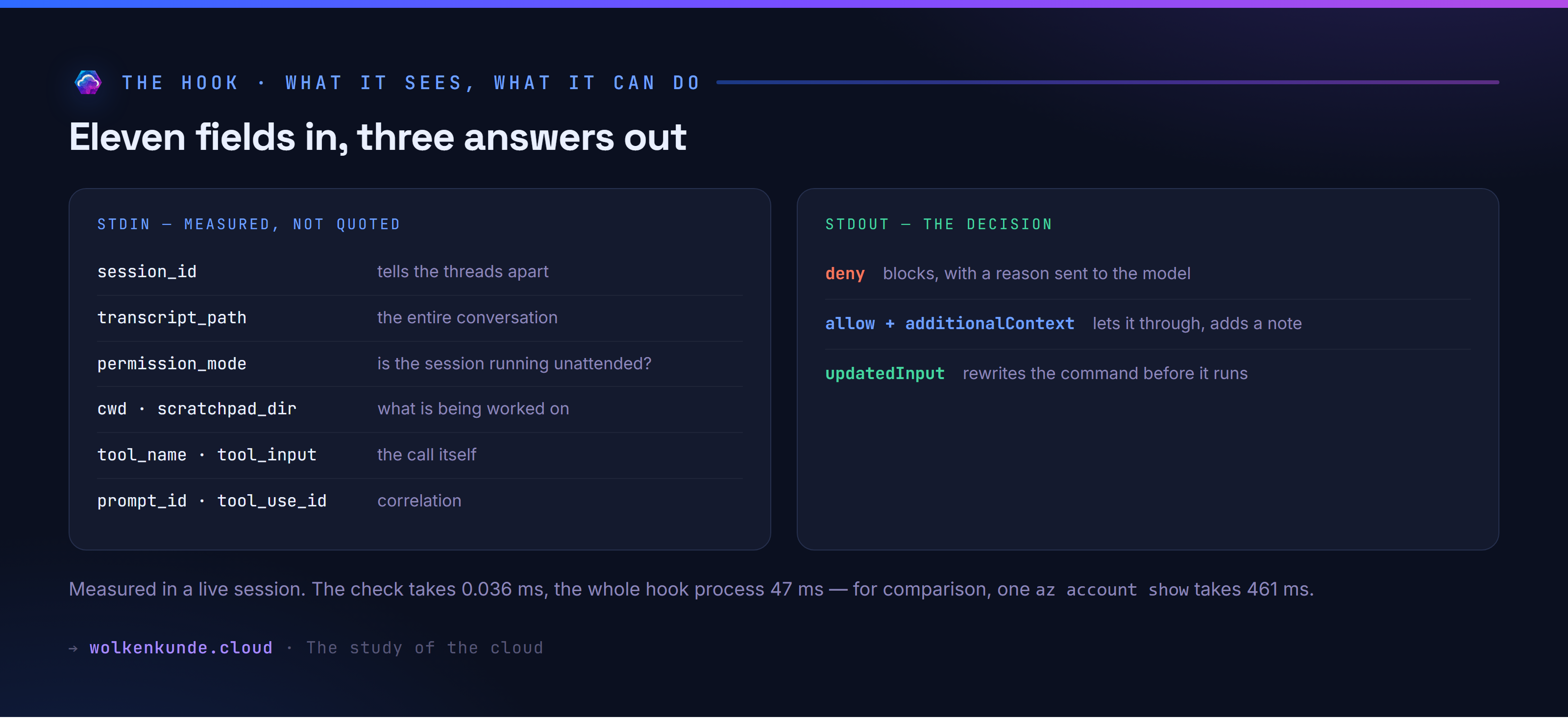
Three of them matter for the question of parallel threads:
session_id is stable per session. It lets you tell threads apart — a policy can allow one thread something another one must not do.
permission_mode says which mode the harness runs in; mine said auto. So a hook can tighten up as soon as nobody is confirming each call any more.
transcript_path points at the full conversation as JSONL. The hook can therefore read back what the human originally wanted. That is powerful — and a reason to treat hooks like any other code with access to conversation content.
agent_id and agent_type did not appear in any of my recordings. According to the documentation they carry a subagent’s identifier and therefore only show up when the call comes from one — I have not measured that myself.
The rule
Now the hook itself. The policy is not code but a file called .azure-guard.json in the root of the project:
my-project/
  .azure-guard.json       ← the policy
  .claude/settings.json   ← where the hook is registered
  src/
It is looked up from the working directory upwards, up to six levels, and last of all in the user’s home directory (~/.azure-guard.json). That is meant for a repository holding several projects: one policy at the top, and every subdirectory inherits it as long as it does not place its own next to it. The house rule comes from the home directory and applies everywhere a project says nothing else.
If the hook finds no file at all, the defaults from the code apply — and those check nothing, because no subscriptions are listed. Without a policy the hook is therefore inert, not strict. That is deliberate: a plugin that blocks every az call right after installation is uninstalled on day one.
If the file is there but broken, it blocks:
} catch (e) {
  // A broken policy file is a reason to block, not to let things through.
  return { ...DEFAULTS, broken: file, error: String(e.message) }
}
Here is what it looks like:
{
  "allowedSubscriptions": ["c530e80c-…", "58072c83-…"],
  "requireExplicitSubscription": true,
  "onMissingSubscription": "fix",
  "allowDestructive": false,
  "allowPermissionGrants": false
}
The hook takes the command line apart, picks out the az calls and checks each one:
export function check(command, policy, context) {
  const calls = azCalls(command)
  if (calls.length === 0) return { decision: 'allow' }

  for (const part of calls) {
    const named = subscriptionFrom(part)
    const allowed = policy.allowedSubscriptions || []

    // 1. An explicitly named subscription has to be allowed.
    if (named && allowed.length > 0 && !allowed.includes(named)) {
      return { decision: 'deny', rule: 'subscription-not-allowed', … }
    }
    // 2. Without one, the shared context applies — and that can move.
    …
    // 3. Deleting, purging, granting rights.
    if (!policy.allowDestructive && DESTRUCTIVE.test(part)) { … }
  }
  return { decision: 'allow' }
}
One design decision with a measurement behind it: the hook does not call az account show to learn the active context, it reads azureProfile.json directly. The reason is on the stopwatch — az account show takes a median of 461 ms, the entire hook process including file access 47 ms. For something that runs before every single tool call, that is the difference between usable and unbearable.
Wiring it up: Claude Code
The entry goes into .claude/settings.json (or into a plugin, then hooks/hooks.json):
{
  "hooks": {
    "PreToolUse": [
      {
        "matcher": "Bash|PowerShell",
        "hooks": [
          {
            "type": "command",
            "command": "node",
            "args": ["${CLAUDE_PLUGIN_ROOT}/hooks/guard.mjs", "--harness", "claude"],
            "if": "Bash(az *)",
            "timeout": 10,
            "statusMessage": "azure-guard is checking the command"
          }
        ]
      }
    ]
  }
}
Field by field:
matcherdecides which tools make the hook run at all — here the two shell tools."*"covers everything.ifis a second, finer condition in permission syntax: the process only starts when the Bash command begins withaz. That saves the 47 milliseconds on everything else.argsinstead of stuffing everything intocommand: the call then runs without a shell, and paths with spaces are a non-issue.${CLAUDE_PLUGIN_ROOT}is substituted at runtime.timeoutin seconds. Ten is generous against a 47-millisecond runtime — why that is not a luxury comes further down.statusMessageappears in the terminal while the hook runs. Without it you wonder about the pause.
Answers go over stdout. Blocking looks like this:
{
  "hookSpecificOutput": {
    "hookEventName": "PreToolUse",
    "permissionDecision": "deny",
    "permissionDecisionReason": "[azure-guard/subscription-missing] The command names no subscription …"
  }
}
The reason is not a log entry for later — it goes to the model. In the terminal it arrived like this:
$ az group list --query "[].name" -o tsv
PreToolUse:Bash hook error: [azure-guard/subscription-missing] The command names no
subscription and therefore runs on the shared, mutable context
(currently: c530e80c-… / N/A(tenant level account)). Append --subscription <id>.
That is the difference between a block that stops you and one that helps: the agent learns not only that it may not, but what to do about it.
Not a handler, a process
This is the point to answer a question I asked myself far too late: how does the harness know which function inside guard.mjs to call?
It does not. There is no mapping onto function names, and the file is never loaded as a module. Anyone coming from the Microsoft world expects something else here:
| How the code is found | |
|---|---|
| Dataverse plug-in | The runtime loads the assembly and calls IPlugin.Execute — an interface contract |
| Azure Function | The runtime loads the assembly, an attribute points at the method — a name binding |
| PreToolUse hook | The harness starts a process and talks over stdin and stdout — no contract, just a protocol |
The closest relative is the Git hook: .git/hooks/pre-commit is some executable file, and Git knows nothing about its contents — only about its exit code.
What sits in settings.json is therefore not a registration but a command line. command and args literally become:
node C:\…\plugins\azure-guard\hooks\guard.mjs --harness claudeThe entire interface consists of three channels: stdin receives the JSON with the eleven fields, stdout takes the answer — and writing nothing lets the call through —, the exit code says whether the process itself was fine.
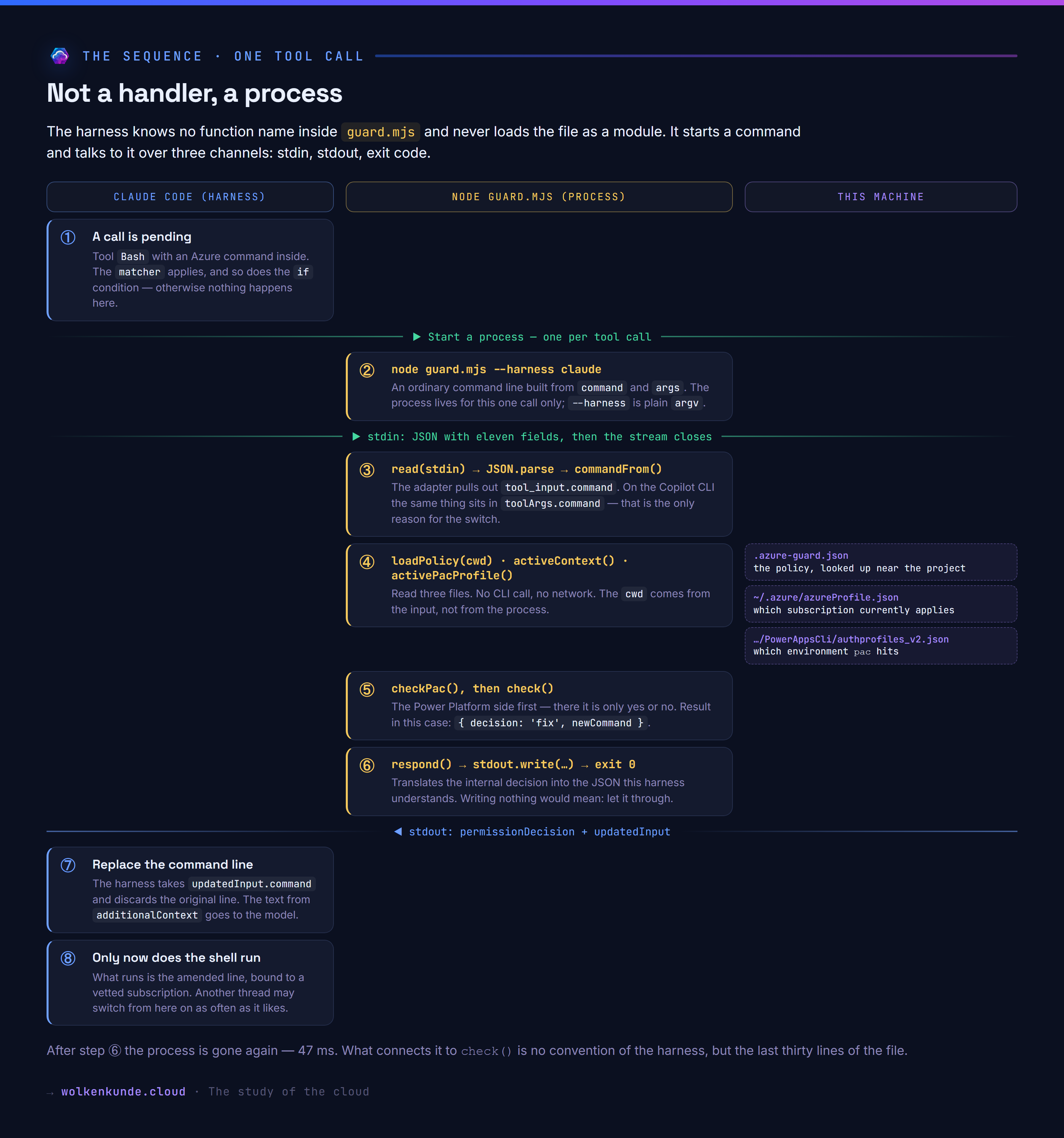
Step by step, using an Azure command with no subscription given:
① The harness decides whether to start at all. Tool and matcher have to match, and so does the condition in if. If either does not apply, nothing happens — no process, no millisecond.
② The process starts. One per tool call, new every time, with no state from before. Even --harness claude is nothing special, just ordinary argv:
const HARNESS = argValue('--harness') || 'claude'

function argValue(name) {
  const i = process.argv.indexOf(name)
  return i !== -1 && i + 1 < process.argv.length ? process.argv[i + 1] : null
}
③ The input is read. This is where what the harness prescribes ends and your own program begins:
const raw = await read(process.stdin)
let input = {}
try {
  input = JSON.parse(raw || '{}')
} catch {
  // Input we cannot parse is no reason to let things through.
  respond({ decision: 'deny', rule: 'input-unreadable', … }, HARNESS)
}
④ The fields are unpacked. Only now does the adapter come in that tells the two harnesses apart:
const cwd     = input.cwd || process.cwd()
const command = commandFrom(input, HARNESS)   // tool_input.command or toolArgs.command
const policy  = loadPolicy(cwd)               // .azure-guard.json
const context = activeContext()               // azureProfile.json
The cwd comes from the input, not from the process — the hook does not necessarily start in the project directory. Three files are read, no CLI is called, no network is touched.
⑤ Checking takes three lines. This is the entire “wiring” people go looking for:
const pac = checkPac(command, policy, activePacProfile())
if (pac.decision === 'deny') respond(pac, HARNESS)

respond(check(command, policy, context), HARNESS)
check is a freely chosen name. I could call the three functions a, b and c and the hook would run unchanged — as long as these lines call them.
⑥ The answer goes over stdout. respond() translates the internal { decision, rule, reason } into the format the respective harness understands:
if (result.decision === 'allow') process.exit(0)   // writing nothing = let it through
…
process.stdout.write(JSON.stringify({ hookSpecificOutput: { … } }))
⑦ and ⑧ belong to the harness again. It reads the JSON, replaces the command line with the new one where updatedInput is present, and only then runs the tool. By that time the process has long since exited.
Why the functions are exported anyway
If the harness never imports the file — what is export function check for? For the test scripts:
import { withSubscription } from './guard.mjs' // probe-rewrite.mjsThat is the reason for a check that looks redundant on first reading:
const startedDirectly = process.argv[1]
  && import.meta.url === pathToFileURL(process.argv[1]).href
Without it an import would start the file as a hook as well: it would wait on stdin, and the test would hang until somebody aborts it. Started directly therefore means “speak the protocol”, imported means “just provide the functions” — the same code, two modes, testable without a harness.
And because the interface is nothing but a process and two streams, the language is free too. Where node stands in my case, pwsh would do just as well.
The plugin ships with German identifiers (
pruefe,ladeRichtlinie,antworte). The names in this article are translated so the code reads in one language — the logic is identical.
Wiring it up: GitHub Copilot CLI
The same script, a different config file. The configuration lives under ~/.copilot/hooks/*.json:
{
  "version": 1,
  "hooks": {
    "preToolUse": [
      {
        "type": "command",
        "bash": "node \"$COPILOT_PLUGIN_ROOT/hooks/guard.mjs\" --harness copilot",
        "matcher": "bash|shell",
        "timeout": 10
      }
    ]
  }
}
The differences are small, but they break any hook that does not know about them:
| Claude Code | Copilot CLI | |
|---|---|---|
| Command in the input JSON | tool_input.command | toolArgs.command |
| Tool name | tool_name | toolName |
| Answer when blocking | hookSpecificOutput.permissionDecision | permissionDecision at the top level |
| Rewriting the input | updatedInput | not provided for |
That is why the script has a --harness switch and two slim adapters:
function commandFrom(input, harness) {
  if (harness === 'copilot') {
    const args = input.toolArgs || {}
    return args.command || args.bash || args.script || ''
  }
  const ti = input.tool_input || {}
  return ti.command || ti.script || ''
}
Same rule, same decisions — in an end-to-end test with both input formats, seven out of seven cases came out identical.
In the Power Platform, two logins cross
So far this has been about the Azure CLI. Anyone working with the Power Platform has the problem twice — and the second time is the nastier one.
The pac CLI keeps its state exactly the same way: one file, one active profile, for all processes at once.
%LOCALAPPDATA%\Microsoft\PowerAppsCli\authprofiles_v2.json

Profiles: [
  { FriendlyName: "Default Directory (default)", Resource: "https://orgf707a816.crm16.dynamics.com/" },
  { FriendlyName: "Sales Trial",                 Resource: "https://org58340192.crm16.dynamics.com/" }
]
Current:  { UNIVERSAL: { … EnvironmentId, Resource, TenantId … } }
Instead of an isDefault flag the key here is called Current. The pattern is the same: pac auth select writes into that file, and from then on every pac command on the machine points somewhere else.
One difference makes it worse. With the Azure CLI I could repair the command by having the hook write --subscription into it. There is no counterpart for pac: which environment a command hits is not in the command, it is exclusively in the active profile. pac solution import, pac pages upload-code-site, pac plugin push — they all follow whatever somebody selected last. All that remains is to allow or to block.
And then comes the point where both worlds cross. In part 1 of this series one of the three undocumented stumbling blocks was exactly this: the App Builder writes to Dataverse with the token of the Azure CLI, while pac only supplies the environment URL. Both logins therefore have to carry the same identity — but they sit in two independent files that know nothing about each other.
For a second thread that means it does not have to do anything dramatic. It is enough that it runs az account set because it needs something in another tenant right now. After that the running build has an Azure identity that no longer matches the Power Platform environment — and either gets an error nobody attributes to a second thread, or it writes where it does not belong.
The hook therefore checks both sides. For pac the policy looks like this:
{
  "allowedEnvironments": ["https://orgf707a816.crm16.dynamics.com/"]
}
And the decision, against this machine’s real profile:
$ pac solution list
[azure-guard/environment-not-allowed] The Power Platform CLI points at
Default Directory (default) (https://orgf707a816.crm16.dynamics.com/).
Only allowed here: https://org58340192.crm16.dynamics.com/.
Switch with `pac auth select` before you continue.
One exception is deliberately built in: pac auth list|select|create|who always gets through. Otherwise an agent could neither determine nor fix its own state — it would be stuck.
The same pattern shows up wherever a tool knows “the current context”: kubectl with its current context in the kubeconfig, gh with the active host, gcloud with the active configuration, terraform with the selected workspace. The files have different names, the problem is the same — and the check can be built to the same scheme.
Not just blocking: repairing the command
This is where it gets interesting. Claude Code allows the hook to change the input before the tool runs:
{
  "hookSpecificOutput": {
    "hookEventName": "PreToolUse",
    "permissionDecision": "allow",
    "updatedInput": { "command": "az group list --subscription c530e80c-…" },
    "additionalContext": "Note from azure-guard: … bound it to c530e80c-…."
  }
}
That is not the milder answer but the stronger one. A deny blocks the call and leaves it to the agent to get it right. A rewrite carries the vetted context into the command — closing exactly the gap this whole article is about. After that another thread may switch as often as it likes; this command is bound.
Live it looked like this. What was submitted was a command without a subscription:
$ az group list --query "length(@)" -o tsv

PreToolUse:Bash hook additional context: Note from azure-guard: The command ran without
a subscription on the shared context. azure-guard bound it to c530e80c-….

ERROR: (SubscriptionNotFound) The subscription 'c530e80c-…' could not be found.
Azure’s error message names a subscription that was not in the submitted line. Proof that the line was changed on the way.
Two mistakes I made while building it
The rewrite was thought out too narrowly. At first it only applied when exactly one subscription was allowed — with several the hook would have had to guess. Now it takes them in this order: the active context, if that is allowed; otherwise a named default; otherwise the only allowed one. If none of these applies, it blocks. The same goes wherever the option cannot be written into the line safely — for instance an az call inside quotes that is text for another program.
Command chains got out of hand. With az account set --subscription X && az keyvault … the hook read the context before the chain and bound the second command to the old tenant. That is exactly what happened to me in practice. Now it carries the context through the chain: if one part switches, the new value applies to everything after it — and if the switch target is not allowed, it blocks.
Two limits that remain
False positives are part of the design. The hook searches command lines for patterns and therefore also hits text that merely looks like one. While building this plugin it locked me out four times — once because a subscription ID sat in a test case as a string:
PreToolUse:Bash hook error: [azure-guard/subscription-not-allowed] The command names
the subscription 11111111-1111-1111-1111-111111111111',. Only allowed here: …
The comma and the quote at the end give it away: that was not a command, that was test data. Anyone wanting fewer false alarms has to parse the command line properly instead of searching it — or accept that the rule gets softer. I chose the simple, readable rule and live with the false alarms.
A timeout lets things through. This is the most uncomfortable point, and it is in both sets of documentation. GitHub states it explicitly for the Copilot CLI: “timeout errors are always fail-open, even for preToolUse and admin-deployed policy hooks”. Claude Code discards the hook output on a timeout and allows the action.
So a hook that takes too long does not protect — it gets bypassed, and the agent notices nothing. That is the real reason for the measurement above: 47 milliseconds against a ten-second limit is a factor of two hundred in headroom. Anyone calling a CLI from their hook, querying a network, or even consulting a model no longer has that headroom.
A note on honesty: this property is documented but not measured by me. My attempt to reproduce it with a deliberately slow hook failed — in five attempts via the non-interactive mode the hook never ran at all, while the same hook fires immediately in a live session. I do not know why.
What else fits into such a rule
The subscription is only the case that made me notice the problem. The hook itself is no special instrument: the harness calls a command, pushes JSON into its stdin and reads JSON from its stdout. Which language sits behind that is of no concern to it — in my case it is Node; in a Windows estate a PowerShell script would be the more obvious choice. And it runs in the context of the signed-in user, with everything that context knows.
That turns “what may this call do” into a question each organisation can answer for itself:
- Who is actually sitting there?
whoami /groupsyields the security groups from the signed-in user’s Windows token, without a line of networking. Whoever is not inPP-Deploymentdoes not get near the production environment — not even when their agent thinks it is a good idea. - From which machine? Device name, domain membership, whether a VPN connection is up. A
pac solution importfrom a home network is something other than one from the office. - When? A change freeze is a date check. No imports on Friday afternoon, none at all during year-end close — that is three lines of code and a discussion you have once instead of at every incident.
- What is in the call? The hook sees
tool_inputin full, and not only for shell commands: on a write access that includes the file content. A configuration with anonymous read access, a solution name without your own publisher prefix, a connection to a tenant that has no business here — all checkable before it happens.
The policy does not have to live in the project either. The file in the home directory can be rolled out via Intune or Group Policy, and then the same house rule applies on every machine. Making it unbypassable, though, requires reversing the order: my lookup path takes the file nearest the project and can therefore be loosened from the project as well. For a rule coming from above, the central file would have to be read first and the project allowed only to narrow it.
One limit on all this is the stopwatch from earlier. Everything the machine already knows costs microseconds. Everything that first has to be asked for — a group membership from Entra ID, the environment type from the admin API — costs a network call and moves the hook towards the time limit beyond which it is silently bypassed. Whatever changes rarely and is needed often therefore belongs in a local file refreshed by a separate job, not in the hook.
What I take away
The hook is not the first line of defence. The real separation of parallel threads is a dedicated AZURE_CONFIG_DIR per thread — in the measurement above it kept all 36 rounds clean. Anyone who can set that up should.
And something else stands out when you look at the problem from the other end: it is a problem of agents running locally. The shared state exists because several threads share a machine and therefore a user profile directory. That is precisely the direction every vendor is moving in — execution migrates to the cloud, each session gets its own environment, provided it really gets its own and not merely a shared build agent. With that, the effect described in this article disappears by itself, because every environment brings its own ~/.azure. It is the same isolation as above, only done consistently rather than by hand.
What does not disappear is everything else. An agent working in its own environment with a service principal can end up in the wrong environment just as easily — only then nobody is sitting beside it reading the output. Moving to the cloud takes away the side effects of a shared machine. It sharpens the question of what an agent may do when nobody is watching, rather than softening it. Hooks run the same in both worlds.
But isolation is not always practical, and it does not help against what this is really about: that an autonomously running agent issues commands nobody reads any more. What helps against that is a rule that lives in the repository, makes the same decision on every call, and can be reviewed in a diff.
The question is not whether you trust your agent. The question is what happens when the assumptions stop holding — and whether you will notice.
The plugin is public: azure-guard in the marketplace repo, with a self-test covering 21 cases and a README that carries the measurements as its rationale.