
 Business Apps·14 June 2026·8 min read
 What is a Power App, really?
“We’ll just build that as a Power App.” You hear it every day. Usually it’s the right call. The expensive mistakes don’t come from whether you pick Power Apps — they come from which of the two build forms you pick. And that decision is made on looks far too often.
This article clears that up: what really separates canvas from model-driven, which limit you hit first, and how to make the call so it still holds in two years.
1. The problem: the build form is sold as a starting option
Create an app in make.powerapps.com and you get three entry points: start with a design, start with data, start with a plan. That sounds like a question of approach — and it hides the fact that you are making an architecture decision you can only correct by rebuilding.
Because a canvas app cannot be turned into a model-driven app. Nor the other way round. There is no migration path, no converter, no switch. Get it wrong and you build again.
The typical damage looks like this: a department builds a canvas app on a SharePoint list, because that was quick and needed no extra licence. A year later there are 4,000 rows, search returns wrong results, and nobody understands why — the app shows no error.
2. What you see first: two rows in the same list
In the app overview both build forms sit side by side, separated only by a Type column: “Canvas” or “Model-driven”. Visually equivalent, technically fundamentally different.
The difference is not “freely designed versus rigid”. It is: where do data, logic and permissions live?
- Canvas app: the app brings its own data access. It connects through connectors to one or more sources — SharePoint, SQL, Dataverse, Excel, web APIs — and the logic sits in formulas on the controls. The app is the centre, the data hangs off it.
- Model-driven app: the data model in Dataverse is the centre. Forms, views, charts and business rules are properties of the table, not of the app. The app is essentially a navigation shell over that metadata.
That isn’t a metaphor, it is what the table designer shows. Open a Dataverse table and “Schema” (columns, relationships, keys) sits right next to “Data experiences” (forms, views, charts, dashboards) and “Customizations” (business rules, commands):
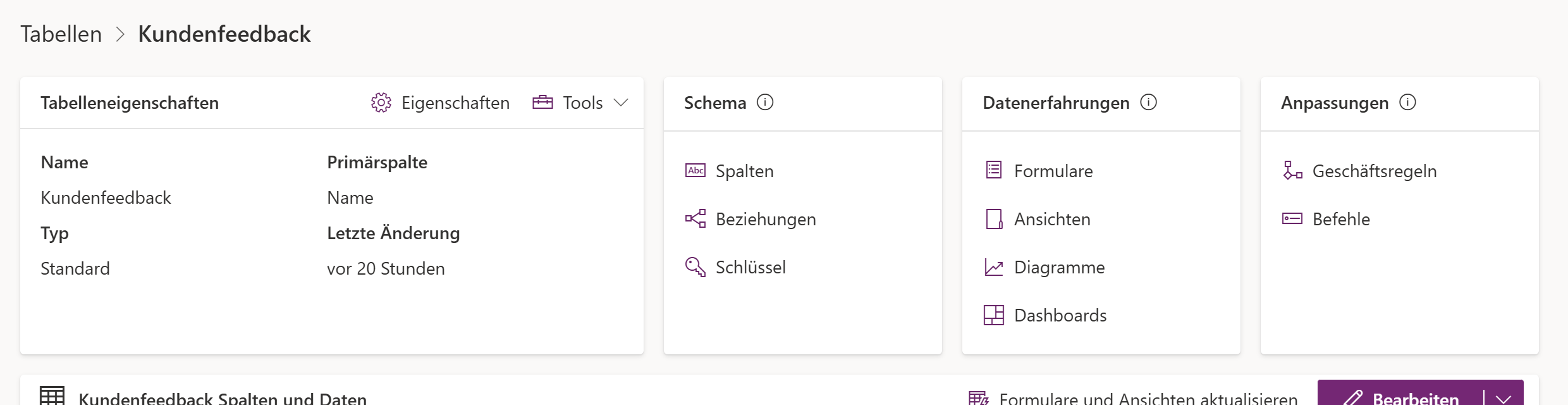
Understand that one view and you understand model-driven: the interface is metadata on the table. Build a second app on the same table and it inherits the same forms, the same rules, the same permissions. With canvas you build both twice.
3. What actually happens technically: delegation
The most important technical term for canvas apps is delegation — and it decides whether your app works at 400 rows and silently returns wrong results at 4,000.
A canvas app does not pull all the data down. It tries to delegate filtering, sorting and search to the data source: the server does the work, the app receives the result. If the source cannot handle a function, the app has to evaluate locally — and for that it only pulls as many rows as the row limit allows.
You find that limit in Canvas Studio under Settings → General:
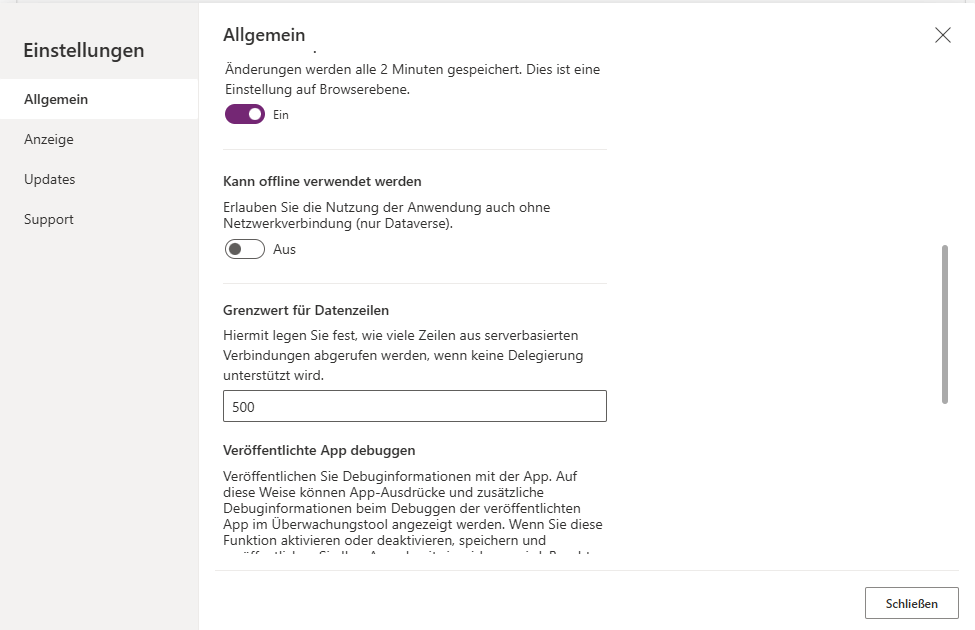
Verbatim (translated from the German UI): “Sets how many rows are retrieved from server-based connections when delegation isn’t supported.” The default is 500.
And there’s the trap: if your table has 4,000 rows and you filter in a non-delegable way, the app works on the first 500 — with no error message. The result isn’t empty, it’s wrong. That is what makes this mistake expensive: it looks like a data problem, not an architecture problem.
Canvas Studio warns you as you write the formula, with a blue hint on non-delegable expressions. Dismissing that warning is the single most common cause of “the app doesn’t show all the records”.
What this means for your choice of data source: how far delegation carries depends on the source. Dataverse and SQL delegate a lot, SharePoint noticeably less, static sources like Excel effectively nothing. So the build form alone won’t save you — the source decides too.
With model-driven apps the question doesn’t arise: views run server-side against Dataverse. In exchange you have no choice of source there — it is Dataverse.
4. The obvious wrong decision: choosing on looks
“Canvas looks better” is the sentence that starts most bad decisions. It’s even true — looks are just rarely the expensive criterion.
Three variants of the same mistake:
- Canvas chosen because the form should look nice — and two years later permission logic, required fields and validation are scattered across formulas on 30 screens instead of sitting once on the data model.
- SharePoint list chosen as the backend because it “costs nothing” — and then delegation arrives. Also worth knowing: in the data panel, the Dataverse connector states explicitly that using it requires a Power Apps Premium plan, a per-app plan, or a pay-as-you-go plan. That licensing question belongs at the start of the decision, not at the end.
- Model-driven chosen because “that’s the professional one” — for a tool that is essentially one photo, two fields and a barcode scan. That is what canvas was built for.
5. The decision path that holds
Four questions, in this order. The first one you can answer clearly decides.
Question 1 — who uses the app? External people without a Microsoft 365 account? Then it isn’t a Power App at all; that’s a case for Power Pages or a real web application.
Question 2 — is the value in the process or in the experience? Process (status, ownership, history, rules, reporting) → model-driven. Experience (one screen, one task, camera, location, offline) → canvas.
Question 3 — will the data model be used by more than one thing? If flows, reports, an agent or a second app also need this data: Dataverse, and with it usually model-driven. The reason is reuse of permissions and rules, not looks.
Question 4 — how many rows in two years? Under 500, delegation is irrelevant. Above that it becomes the main question, and the answer is: a delegable source (Dataverse, SQL) and delegable formulas.
The mixed case, which is often the right one
The build forms don’t exclude each other. A common, durable pattern: Dataverse as the data model, model-driven for back-office case work, a lean canvas app for the mobile edge case — both on the same tables, the same rules, the same permissions.
That is exactly when Dataverse pays off: the effort for the data model happens once and carries both apps. How far that goes on mobile — offline included — is in Canvas apps offline with Dataverse; the “can be used offline” toggle in the screenshot above already says it: Dataverse only.
6. Decision checklist
- Audience clarified — internal accounts, or does this need Power Pages?
- Build form chosen deliberately (process → model-driven, task/mobile → canvas), not on looks
- Data source chosen deliberately; licence needs for Dataverse/premium connectors settled up front
- Expected data volume in 2 years estimated; above 500 rows: delegability checked
- “Data row limit” set deliberately (default 500) — and understood as a stopgap, not a solution
- No delegation warning ignored in the formulas
- Offline need clarified (Dataverse only, and only in the native mobile player)
- Dev/test/prod environments in place before the first app is built
- Solution and publisher prefix from the start, not retrofitted
- Connection references instead of personal connections
- Clear who owns the app when that person leaves the company
7. Limits — where not to push past
- No conversion between the build forms. Decided wrong means built again.
- Delegation fails quietly. No error, just wrong results. That is the platform’s most uncomfortable property.
- Model-driven means Dataverse. With it come licence cost and capacity consumption — both belong before the decision, not after.
- Pixel-perfect brand experiences aren’t a design goal in model-driven and are handwork in canvas. For a product with thousands of external users, both are the wrong choice.
- Low-code doesn’t mean maintenance-free. Without environments, solutions and ALM you end up with 300 apps in a year and nobody knows which are in production. The way out is in Git-first with Dataverse environments in a team.
Rule of thumb: Power Apps solves the specific problem of one team extremely well. It is not a replacement for a product with thousands of external users.
As of August 2026. Screenshots and values (row limit 500, offline toggle, licensing notice on the Dataverse connector) come from our own run in make.powerapps.com on 29 August 2026; the portal was in German. The delegation warning in the formula editor is described but not pictured — it could not be captured cleanly in that run.
See also
- Canvas apps offline with Dataverse — what canvas really does on mobile, and why offline hangs on Dataverse.
- The old grid is deprecated — what the list view in model-driven apps looks like today.
- Git-first with Dataverse environments in a team — environments, solutions and approvals before the sprawl starts.