
 Platform Engineering·27 August 2026·9 min read
 Entra Agent ID: Every Agent Now Has an Identity — but Not a Permission
Since May 2026, the Entra admin center shows an identity for every new Copilot Studio agent — automatically, without anyone flipping a switch, and with no opt-out. To admins it looks like a power-up at first: “Finally each agent has its own account, so I’ll authorize per agent who gets to reach Jira, SharePoint, or ServiceNow — like a service account.”
That’s the expectation. And it’s only half true. Take it at face value and you build yourself a false security model. Let’s clean it up.
1. The problem: “own identity” gets confused with “own permission”
The Microsoft Entra Agent ID has been GA since May 2026. Concretely: create a new agent in Copilot Studio and an identity object appears in the directory for exactly that agent. Wire a connector into the agent — say the certified Jira connector — and publish it, and its permissions show up as API permissions on the agent identity.
The obvious but wrong reflex: “So I’ll revoke the Jira permission from the agent in Entra and it can’t reach Jira anymore.” Or: “I’ll grant agent A the SharePoint rights and agent B not — fine-grained control, right in Entra.” That is exactly what does not work, and it’s the core of this article.
2. What you see first
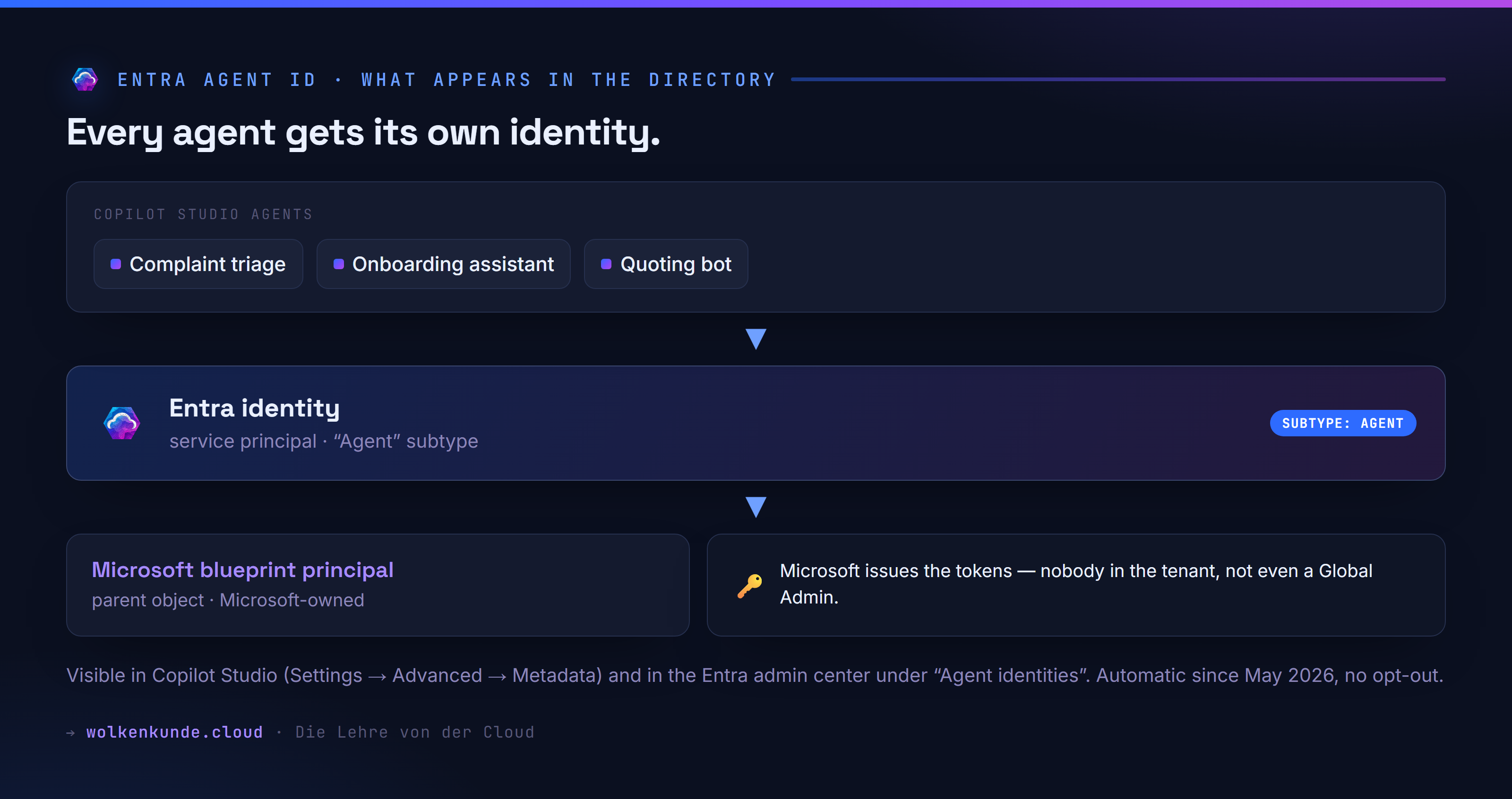
Two places surface the new identity:
- Copilot Studio → Settings → Advanced → Metadata: the GUID appears as “Entra Agent ID”.
- Entra admin center → a dedicated Agent identities view (“All Agents”). Each agent sits here as its own entry.
After publish you see the connector permissions on that identity as scopes — depending on the configuration, e.g.:
Operations.Execute.All— the whole connector at tool level,- individual operation scopes — only the actions actually used,
Azure API Connections Runtime.All— as a fallback.
It looks like a classic app registration with API permissions. And that very sight tempts you into the wrong conclusion.
3. What actually happens under the hood
The identity is a service principal with an “Agent” subtype. Not a wholly new object type — the docs say literally “Microsoft Entra service principals with an ‘Agent’ subtype”. Each of these identities is created as a child of a Microsoft-owned “blueprint principal”. Token issuance runs over federated identity credentials that Microsoft controls — nobody in the tenant, not even a Global Admin, can issue tokens for the agent identity themselves. So you don’t own the identity the way you own a service account.
And now the decisive sentence, almost verbatim from the governance docs:
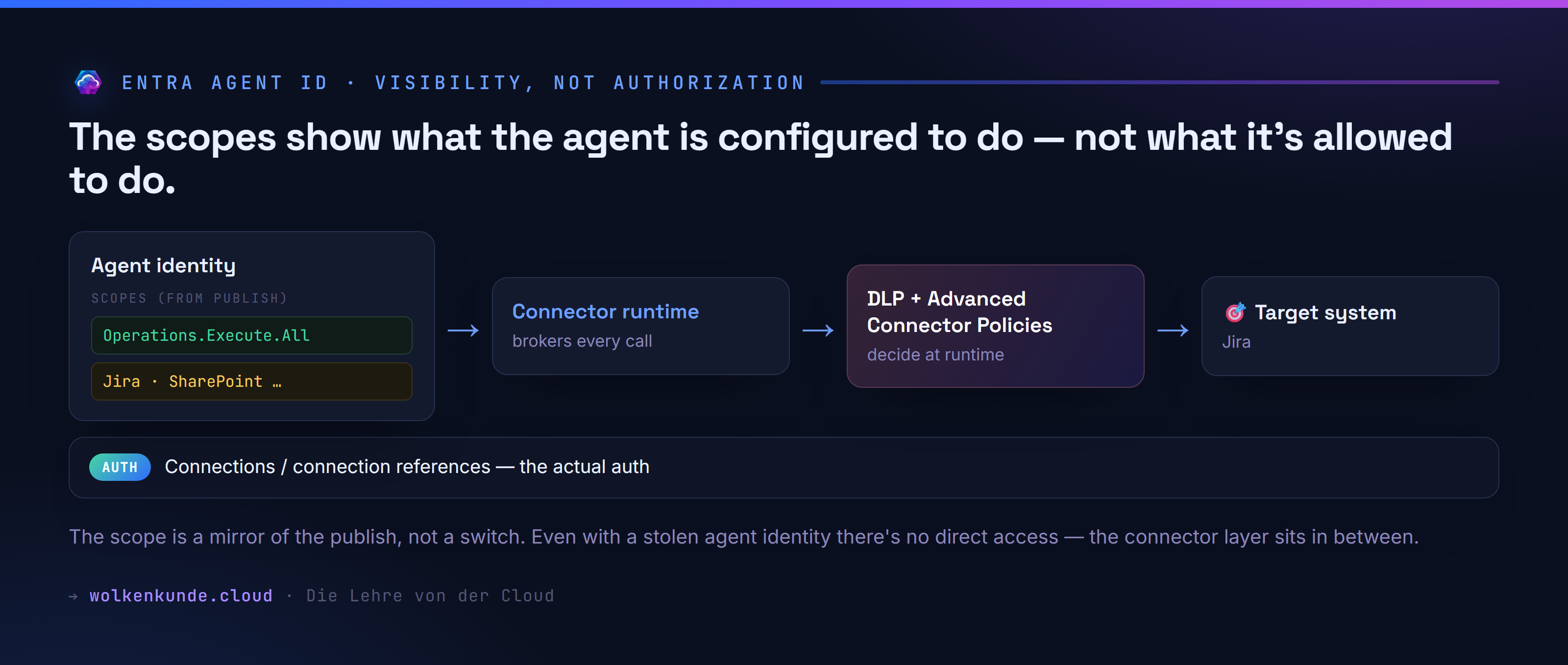
The scopes describe what an agent is configured to do — not what it’s allowed to do. What it’s allowed to do at runtime is decided by Advanced Connector Policies (ACP) and DLP at the moment of execution.
So the scopes on the agent identity are a mirror of the publish configuration, not a permission switch. The actual authentication against Jira, SharePoint & co. still runs through the Power Platform connector runtime — with the familiar connections / connection references (maker or user OAuth). Every single call is brokered by the connector platform and re-checked against ACP + DLP. Even someone who stole the agent identity could not directly call Graph, Outlook, or Jira — the connector layer sits in between.
If that rings a bell: it’s the same school of thought as in grounding Copilot agents properly — the source and the guardrails decide, not the pretty façade. And unlike a real managed identity, where you assign the target resource a role via RBAC, the agent ID is not a place where you assign access.
4. The obvious but wrong fix
Wrong: “I control agent access by editing the agent identity’s API permissions in Entra — add, revoke, distribute per agent.”
Why it doesn’t hold:
- The permissions come into being at publish from the agent’s connector configuration. They are a result, not a control.
- They are honored only by the connector runtime and cannot bypass governance — DLP and ACP always win.
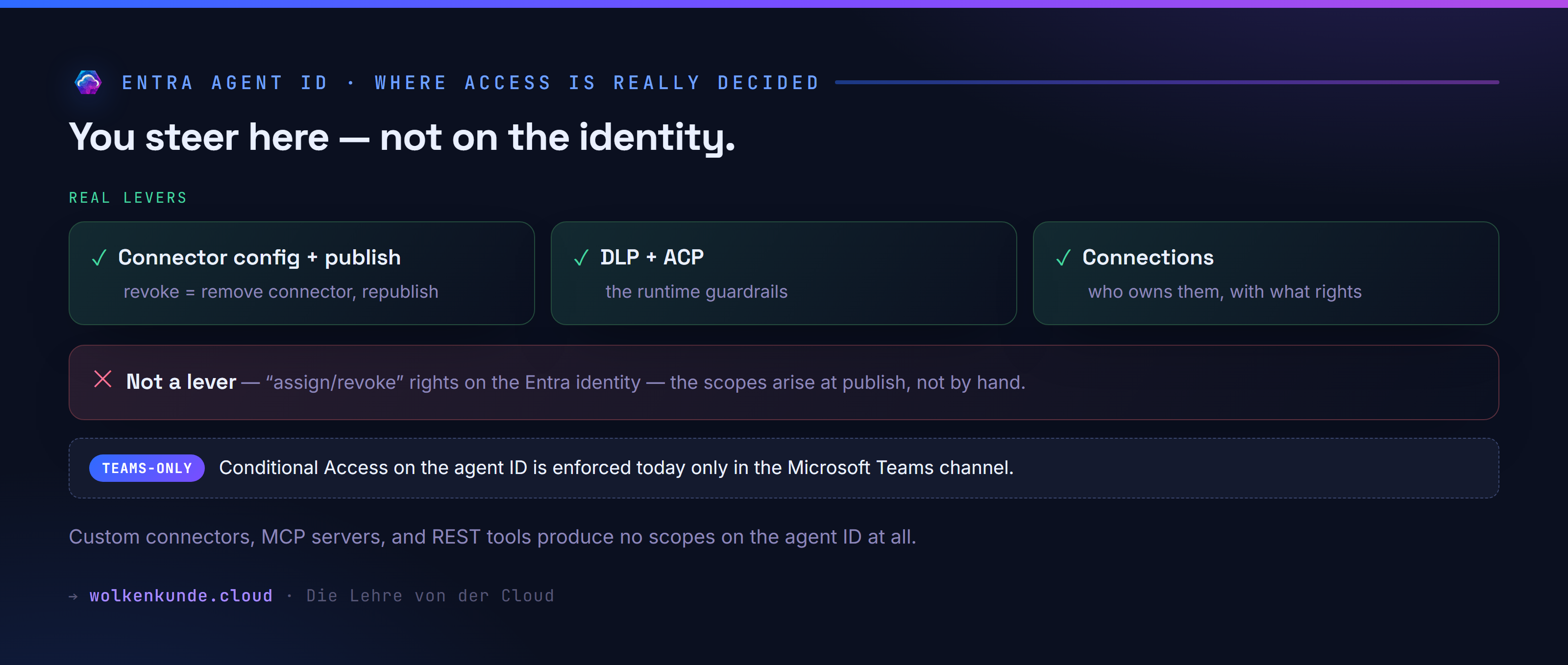
- Custom connectors, MCP servers, and REST API tools produce no such scopes on the agent ID. Wire Jira in as a custom connector instead of the certified connector and you don’t see this visibility at all — your “control point” would simply be empty.
- And the classic: Conditional Access on the agent identity is enforced at runtime today only when the agent runs in the Microsoft Teams channel. In other channels you see the scopes, but CA evaluation does not happen. A CA policy you rely on outside Teams is deceptive security.
5. The robust fix: steer at the right places
An agent’s access is genuinely determined at three layers — none of them is “assign rights on the Entra identity”:
- Connector configuration + publish. What the agent may use, you set by configuring the connector in the agent and publishing. Revoke access = remove the connector from the agent and republish. The scope then disappears.
- DLP policies and Advanced Connector Policies (ACP). These are the real runtime guardrails. Want “Jira read-only” or “this connector not at all in this environment”? You set that here — not on the agent ID.
- Connections / connection references. The actual auth to the target system. Who owns the connection and what rights it carries at the target system remains the deciding factor.
What the agent ID gives you on top — and this is the real win:
- Visibility without PPAC. Entra/security admins see an agent’s connector permissions directly in the Entra admin center, without opening the Power Platform admin center.
- Audit & sign-in logs. Agent authentications show up in Entra as “AI agents” — traceable like other sign-ins.
- Conditional Access — in the Teams channel. Because the scopes are real API permissions, you can target them with CA (network location, device compliance, risk before token issuance). Just, today, with effect only in Teams.
- Lifecycle. Delete the agent in Copilot Studio and its identity is deleted with it — no orphaned principals. The creator is recorded as a “sponsor” (limited rights, not full owner).
Hands-on: list agent identities via Microsoft Graph
To inventory all agent identities in your tenant, query the service principals for the agent subtype. Via the Graph CLI:
# Sign in with sufficient directory-read rights
az login --allow-no-subscriptions

# List service principals with the Agent subtype (Graph v1.0)
az rest --method get \
  --url "https://graph.microsoft.com/v1.0/servicePrincipals?\$select=id,displayName,servicePrincipalType,tags&\$top=999" \
  --query "value[?contains(to_string(tags),'Agent')].{name:displayName,id:id,type:servicePrincipalType}" \
  -o table
Example output:
Name                                Id                                    Type
----------------------------------  ------------------------------------  ---------------
Complaint triage (Agent)            5f2a...c19d                           ServicePrincipal
Onboarding assistant (Agent)        7b81...4e02                           ServicePrincipal
You read the connector permissions granted at publish via the same identity’s OAuth2 grants / app role assignments:
az rest --method get \
  --url "https://graph.microsoft.com/v1.0/servicePrincipals/5f2a...c19d/appRoleAssignments" \
  -o table
Important framing: this output tells you what was configured — it’s audit and visibility material. It is not the place where you flip rights “real quick” in operations. For that you go to DLP/ACP and to the connector configuration in the agent.
6. Decision and diagnosis checklist
Before you rely on the agent ID as a governance tool:
- Check the channel. Does the agent run in Teams? Only there is CA on the agent identity enforced at runtime. Otherwise: visibility yes, enforcement no.
- Check the connector type. Certified/first-party connector → scopes visible on the agent ID. Custom connector / MCP / REST → no scopes, no CA coupling.
- Watch the directory quota. Every agent ID is a directory object and counts against the tenant quota (default 50,000, with a verified domain 300,000; only 95% usable). If the quota is exhausted, creating new agents fails. The usual per-blueprint cap of 250 does not apply here — agent sprawl is genuinely possible.
- Check licensing. The agent ID as a foundation is included. But CA for agents and ID Protection for agents (new policy templates like “Block high-risk agent identities”) require Microsoft Agent 365 or the corresponding service plans.
- Existing agents. Agents from before May 2026 keep running on app registrations and get migrated; the GUID is preserved, no downtime.
- Agent Builder ≠ Copilot Studio. M365 Agent Builder agents currently use neither app registration nor agent ID — these rules apply to Copilot Studio agents.
7. The uncomfortable parts
- No opt-out. From May 2026 every new Copilot Studio agent is forced to have an identity. Build many agents and you produce many directory objects — and you must plan that against the quota.
- Scopes are not RBAC. The widespread notion “agent X may use Jira, agent Y not — I steer that purely by Entra rights assignment” is wrong. Steering happens via connector configuration + DLP/ACP.
- CA only in Teams. The strongest governance promise (Conditional Access on the agent identity) has exactly one channel where it bites today. The docs say “currently” — it will likely expand, but today you can only rely on Teams.
- No bring-your-own-identity. These identities are not a freely usable service account; Microsoft issues their tokens, not you.
Bottom line: The Entra Agent ID is real progress — for visibility, audit, and (in the Teams channel) Conditional Access. It is not a new, fine-grained permission system that replaces existing connector governance. Mistake it for that and you rely on a switch that doesn’t switch anything. The truth about an agent’s access still lives in its connector configuration, in the connections, and in DLP/ACP — the identity just finally makes it visible.
See also
- Grounding Copilot agents properly — why source and guardrails decide an agent’s quality.
- Managed Identity instead of secrets — how a real Entra identity with an RBAC assignment works (and how the agent ID differs).
- Azure App Registration Monitor — keeping identities and their expiry/lifecycle traps in view.
Sources: Microsoft Learn — “Govern agents: identities overview”, “Use Microsoft Entra agent identities” (Copilot Studio), “What are agent identities” and “What’s new in Agent ID” (Microsoft Entra). As of August 2026. Preview/GA status and the Teams-only note may change with future release waves.