
 Platform Engineering·28 July 2026·15 min read
 "Who gets to push this to prod?" — Git-first with Dataverse environments in a team
“Who actually gets to push this to prod?” The moment more than one maker works on the same solution, that stops being a detail and becomes the core question. And “we’re going git-first now” doesn’t answer it — on the contrary: without an order, a branch strategy and roles, git-first quickly turns into a repo that three environments commit to uncoordinated, and where nobody knows anymore which state is allowed to go to prod.
The good news: since Git integration in Power Platform is generally available (GA since April 2025) and Pipelines in Power Platform handle the release, there’s a documented, straightforward path. You just have to walk it in the right order. One step at a time — for a team, not the lone wolf.
The problem: in a team “git-first” isn’t “everyone commits”
Solo it’s enough: connect the environment to a repo, commit, done. In a team exactly those questions come up that the individual never asks:
- Who works where? Two makers in the same dev environment overwrite each other — the solution is the state, there’s no “mine” and “yours”.
- Which environment hangs on which branch? If dev, test and prod are all somehow connected to Git, it’s unclear where the authoritative state lives.
- Who approves? If every maker can deploy to prod from their own environment, the release is a click — no review, no four-eyes principle.
Git-first in a team therefore means: a clear separation of who develops, who reviews and who approves — technically enforced, not by shouting across the room. For that you first have to keep apart two building blocks that are easily confused.
Two building blocks you must not confuse
The most common misconception: “Git integration deploys to prod.” It doesn’t. These are two separate features with two separate jobs:
- Git integration — binds a dev environment to an Azure DevOps repo and stores your solution there as readable source. Responsible for development and versioning. Explicitly for dev environments only, not for test or prod. (What it does exactly is in the post Git integration in Power Platform.)
- Pipelines in Power Platform — take a built managed solution artifact and move it in a controlled way through the stages up to prod. Responsible for release and deployment.
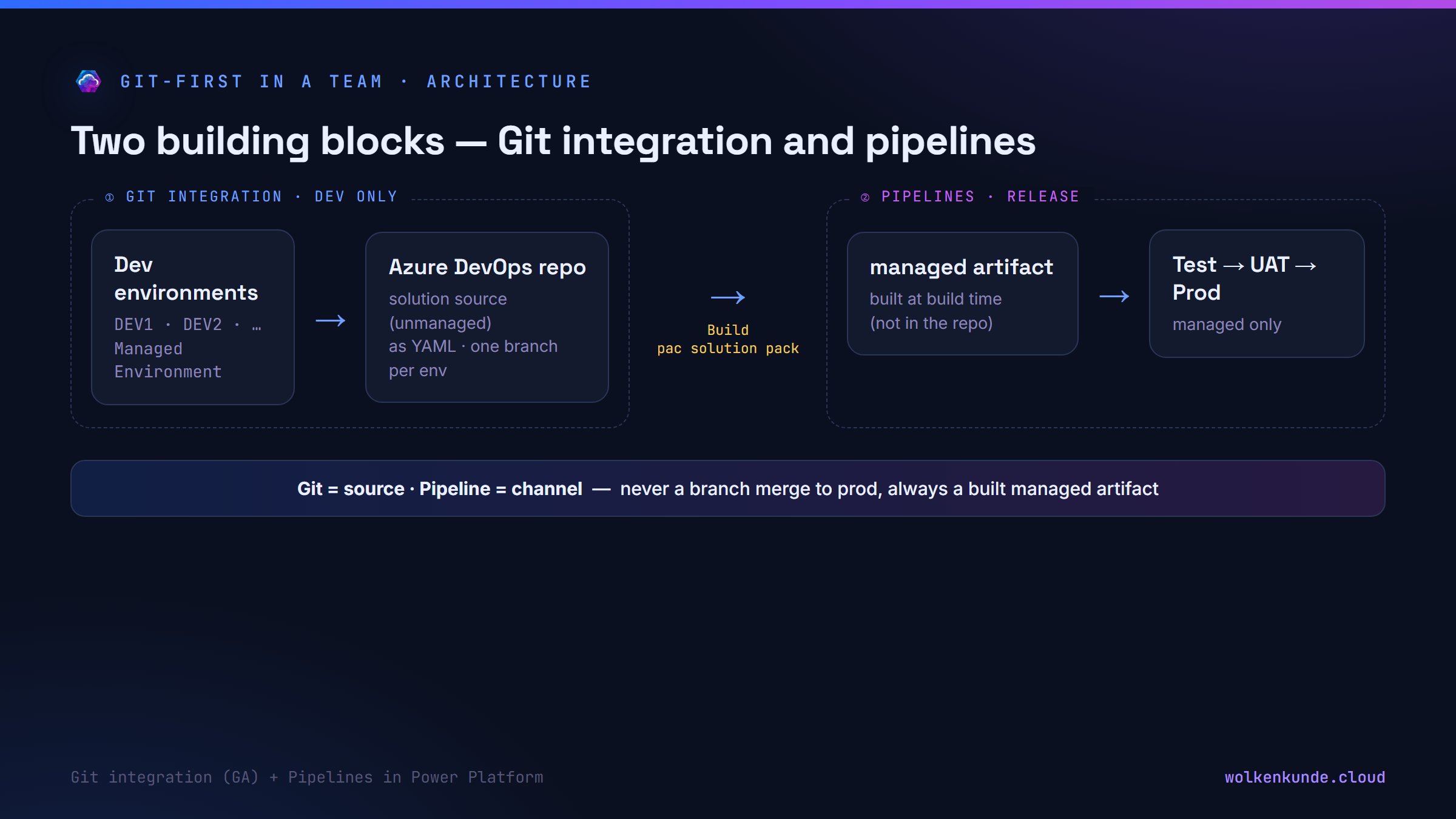
Rule of thumb: Git is the source, the pipeline is the channel. To prod there’s never a branch merge, always a built managed artifact. Internalize that and you won’t get anything fundamentally wrong during setup.
The order of setup
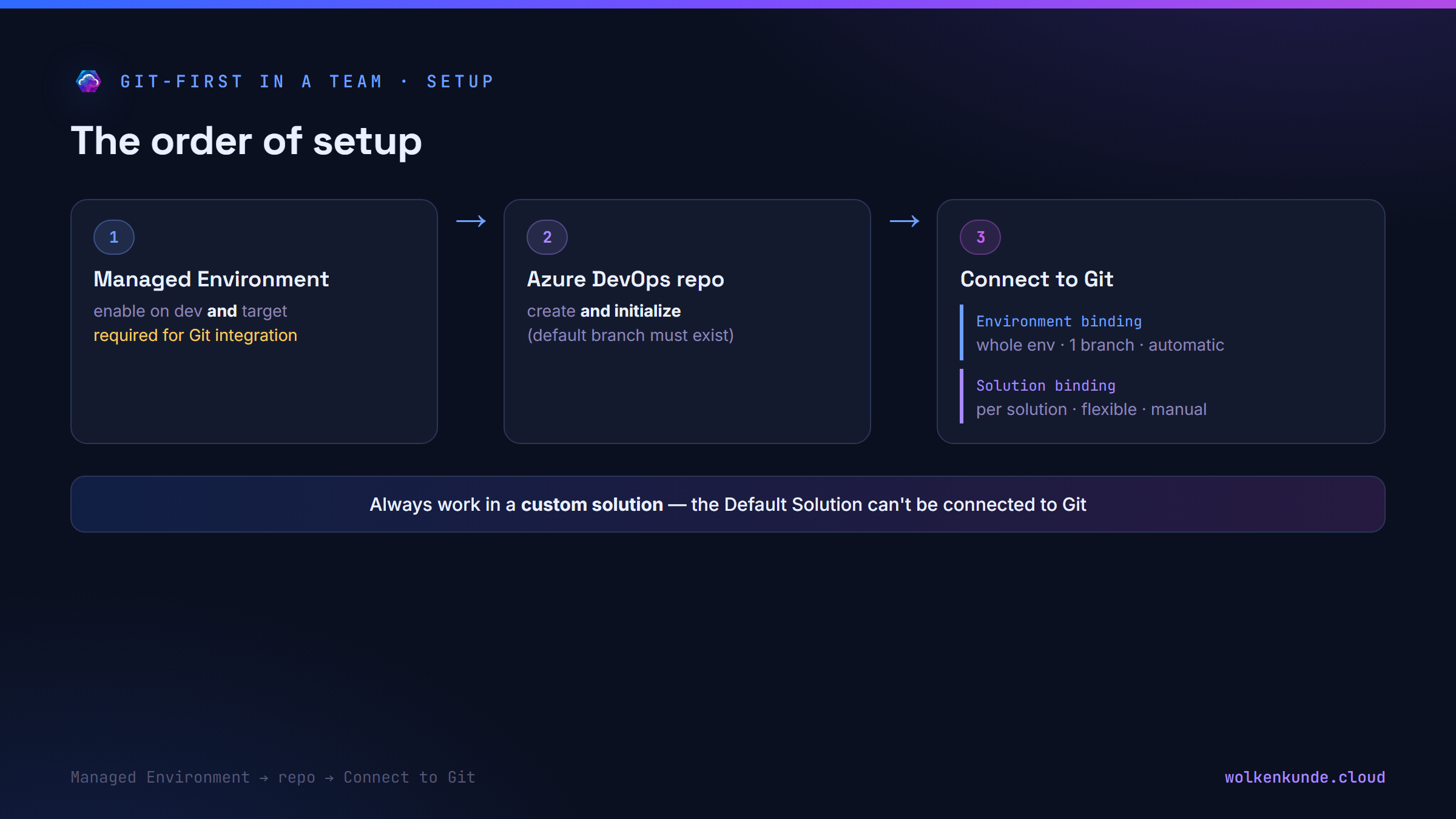
The order isn’t arbitrary — every step depends on the previous one. This is the documented path:
1. Enable Managed Environments
Git integration is a feature of Managed Environments. Both the dev environments and the target environments must be enabled as Managed Environments in the Power Platform Admin Center. That’s mandatory, not a nice-to-have — without it you can’t even get to connecting.
A subtle but important distinction: plain pipelines don’t require Managed Environments for dev environments. But as soon as you combine Git integration and pipelines, the stricter Git rule applies. (From February 2026 Microsoft auto-enables Managed Environments for pipeline target environments anyway.)
2. Create and initialize the Azure DevOps repo
The provider is exclusively Azure DevOps Git — GitHub is currently not supported for the native connection. Create a Git repo in the Azure DevOps project and initialize it (Repos → Initialize). A non-initialized repo has no default branch and answers the connection attempt with an error (“Failed to retrieve the default branch”).
Permissions: in Dataverse you need System Administrator to establish the binding. In Azure DevOps Basic Access plus membership in the repo’s Contributors group is enough.
3. Connect the solution to Git — and make the fundamental decision
In the maker portal under Solutions, Connect to Git appears. Here you make a decision you should make early and deliberately, because it shapes the whole team workflow:
- Environment binding (recommended by Microsoft as the starting point): the entire environment hangs on one repo, one folder, one branch. Every new unmanaged solution is synced automatically — no extra step per solution.
- Solution binding: individual solutions of an environment can be bound to different branches/folders — more flexibility, but every new solution has to be onboarded manually. Constraint: the same object may only live in one place in source control.
The Default Solution (and the Common Data Service Default Solution) can’t be connected to Git by design — always work in your own, custom solution.
4. One dev environment per developer — each on its own feature branch
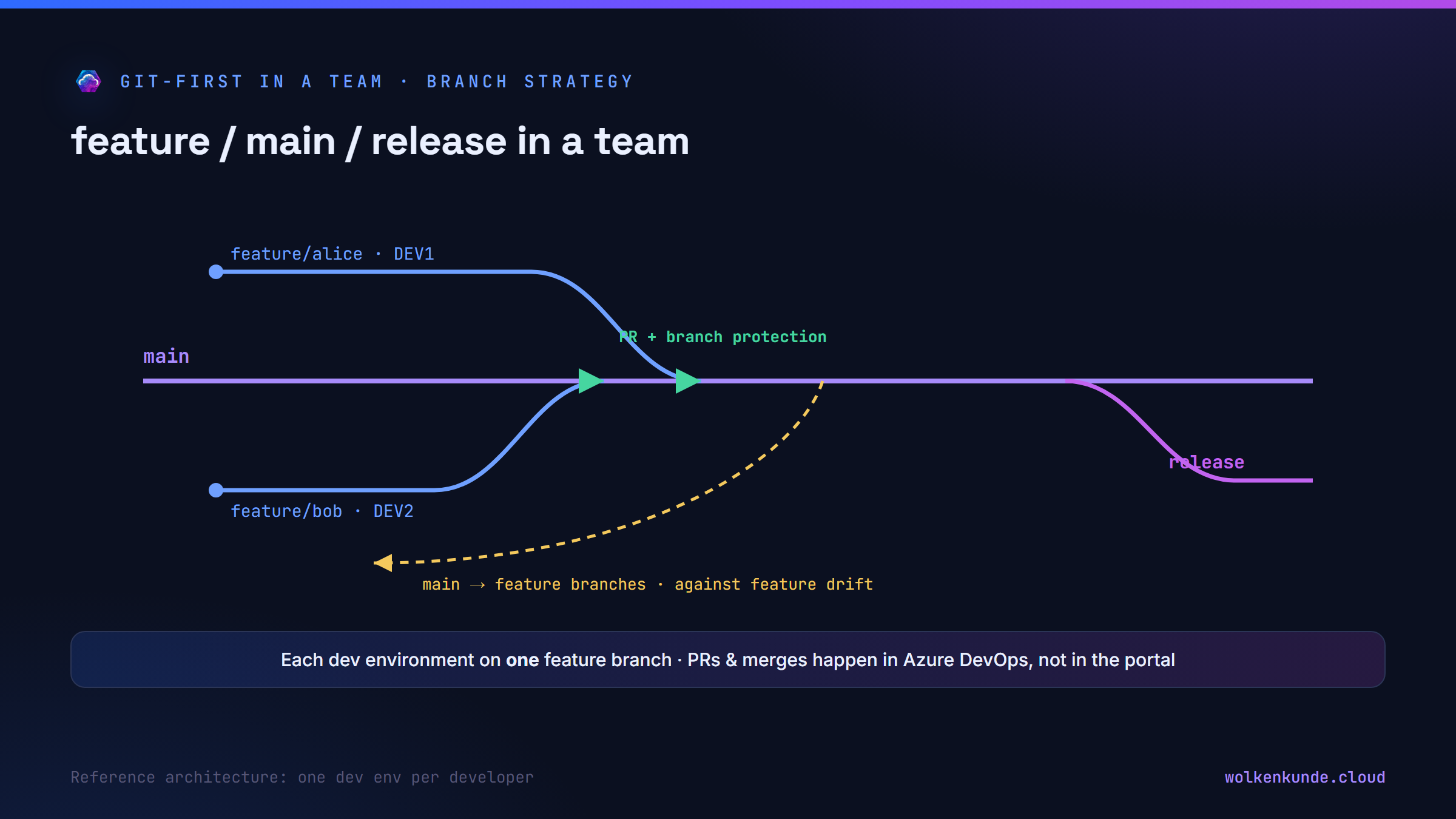
Now the team part. Microsoft’s reference architecture provides for several parallel dev environments (DEV1, DEV2, …) — ideally one per developer or per work stream. Each of these environments binds to its own branch. That way everyone works in isolation, without changing the solution out from under someone else.
The obvious but wrong reflexes
Before we get to the branch strategy, three reflexes that get expensive in a team:
Reflex 1: “We’ll hang dev, test and prod on Git and merge the config to prod by branch.” Wrong. Git belongs only on dev environments. To prod you don’t merge; you deploy a built managed artifact. Test and prod never see the repo.
Reflex 2: “Every maker deploys to prod from their own environment.” That’s exactly what the separation prevents. The release runs through a pipeline with approval — the maker starts, an approver decides.
Reflex 3: “I’ll just commit my one change selectively.” Not possible: a commit takes all pending changes of the solution together. Whoever isn’t careful with a quick fix pushes half-finished neighboring work up too. Antidote: cut solutions small and keep PRs small.
The robust solution: branch strategy and release
Branch strategy: feature / main / release
Microsoft’s reference architecture names a classic, codified strategy with three branch types:
- feature — one branch per developer/work stream, to which their dev environment is bound. This is where the work happens.
- main — the authoritative integration branch. What’s here is “ready for the path to prod”. Nobody commits directly into it.
- release — the state that’s actually out there; the basis for hotfixes.
The flow: feature branch → pull request → main. To keep main clean, branch protection secures it (no direct push, PR required, reviewer required). And against “feature drift” — the drifting apart of the many dev environments — you pull the state merged into main back into the other developers’ feature branches.
Technical note: the native Git integration binds exactly one branch per binding. Pull requests, merges and branch switches happen in Azure DevOps, not in the maker portal. To pull a different branch state into an environment, you disconnect the binding and reconnect to the target branch — that’s the documented way.
Who makes the pull requests?
The developers make the pull requests — from their feature branch to main, in Azure DevOps. The PR is the place for the review: because the native Git integration stores the solution components in a Git-optimized structure — tables, columns, forms and views in particular as individual, readable YAML files — the diff shows in a focused way “this column was added, this view changed”, instead of hunting for the change in a large Customizations.xml. The PR approval is thus a substantive code review, not a click-through. Azure DevOps provides the governance: branch protection, reviewer rules, audit trail.
Important: this PR merge brings nothing to prod yet. It only consolidates the source state in main. The path to prod is a separate, controlled step.
The king of the repo: an owner for main
So that “everyone opens PRs” doesn’t end in chaos, main needs a clear owner — a person or a small release-owner group (a single king is a single point of failure). You anchor this role technically in Azure DevOps via the branch protection of main:
- Required reviewer: the repo owner is a required reviewer on every pull request to
main— no merge without their approval. - Substantive review: they read the YAML diff — which components change, is the solution cut cleanly, are connection references and environment variables correct.
- Version & document: the merge to
maincreates a release candidate. The owner assigns the solution version and records what’s in it (release notes) — so every later-built artifact is traceable. - Approve for the test run: only the owner triggers build and deployment to test (or approves it). That cleanly separates: developers propose (PR), the owner decides what becomes a release candidate and goes to test.
This creates a continuous chain of responsibility: the developer owns their feature branch, the repo owner owns main and the path into test, the prod approver (next section) owns the last door before prod. In a small team the repo owner may also be the prod approver; in the spirit of the four-eyes principle it’s cleaner to separate the two roles.
Who approves PROD?
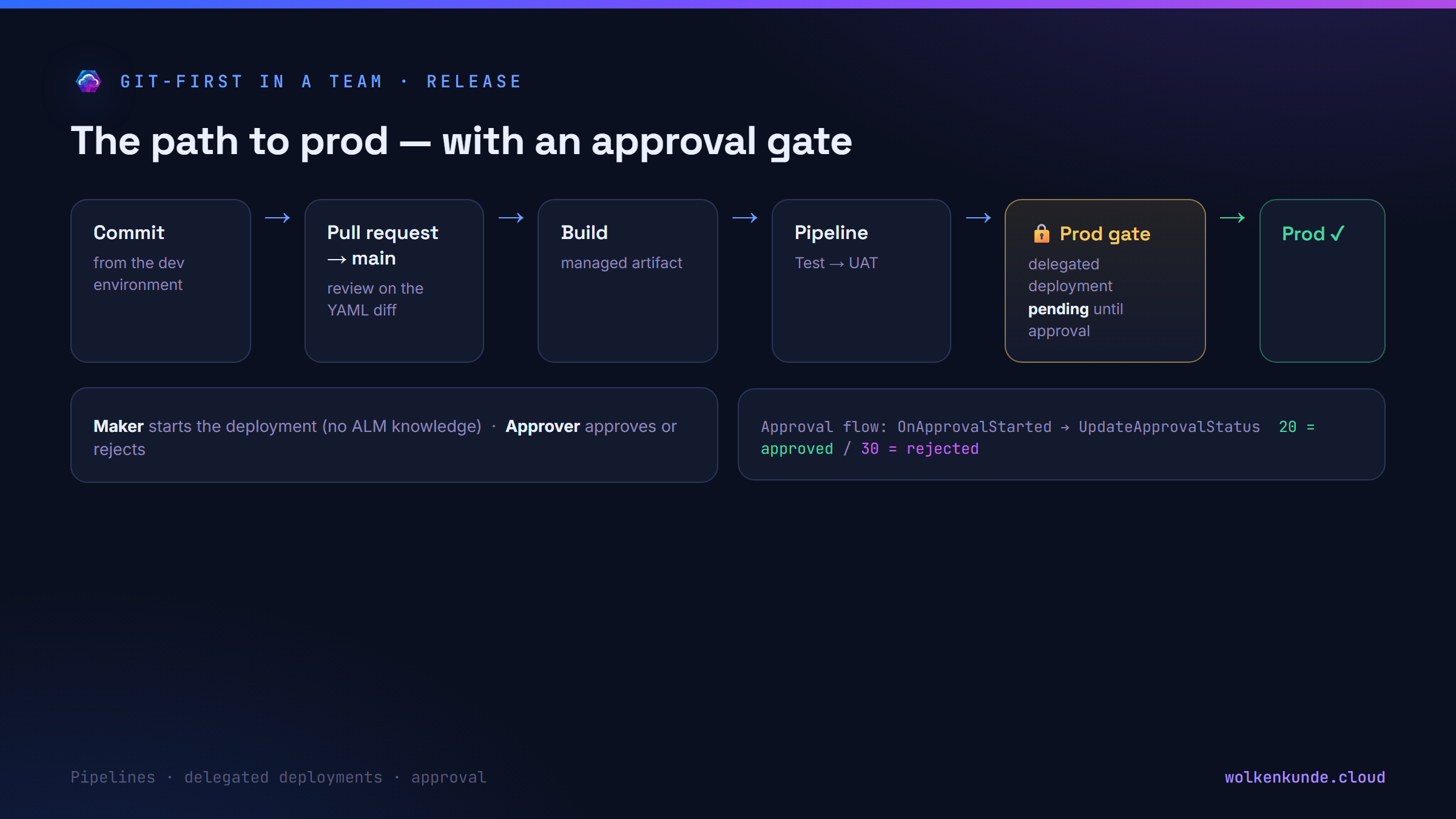
This is where Pipelines in Power Platform come in — and their native approvals. The key mechanism is called delegated deployments:
- A deployment no longer runs as the requesting maker, but as a service principal.
- Every delegated deployment stays pending at first — it waits for approval.
- The approval itself you hang on a Power Automate flow with the trigger
OnApprovalStartedand the Dataverse actionUpdateApprovalStatus(status value 20 = approved, 30 = rejected). That lets you build any approval logic you want — from “one approver is enough” to “release only within the change window”.
This anchors the role separation technically:
- Maker starts the deployment with a few clicks from their dev environment — no ALM knowledge.
- Approver/admin approves or rejects; they decide what goes to prod.
- Managing pipelines requires the security role Deployment Pipeline Administrator; the service principal of the delegated deployment needs this role in the pipeline host and System Administrator in the target environments (otherwise plug-ins, for instance, can’t be deployed).
And because the pipeline exports the solution once at the deploy request and sends that same artifact through all stages, nobody can “customize” past the near-prod state in between — the release can’t be bypassed.
A feature end to end
- The developer works in their dev environment, commits from the environment onto their feature branch.
- In Azure DevOps they open a pull request to
main; a colleague reviews the YAML diff and approves. - From
maina managed artifact is built — either exported from the dev environment or packed from source control:
# Build a managed artifact from the checked-out main state
pac solution pack \
  --zipfile ./out/CustomerService_managed.zip \
  --folder ./ \
--packagetype Managed- The pipeline moves the artifact through Test → UAT → Prod. In the non-dev environments only managed arrives; connections, connection references and environment variables are bound by the pipeline along the way (see the post Connection References from Dev to Prod).
- At the prod gate the delegated deployment waits as pending — until the approver approves. Only then does it go live.
Where does the managed artifact live? Not in the Git repo — that holds only the unmanaged source. The managed artifact is built at deploy time. With Pipelines in Power Platform the pipeline exports the solution once and manages that artifact in the Dataverse pipeline host; the same artifact travels through all stages (no re-export, no tampering). If you build via Azure DevOps pipelines instead, the managed
.zipis an ordinary pipeline artifact of the build run — you don’t need an Azure Artifacts feed (package registry) for it, it’s only optional if you want to retain packages versioned and share them across teams.
Two paths to prod: Pipelines in Power Platform or Azure DevOps
Whichever path you choose — both build the managed artifact from the same Git source state. The question isn’t “Git or DevOps”, but which machine orchestrates the deployment. (Git integration provides the source in both cases; per the docs pipelines can even be combined with Azure DevOps or GitHub.)
| Pipelines in Power Platform | Azure DevOps pipelines | |
|---|---|---|
| Setup | in-product, a few clicks | YAML pipelines + Power Platform Build Tools, service connection |
| Who operates it | maker (no ALM knowledge) | DevOps/ALM role |
| Artifact | in the Dataverse pipeline host, exported once | pipeline artifact of the build run (feed optional) |
| Approvals | native: delegated deployments + approval flow | ADO environments, checks, approvals |
| Build freedom | limited (fixed steps, extendable via Power Automate) | free: tests, Solution Checker, code-first build, custom steps |
| Prerequisite | Managed Environment (target environments) | service principal + build agent |
| Typical limit | one dev environment per solution, no multi-solution per run, no table data | more setup and maintenance |
What you need to know in both cases:
- In non-dev environments only managed arrives; you bind connection references and environment variables via deployment settings — don’t click them by hand in prod.
- No Dataverse table data travels along; both paths deploy solutions plus configuration, not rows.
- The default import is an upgrade without “overwrite customizations” — know the rollback behavior.
What’s specific to each:
- Pipelines in Power Platform: target environments must be Managed Environments (from February 2026 Microsoft enables this automatically for pipeline targets). The native implementation addresses one dev environment per solution — the multi-dev / feature-branch parallelism comes from Git integration, not from the pipeline.
- Azure DevOps pipelines: you work with the Power Platform Build Tools (marketplace extension: export/pack/import/Solution Checker) and a service connection (service principal). You only need an Azure Artifacts feed for versioned retention/reuse, not for the standard flow.
When which path?
- Pipelines in Power Platform — low-code teams, quick start, maker-driven release, straightforward standard deployments.
- Azure DevOps pipelines — pro-code/fusion teams, automated tests and quality gates (Solution Checker), code-first components (PCF, plug-ins), fine-grained CI/CD and package versioning.
- Many teams combine both: Git integration as the source + Pipelines in Power Platform for the standard path, and Azure DevOps pipelines where automated tests or a custom build are needed.
Roles and order checklist
- Managed Environments enabled on dev and target?
- Azure DevOps repo created and initialized (default branch present)?
- Binding type chosen deliberately — environment (automatic, one branch) vs. solution (flexible, manual)?
- Are you working in a custom solution (not the Default Solution)?
- One dev environment per developer, each bound to a feature branch?
-
mainprotected by branch protection (PR required, reviewer)? - Does
mainhave a named repo owner (required reviewer) who documents releases and approves the test run? - Does the path to prod run through a pipeline with approval — not a maker’s direct deploy?
- Deployment path chosen deliberately — Pipelines in Power Platform (simple) or Azure DevOps pipelines (full CI/CD)?
- Are Deployment Pipeline Administrator and the service principal (host + target) correctly permitted?
Limits and the uncomfortable parts
- Azure DevOps only. GitHub isn’t a native provider (yet) — GitHub teams stay on the
pacroute plus GitHub Actions, without the built-in environment binding. - Only dev on Git. Test and prod are never bound to Git; upward goes only the built managed artifact.
- Managed Environment is mandatory for Git integration — on dev and target.
- No selective commits. A solution commits all pending changes together — small solutions and small PRs are the answer.
- One branch per binding. Multi-branch parallelism comes from several bound dev environments plus Azure DevOps branching — not from the portal alone.
- One dev environment per solution in pipelines. The native pipeline currently addresses exactly one dev environment per solution; the team parallelism comes from Git integration + branching.
- No cross-tenant. The Dataverse tenant and the Azure DevOps tenant must coincide; cross-geo needs explicit consent.
In short: git-first in a team works — but not as “everyone commits”, rather as a cleanly separated chain of development (Git integration, one dev env per developer on a feature branch), consolidation (pull request to main with a real review) and release (pipeline with delegated deployment and an approval gate before prod). The order at setup and the roles at release aren’t a formality — they’re the difference between “we work git-first” and “we know at any time who brought what to prod”.
State: July 2026. Git integration has been GA since April 2025; delegated deployments/approvals are natively supported. Microsoft keeps evolving both features — when in doubt, check the relevant Learn pages on Git integration and pipelines.