
 Platform Engineering·25 July 2026·9 min read
 Git Integration in Power Platform: Your solution as readable code in the repo
“Who changed this business rule?” To this day a Dataverse environment gives you no honest answer. The solution is the state — there’s no history, no diff, no “git blame”. Since April 2025 Microsoft closes exactly this gap: Git integration in Power Platform (generally available) binds an environment directly to a Git repo and stores your solution there as readable source — with commit history, diff and rollback.
That sounds like the end of a long DIY phase (export → unpack → commit via pipeline). In part it is. But the marketing line “GitHub integration and deploy from Git” contains words that don’t hold for the shipped state — plus a few deliberate limits worth knowing. One at a time.
The problem: the truth lives in the environment, not in the repo
Classic ALM everyday life without source control on the environment:
- Two makers work in the same dev environment on the same solution. Who changed what and when — nobody knows.
- A form is suddenly different. Undo? Only if you happen to have an old export ZIP lying around.
- The “state” exists exactly once — live in the environment. A review before deployment is a click-through, not a diff.
Whoever wanted it clean built it themselves: pac solution export, then pac solution unpack, commit the result into a repo, automate it with an Azure DevOps pipeline. Works — but it’s infrastructure every team re-assembles from scratch.
What you see first
In an environment enabled for it, a new option appears in the solution area: the environment can be connected to a Git repo. After connecting, you get a source-control status per solution: changed components, a Commit button, and for each commit a link that takes you straight to the diff in Azure DevOps.
The decisive difference from the DIY route: you export nothing anymore. Committing happens from the environment, and the repo holds no ZIP but an unpacked, human-readable folder structure.
What actually happens technically
When connecting, you bind the environment to exactly one branch of an Azure DevOps repo. From then on:
- Changes originate in the environment, not in the repo. You edit solution components as usual in the maker portal. The repo is the store, not the editor — editing the files in the repo directly is not the intended path.
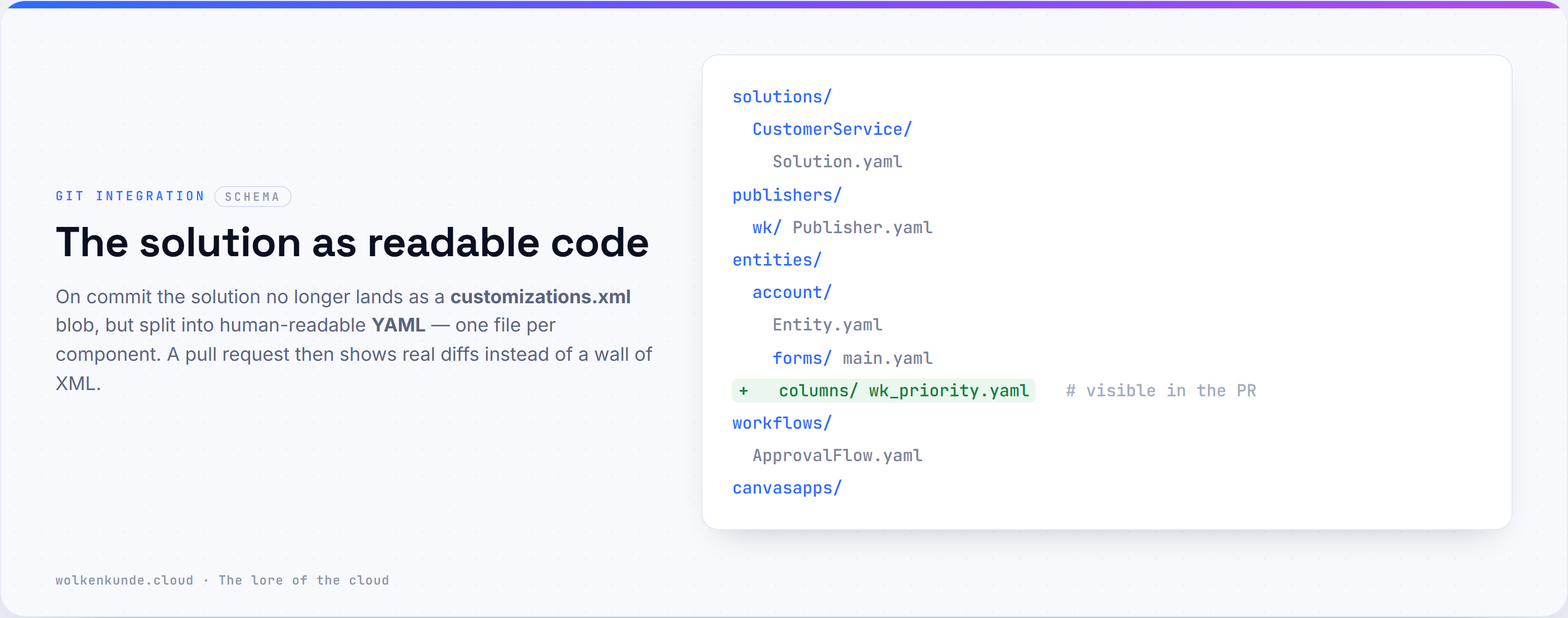
- A commit writes the solution as readable YAML into the branch. Instead of the cryptic
customizations.xmlyou get a split folder structure:
/
├─ solutions/
│  └─ <SolutionUniqueName>/        # solution metadata
├─ publishers/
│  └─ <PublisherUniqueName>/       # publisher info
├─ entities/                       # tables, columns, forms, views …
├─ workflows/                      # flows, business rules, classic workflows
└─ canvasapps/                     # canvas apps
These files are diff-able. A pull request then really shows “these three columns were added, this view changed” instead of a wall of XML.
Two honest caveats about the format: this YAML is produced by the native Git integration (or
pac solution clone/sync, PAC ≥ 2.4.1) — a classicpac solution unpackstill yields XML (Solution.xml,Customizations.xml). And not every component becomes YAML: security roles, global option sets, dashboards, site maps and ribbon customizations stay XML internally, and environment variable values are JSON. So the diff benefit applies above all to tables, columns, forms and views.
3. Unmanaged only. Only your unmanaged source belongs in Git. Whether managed or unmanaged comes out in the end is decided only at build/release — not in the repo. (That’s the same separation as with connection references: logic travels, the target state is set at deployment.)
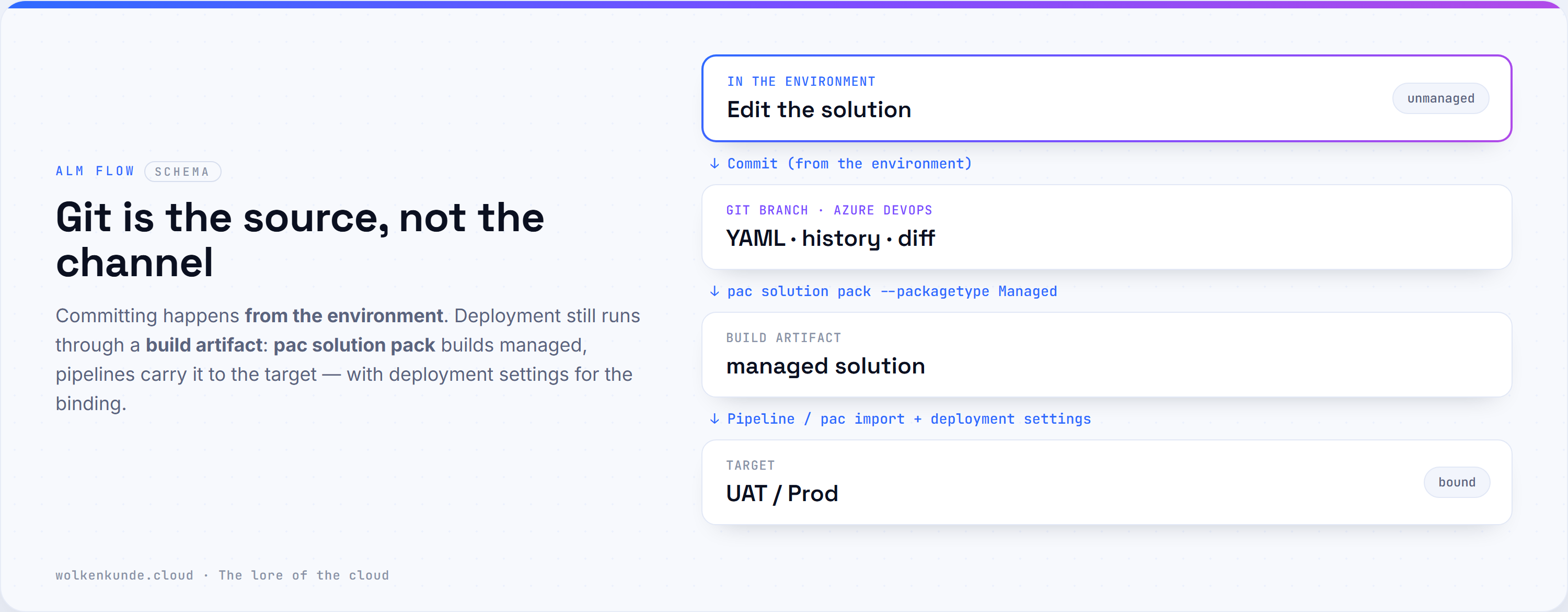
Environment (unmanaged) ──Commit──▶ Git branch (YAML) ──pac pack / pipeline──▶ managed artifact ──▶ UAT/ProdFrom this mechanics it follows directly which two reflexes go wrong here.
The obvious but wrong fix
Reflex 1: “Finally — I’ll hang my prod solution on Git and work like this from now on.” Wrong — but not because of preview (the feature is GA). Git integration is by design for developer environments only; the docs are explicit: don’t bind it to test or production environments. What goes there is a managed artifact built from the source and deployed via pipelines — not a Git branch. Git is the place to develop and review, not the prod channel.
Reflex 2: “Then I’ll just commit the one change selectively.” Not possible. A commit takes all pending changes of the solution together — no cherry-picking individual components like in normal Git. Whoever ignores this pushes half-finished neighboring work up with the quick fix.
And the third one, hidden in the marketing: “GitHub integration.” The release plan sells “GitHub integration and deploy from Git”. The actually shipped state supports only Azure DevOps as a provider. GitHub may be added later via the provider model — today it isn’t there. Whoever mistakes the roadmap headline for the current state plans past reality.
The robust fix: the clean flow
If you use Git integration usefully today, then like this:
1. Meet the prerequisites
- Managed Environments for dev and target — Git integration requires Managed Environments, not a nice-to-have.
- System Administrator in the Dataverse environment.
- An Azure DevOps Git repo, access level at least Basic — created and initialized (otherwise the default branch is missing).
- Access via
make.powerapps.com— Git integration lives in the regular solutions experience.
2. Bind the environment to a feature branch
One branch per environment. For a PR workflow you disconnect the binding and reconnect to another branch — that’s the documented way to serve feature branches.
3. Work in the environment, then commit
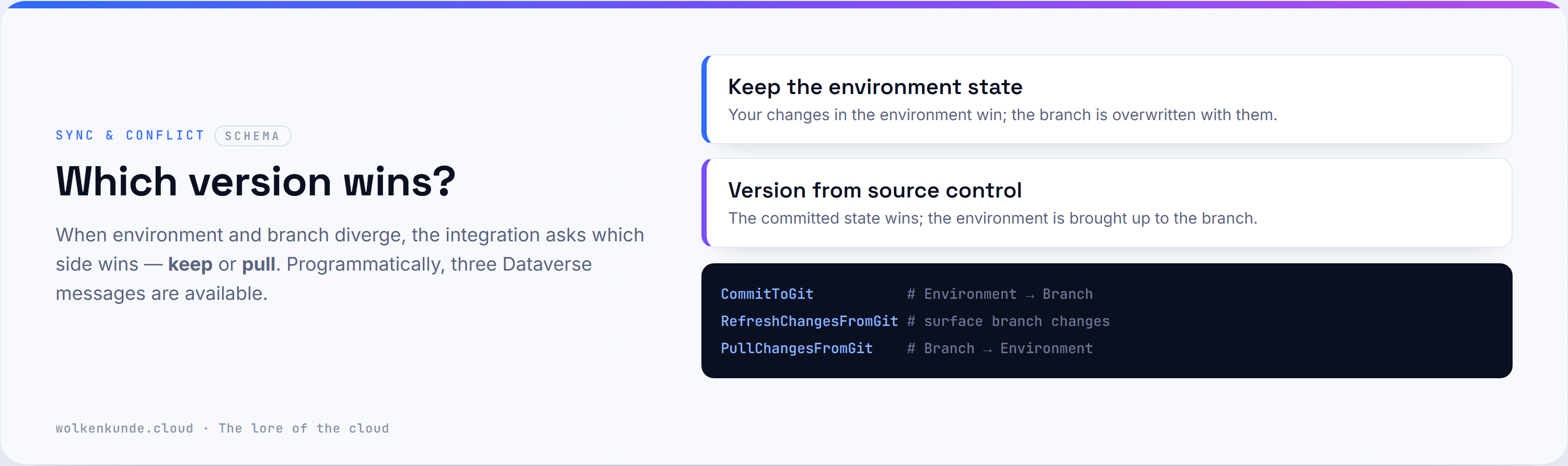
Edit components as usual in the maker. When a sensible state is reached: commit. Programmatically the Dataverse messages are available — useful when you pour this into your own automation:
CommitToGit          # write the local solution state as a commit into the branch
RefreshChangesFromGit# surface the changes from the branch
PullChangesFromGit   # pull the changes from the branch into the environment
When states diverge, the feature asks you which side wins: keep the state from the environment or pull the version from source control. (Large files are split automatically by the integration to stay within Azure DevOps’s 17-MB-per-file limit — you don’t have to worry about it.)
4. Deploy as before — via the build artifact
The repo is the source, not the deployment channel. To roll out, you build an artifact from the branch and import it into the target:
# From the checked-out branch, pack the solution into a managed artifact
pac solution pack \
  --zipfile ./out/CustomerService_managed.zip \
  --folder ./ \
  --packagetype Managed

# Import into the target — with deployment settings for connection references & environment variables
pac solution import \
  --path ./out/CustomerService_managed.zip \
  --settings-file ./deploymentSettings.prod.json \
  --activate-plugins true --publish-changes true
In an Azure DevOps pipeline or with GitHub Actions it’s the same step, just automated: pac solution pack builds the artifact, pac solution import (or the Pipelines in Power Platform) brings it into the target. Binding the connection references runs exactly as usual via the deployment settings — see the dedicated article below.
Diagnostic and decision checklist
When Git integration today, when (still) the classic pac route?
- Binding a test or prod environment? Don’t — Git integration is for dev environments; prod gets a managed artifact via pipelines.
- Are dev and target Managed Environments? If not, the prerequisite is missing — switch first.
- Azure DevOps available? GitHub as a provider isn’t there (yet). Whoever works GitHub-native stays on
pac pack+ GitHub Actions for now, without the built-in environment binding. - Do you need selective commits? Then the “all together” commit model doesn’t fit — cutting smaller solutions helps.
- Do you want diffs in the PR? That’s exactly what the readable YAML is for — here the integration plays its strength.
Limits and the uncomfortable parts
- Azure DevOps only. Despite the “GitHub integration” headline in the release plan, GitHub as a provider isn’t in the shipped state. Provider model = “maybe later”.
- Developer environments only (by design). Explicitly not to be bound to test or production environments — those get the built managed artifact via pipelines.
- Unmanaged only. The source belongs in the repo; managed comes out at build time.
- No selective commits. All changes travel together.
- One branch per binding. Switching branches = disconnect and reconnect the binding.
- No cross-tenant. Environment and repo in the same tenant context.
- Changes only from the environment. Editing the repo files directly is not the intended path.
- Legacy object types. Individual older component types aren’t supported (yet); developer-tools deployment for the new format isn’t available everywhere yet.
In short: Git integration is the overdue, built-in replacement for the export/unpack/commit DIY route — with real value for history and diff, and generally available since April 2025. It stays bound to Azure DevOps and Managed Environments, and is deliberately limited to developer environments: the path to prod still runs through a built managed artifact and pipelines, not a branch merge. For clean feature work, reviews on the readable diff and team collaboration it’s the standard way now — only “deploy from Git” straight from the repo and GitHub support are still missing.
State: July 2026. Git integration has been generally available since April 2025 (public preview since November 2024); the provider remains Azure DevOps. Microsoft keeps evolving the feature — when in doubt, check the relevant Learn page on Git integration.