
 Business Apps·05 July 2026·12 min read
 LookupImportPlus: No more guessing on Dataverse lookup imports
LookupImportPlus: No more guessing on Dataverse lookup imports
Every Power Platform admin has a “Contoso GmbH” story. You export a spreadsheet of contacts, someone fills in a company name in a text column, you import it back — and Dataverse quietly links half your new contacts to the wrong Contoso, because two accounts happen to share that name. Nobody gets an error. Nobody gets a warning. You just find out weeks later when a salesperson can’t see their own contact.
LookupImportPlus is a small Power Apps tool built to make that impossible. This post walks through what it does, why the problem is harder than it looks, and how to actually use it — screen by screen, ending with one real import run where you see every matching method in action.
The problem: guessing isn’t resolving
If you’ve worked with Dataverse (Microsoft’s business database behind Dynamics 365 and Power Apps), you already know a lookup: a column on one table that points to a record on another, like a Contact’s Parent Account pointing at an Account record. Under the hood a lookup isn’t the name you see — it’s a reference to a specific record by its GUID (a globally unique ID), plus the target table.
Dataverse’s built-in Excel import doesn’t know that. When you import a spreadsheet with a “Parent Account” column full of company names, it resolves each name by searching for a match — and if it finds more than one, it silently takes the first result. Two accounts named “Contoso GmbH”? Congratulations, some fraction of your imported contacts are now attached to the wrong one, and the import log says “success.”
LookupImportPlus exists to remove that silent guess. Its rule is simple: resolve deterministically, or stop and ask a human. Never guess.
The technical challenge
A few things make “just resolve the lookup properly” harder than it sounds:
- Names aren’t unique. The obvious identifier (GUID) is the one thing your Excel column almost never has, because business users don’t work in GUIDs.
- Polymorphic lookups. Some Dataverse lookups —
customerid,ownerid,regardingobjectid— can point at several different tables. Acustomeridmight be an Account or a Contact. Each target table has its own field names (an Account searches byname, a Contact byfullname), so “search for a match” needs a different query per possible target. - Writing the link. Once you know the target record, you set the lookup through Dataverse’s Web API using a special annotated field called
@odata.bind:
POST /contacts
{ "firstname": "Max", "lastname": "Mustermann",
  "parentcustomerid_account@odata.bind": "/accounts(8f2c…-guid)" }
That’s a write instruction, not a name lookup — which is exactly why getting the read side right (finding the correct GUID first) matters so much.
- OData filters. If your source data can also come from a Dataverse view defined in FetchXML, that has to translate too:
<condition attribute="statecode" operator="eq" value="0"/>   →   statecode eq 0
<condition attribute="name" operator="like" value="%Contoso%"/> → contains(name,'Contoso')
None of this is exotic — but strung together, it’s exactly the kind of “should be simple” problem that quietly corrupts data at scale if you don’t take it seriously.
The idea: configuration-first, versioned, round-trip
LookupImportPlus doesn’t start from a spreadsheet. It starts from a job configuration — a saved, versioned description of how one Dataverse table should be exported and re-imported, including exactly how each lookup column should be resolved. Every import run keeps an immutable snapshot of the configuration it used, so editing the config later never silently reinterprets an old run.
The day-to-day cycle looks like this:
Configure → Export (template or data) → edit in Excel → Import (upload → dry run → resolve conflicts → commit).
Hands-on walkthrough
1. Job configurations — the start page
The landing screen lists every saved configuration as a card: target table, operation, how many columns and lookups it covers, its version, and whether it’s a draft. Each card has Export ▾, Bearbeiten (edit), Import starten (start an import run), and delete.
 The configuration list (dark theme) — one config, “Contacts – Parent Account,” version 4.
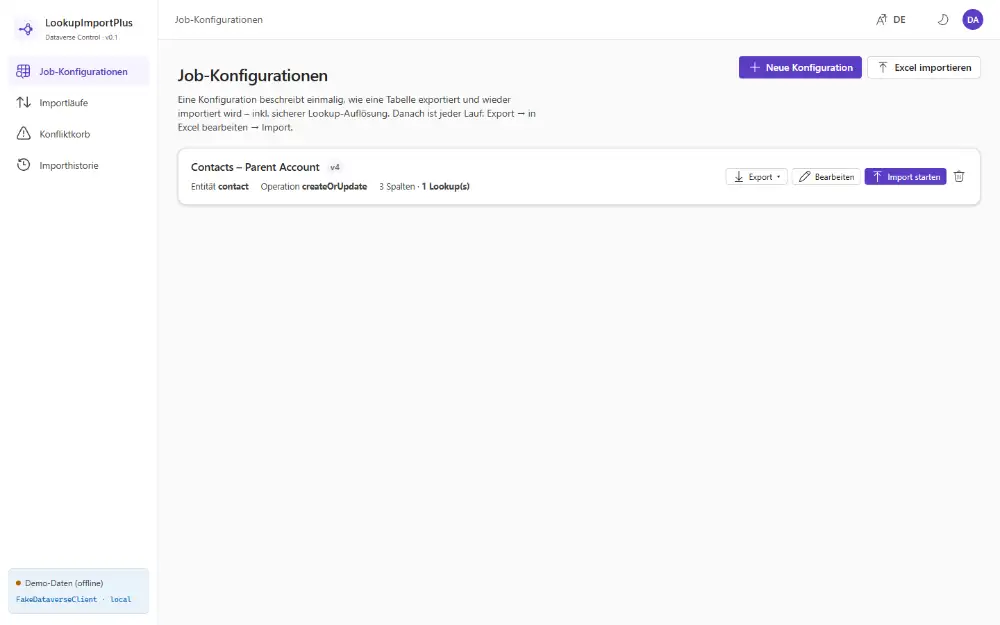 The light theme variant. The theme toggle (moon/sun icon) sits top-right next to the language switch.
Click Neue Konfiguration (New configuration) to open the guided wizard — a numbered, tabbed flow where later tabs unlock once you’ve picked a target entity: Entity & Source, General (name, operation, strict/partial write mode), Columns, Lookups.
2. Columns — pick what travels
The Columns tab lists every attribute on the chosen table, with filters for search, selected only, lookups only, required only, and writable only — genuinely useful once a table has 200+ system columns.
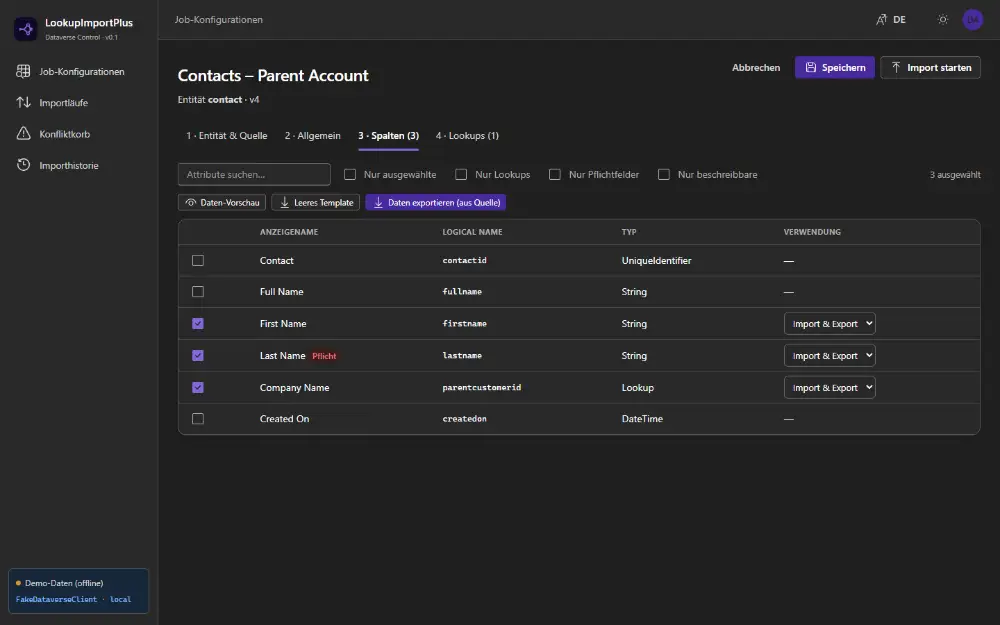 The Columns tab — ticking columns to include, with the lookups-only filter available.
3. Data preview — checking before you export
Opened from the Columns tab, this modal shows up to 10/25/50 real records, toggling between CRM columns (raw Dataverse values) and Schema columns (the exact Excel layout the export produces), with colour-coded groups and a legend.
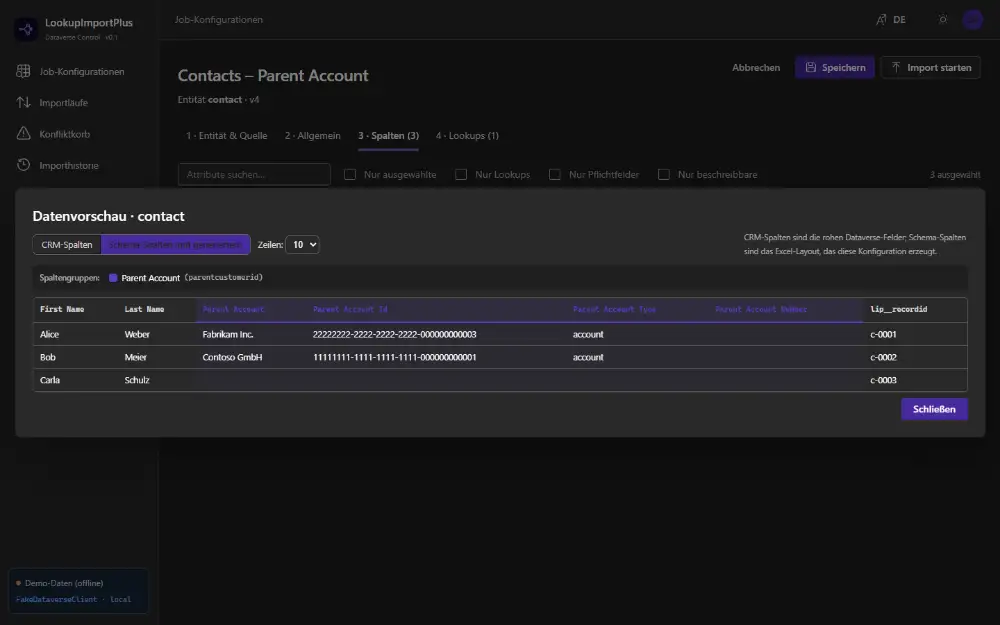 The schema view reveals what the export really produces: alongside “Parent Account”, the technical columns “Parent Account Id” (GUID), “Parent Account Type” and “Parent Account Number” — the channels for GUID and business-key matching.
4. Lookups — the heart of the tool
Every lookup column you selected gets its own configuration card. This is where the “never guess” promise is built, and the card bundles everything a match needs:
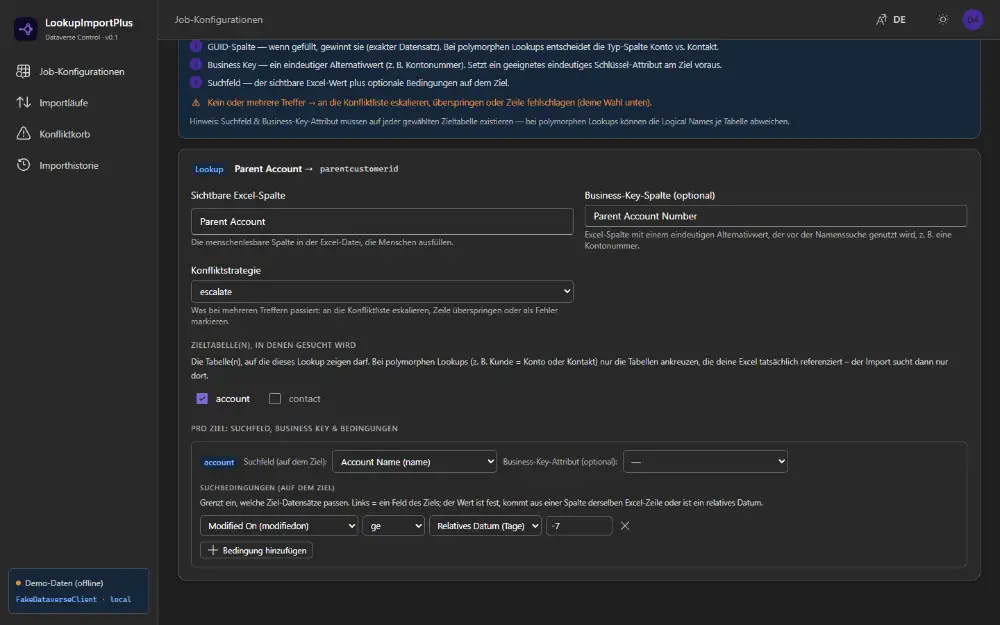 A single lookup in detail — target field
 parentcustomerid, business-key column “Parent Account Number”, conflict strategy escalate, account/contact targets (polymorphic scope), and a condition “Modified On ≥ relative date −7 days”.
For a polymorphic lookup you tick which target tables are in scope, then configure per target: its search field, its business-key attribute, and any extra conditions — because the same lookup might need account.name for one target and contact.fullname for another.
5. Import run — upload, dry run, decide
Uploading a filled spreadsheet (or loading the built-in demo file) first runs a configuration check (schema-drift protection), then a dry run that classifies every row with a determinate progress bar.
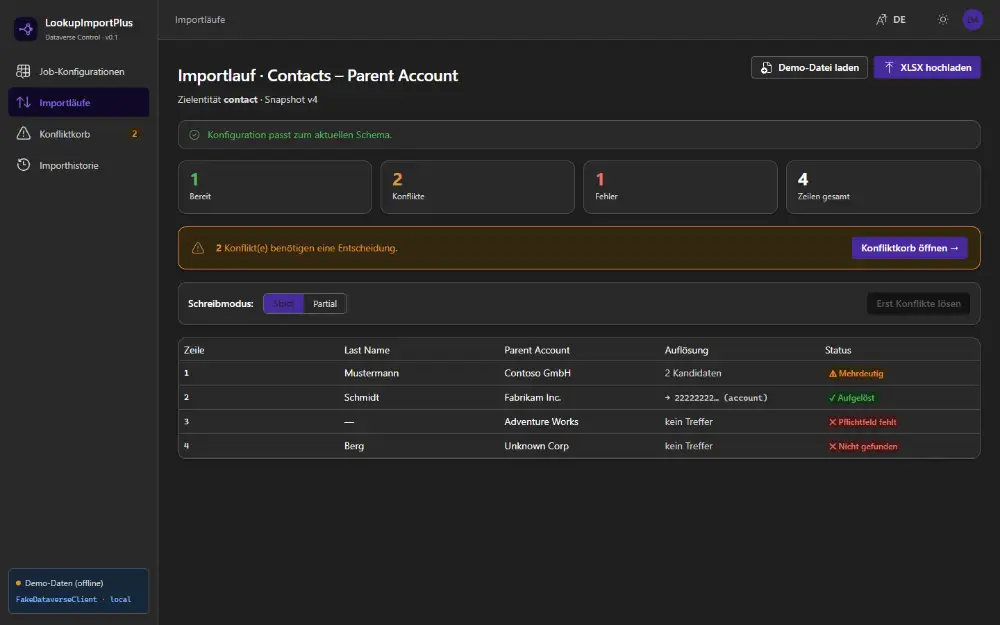 Dry-run results for the demo file — four rows, four different outcomes. We walk each one below.
You choose Strict (write nothing until everything’s resolved) or Partial (write the clean rows now), then commit.
6. Conflict basket — deciding at scale
Every unresolved lookup lands here, grouped by the source value — so many rows sharing “Contoso GmbH” are one decision, not many.
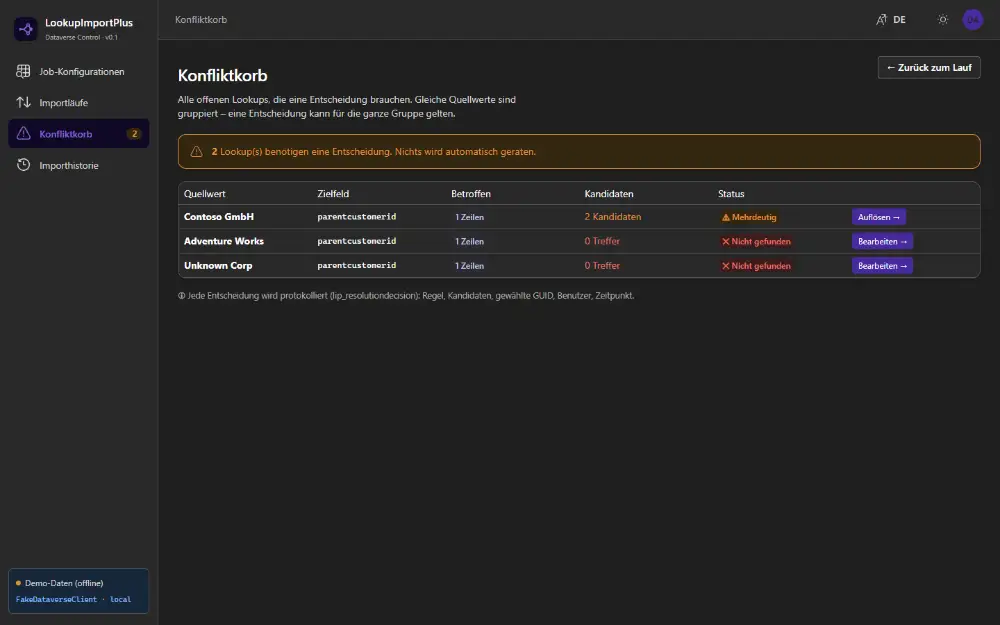 The conflict basket — “nothing is guessed automatically.” Every decision is logged: rule, candidates shown, chosen GUID, user, timestamp.
7. Import history
Every run is listed with its frozen configuration snapshot and counts — traceable back to the exact row and lookup decision.
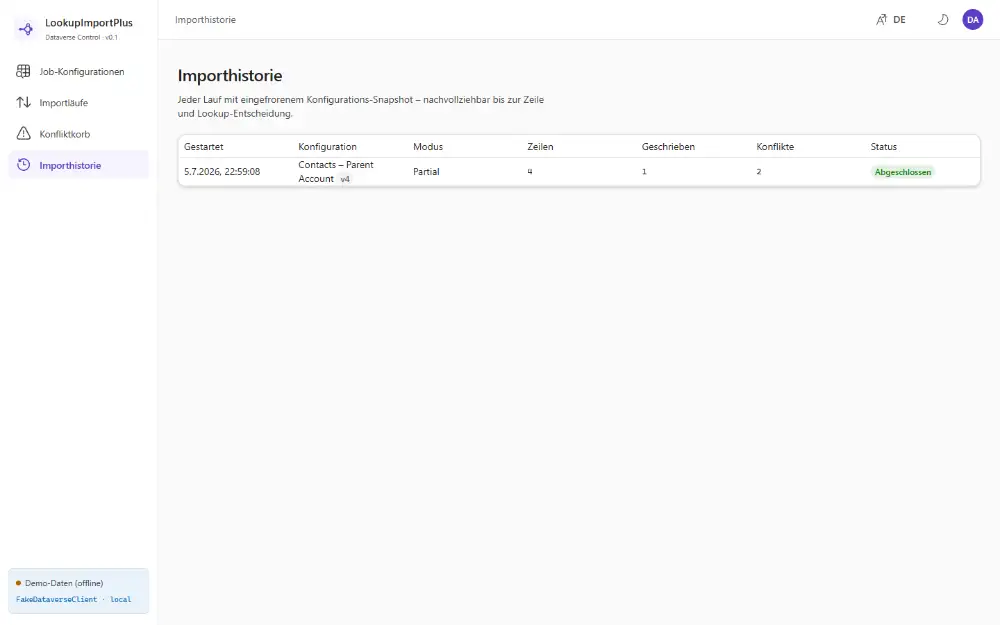 Import history (light theme) — a Partial run: 4 rows read, 1 written cleanly, 2 conflicts left open.
The matching model
The resolution order is fixed and never improvises — the app documents these three stages right in the Lookups tab:
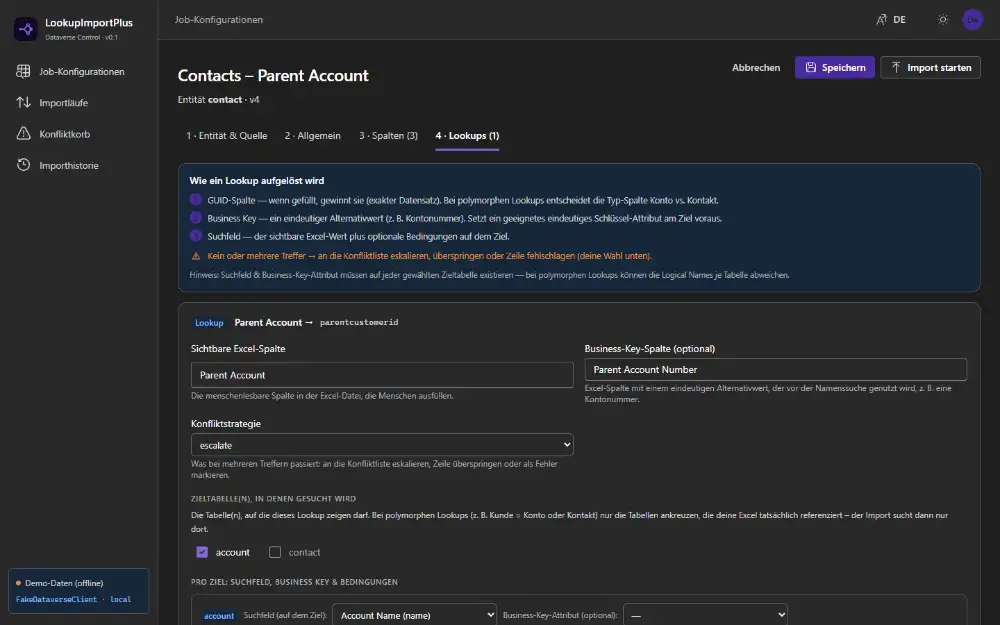 The three matching stages, as the app documents them itself — first hit wins.
1. GUID column        → retrieve by id, verify target type → bind
2. Business key        → query by unique alternate attribute
3. Search field + conditions → query candidates
     exactly one → resolved | zero → NotFound | many → Ambiguous (→ conflict list)
Import scenarios: the matching methods in action
Enough model — let’s watch it on a real run. The built-in demo file has four rows, and each deliberately lands in a different matching outcome, visible in the dry-run screen above:
| Last Name | Parent Account | Resolution | Status | What fires |
|---|---|---|---|---|
| Schmidt | Fabrikam Inc. | → 22222222… (account) | ✅ Resolved | Search field, exactly 1 hit |
| Mustermann | Contoso GmbH | 2 candidates | ⚠️ Ambiguous | Search field, >1 hit → escalate |
| — | Adventure Works | no hit | ❌ Missing required | Validation before matching |
| Berg | Unknown Corp | no hit | ❌ Not found | Search field, 0 hits |
Scenario 1 — Unique name: the happy path
Schmidt → Fabrikam Inc.: exactly one account is named “Fabrikam Inc.”. GUID and business-key columns are empty, so stage 3 (search field) fires; name eq 'Fabrikam Inc.' returns a single hit → resolved, and the commit would bind parentcustomerid_account@odata.bind to that account. No human involved. This is how you want most rows to go.
Scenario 2 — Ambiguous name: two “Contoso GmbH”
Mustermann → Contoso GmbH: stage 3 fires again — but the name search finds two “Contoso GmbH” accounts. The conflict strategy is escalate, so the app doesn’t guess; it pushes the row into the basket. Open the group:
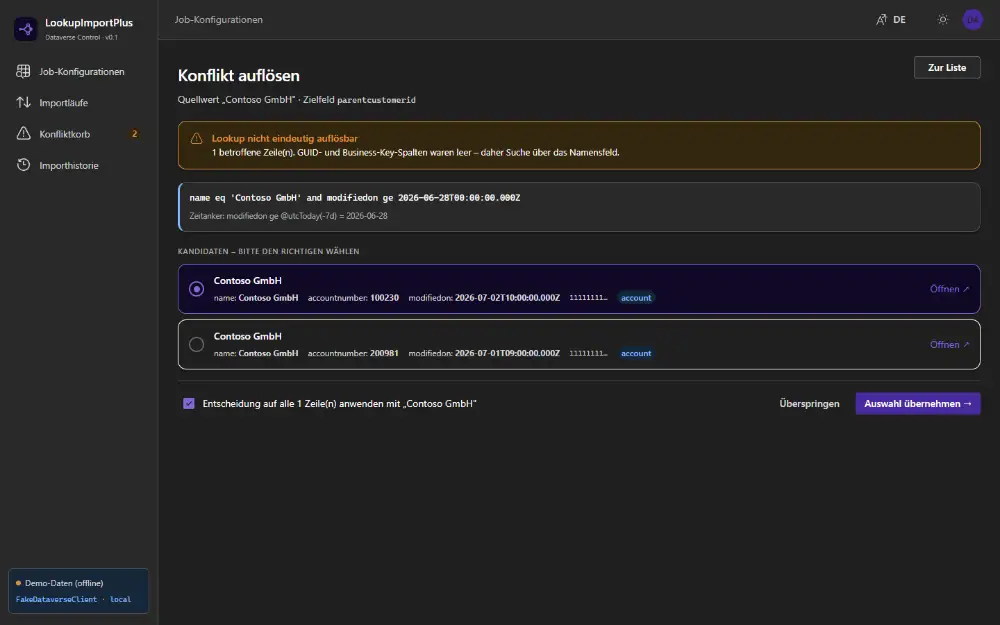 The resolve page exposes what it matched on:
 name eq 'Contoso GmbH' and modifiedon ge 2026-06-28… — and shows the two candidates, which differ only by accountnumber (100230 vs. 200981).
Pick the right record (optionally “apply to all rows with this value”) and commit. Every decision is logged. That’s the manual path — but you can head off this exact conflict in three places, without ever seeing the basket:
a) GUID round-trip (stage 1). Export real data, unhide the “Parent Account Id” column, paste the correct GUID on known-ambiguous rows, re-import. GUID wins outright.
b) Business key: the account number (stage 2). That’s what “Parent Account Number” is for. The two Contoso differ by accountnumber (100230 vs. 200981). Put the right number in the business-key column and the app resolves via the unique alternate attribute — before the name search even starts.
c) A condition: a second attribute (stage 3). No GUID or number, but another distinguishing field in the row? Add it as a condition:
name = Excel["Parent Account"] AND address1_country = Excel["Country"]Now only the German Contoso GmbH matches. (The demo already uses a modifiedon condition as a time anchor; add your own on the same pattern.)
Scenario 3 — Missing required field: caught before matching
Adventure Works with no last name: the lookup would resolve, but the row is missing a required field (lastname). The app checks that before writing and flags “missing required”, instead of throwing a raw API exception at commit time. Fill the value in Excel and re-import — it’s data validation, not a lookup problem, surfaced early.
Scenario 4 — Not found: zero hits
Berg → Unknown Corp: stage 3 searches but finds no “Unknown Corp” account → Not found. That’s more honest than a wrong hit. Usually it’s a source typo or a record that doesn’t exist yet. You decide: create the account, fix the name, or deliberately skip — “not found” gets a row with “Edit →” in the basket too.
The through-line
Four rows, four outcomes — and not one of them guessed. Every status maps straight to a matching stage: resolved (stage 3, 1 hit), ambiguous (stage 3, >1 hit, escalate), not found (stage 3, 0 hits), missing-required (validation before). And for the unpleasant cases you have two levers — GUID (stage 1) and business key (stage 2) — to make them vanish on the next round-trip.
Under the hood (brief)
LookupImportPlus is a Power Apps Code App — you write real React + Fluent UI code instead of building screens visually, using Vite. Data access goes through the @microsoft/power-apps SDK’s Dataverse data source, which exposes far more than the basic connector docs suggest — full entity/attribute/relationship metadata, OData paging, and the navigation properties needed for polymorphic lookups — so no custom connector or plug-in was needed for the core feature set.
Configurations and run history currently live in the browser’s localStorage; the app itself is the only thing installed in your Dataverse environment. Before every run, a schema-drift preflight re-checks the saved configuration against the table’s current metadata and blocks on real errors while surfacing warnings.
Limitations & roadmap
- Row-by-row writes. Commits go one record at a time (bounded-concurrency pool, per-row retry) rather than server-side bulk operations like
CreateMultiple/UpdateMultiple. Next throughput milestone. - No shared, persisted history — yet. Config and history live in each user’s browser storage. Team-shared, Dataverse-backed audit tables (
lip_jobconfiguration,lip_importjob) are a planned phase two. - No async queue for very large jobs. For big volumes, the plan is a Dataverse-native Custom API that processes rows as a background job — deliberately not an external Azure function. Not built yet.
None of these block the core promise — deterministic, auditable lookup resolution.
Try it yourself
The full source is open on GitHub: github.com/brunsforge/LookupImportPlus.
git clone https://github.com/brunsforge/LookupImportPlus
cd LookupImportPlus
npm install && npm run dev        # local, demo data, no Dataverse needed
npm run deploy -- -EnvironmentUrl https://<org>.crm.dynamics.com   # to a trial
The local dev mode runs entirely against an in-memory mock — including the two deliberately colliding “Contoso GmbH” accounts from the scenarios above — so you can see a conflict happen and resolve it without touching a real environment first.