 AI & Agents·23 August 2026·11 min read
 A memory that stays: OpenViking as a personal RAG — from any device
You know the feeling: a new chat, and the AI knows nothing again. Not how you solved a problem last week. Not which server types your host no longer offers. Not the convention you painstakingly worked out. Every session starts from zero — and the hard-won knowledge is scattered across chat histories nobody can find again.
The usual reflex: cram everything into one tool and hope its built-in “memory” is enough. But that ties your memory to exactly that vendor and exactly that device. Switch from the terminal to the browser or to your phone, and it’s gone.
The cleaner idea: memory is its own layer — beneath all agents, not inside one of them. That’s exactly what OpenViking is: a semantic long-term memory database that runs as a personal RAG on a small VM of your own and is reachable from every client. This article shows the tool, the infrastructure behind it, and why it’s worth it — high-level, with diagrams and three real demos from three devices.
What OpenViking is — and what it isn’t
The most common misconception first: OpenViking is not an alternative to Claude Code, Cursor or ChatGPT. It doesn’t sit beside your agent, it sits beneath it.
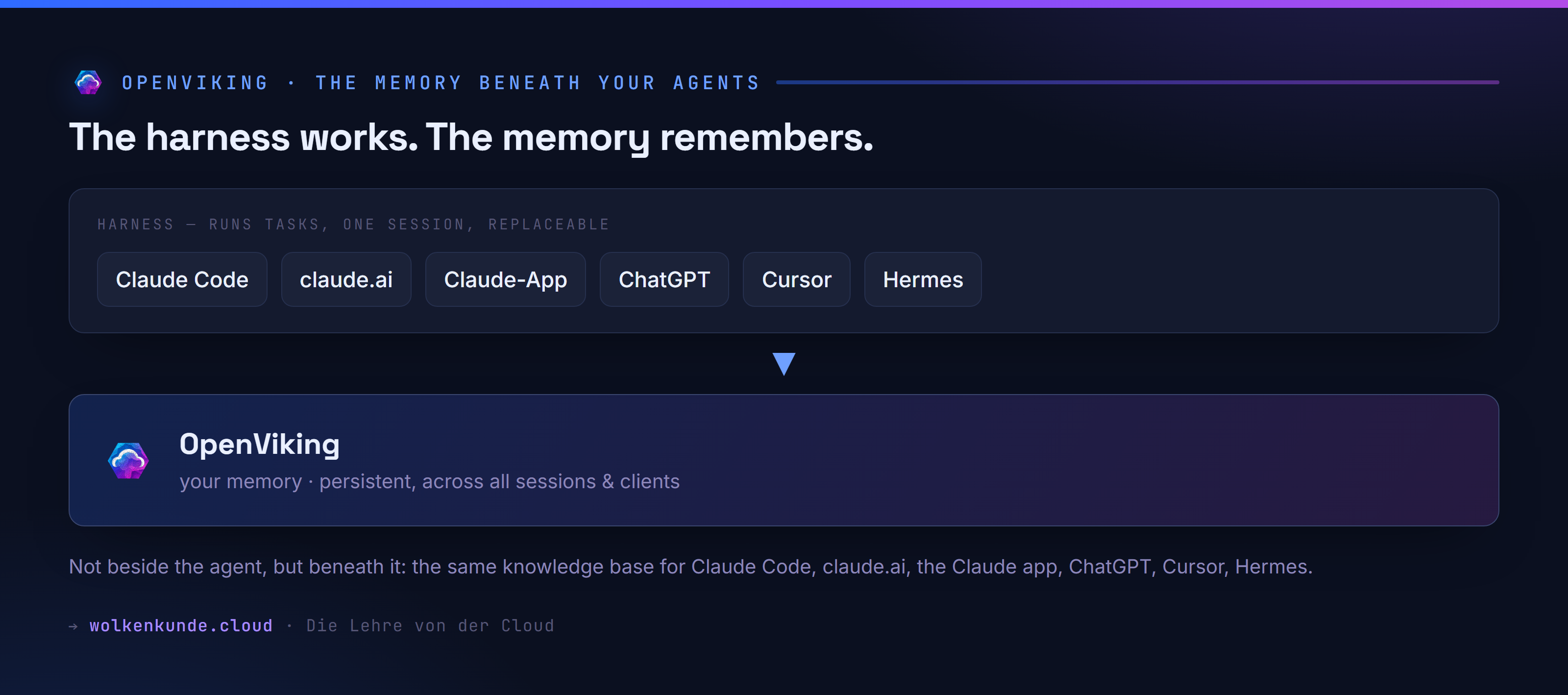
The harness — Claude Code, Hermes, Cursor, the Claude app — runs tasks, calls tools, and is forgotten after the session. It’s deliberately replaceable. The memory, by contrast, should stay: persistent, across all sessions, regardless of which tool you happen to be using.
The practical benefit of this separation: your knowledge base is not tied to one agent. Whoever works in the terminal with Claude Code today and adds Cursor or the Claude app on their phone tomorrow reaches the same store. A real-world example: Hermes Agent by Nous Research wires OpenViking in directly as a memory provider (hermes memory setup openviking), Claude Code via a small plugin — same base, two tools.
A personal RAG: a filesystem, not a vector soup
Now the core — why this is a good personal RAG and not just “another vector database”.
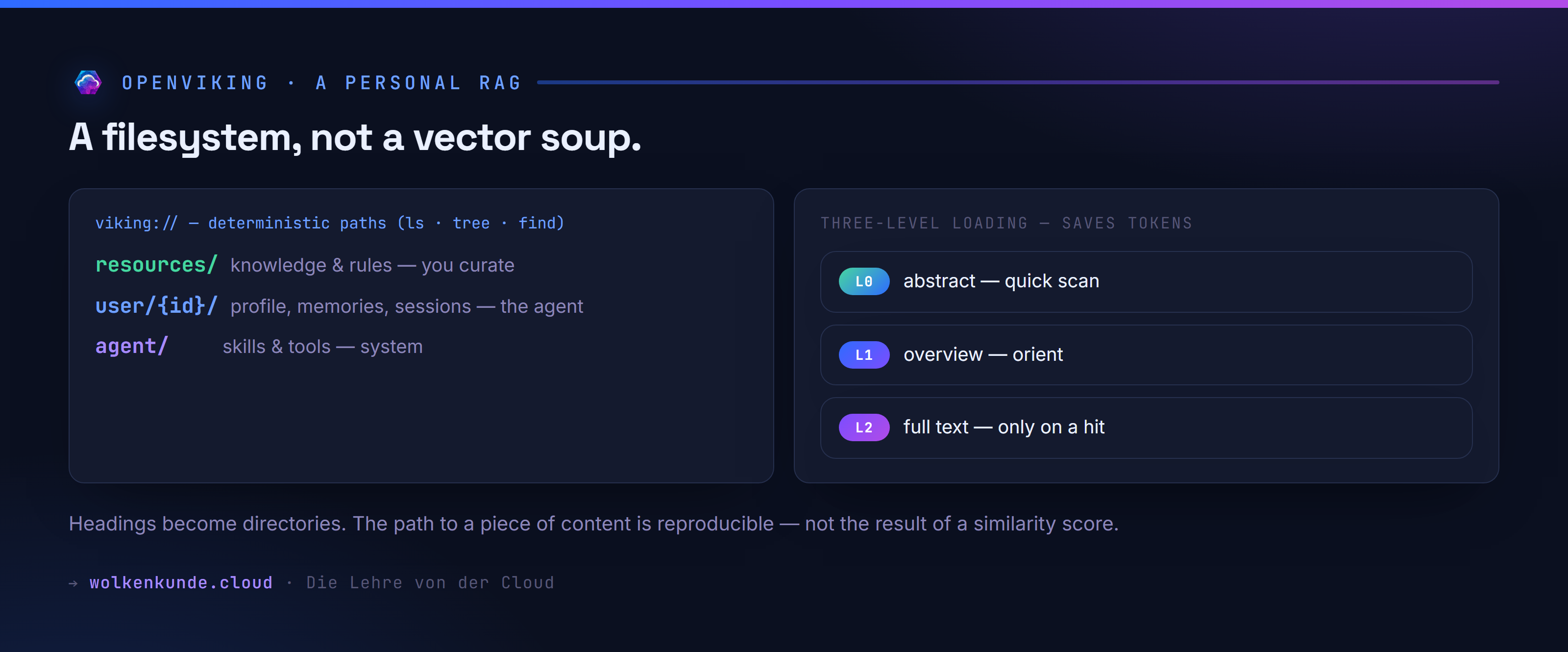
OpenViking maps all context as a virtual filesystem under viking://. Agents find content not only via vector search but by navigating deterministic paths — with ls, tree, find. That’s the essential difference from a classic vector database: the path to a piece of content is reproducible, not the result of a similarity score.
There are three fixed areas:
viking://resources/— knowledge and rules that you curate (documentation, manuals, learnings)viking://user/{id}/— profile, memories, preferences, sessions that the agent maintainsviking://agent/— skills and tool configuration, managed by the system
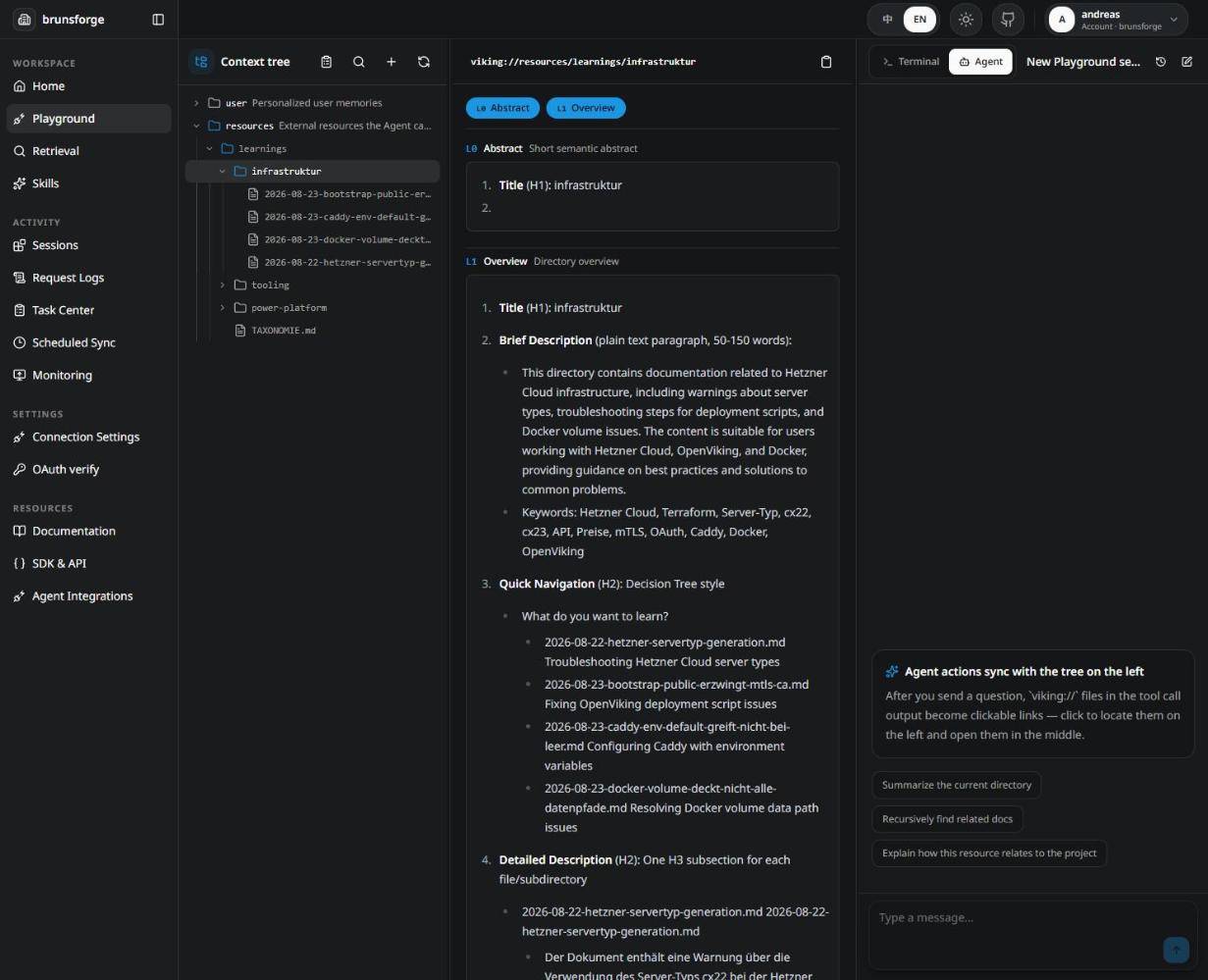
When you add a document, a three-stage process runs: split (by headings, no LLM), condense (two short levels per file, via LLM) and index (vector index). That’s where the token-saving loading comes from: an agent reads the L0 abstract first, steps up to the L1 overview when needed, and fetches the L2 full text only on real hits. And because your heading structure becomes the directory structure, clean outlining earns you a clean store for free.
A curated library, not a conversation transcript
A deliberate difference from the default: OpenViking is often run as an automatic session memory — the harness records everything, the system extracts preferences. Here it runs the other way, as a curated library: AUTO_CAPTURE is off, AUTO_RECALL is on. What goes in are proven mechanisms as Markdown files with a diff review — no conversational noise.
The reason is simple: reading is consequence-free, writing acts permanently on all projects. The automatic path fills the base with noise and carries in customer names that don’t belong there. A pull request’s diff is the only place where that still gets caught before it’s stored centrally.
The infrastructure — high-level
And what does it run on? Deliberately lean: one small VM, a Docker stack, its own data disk.
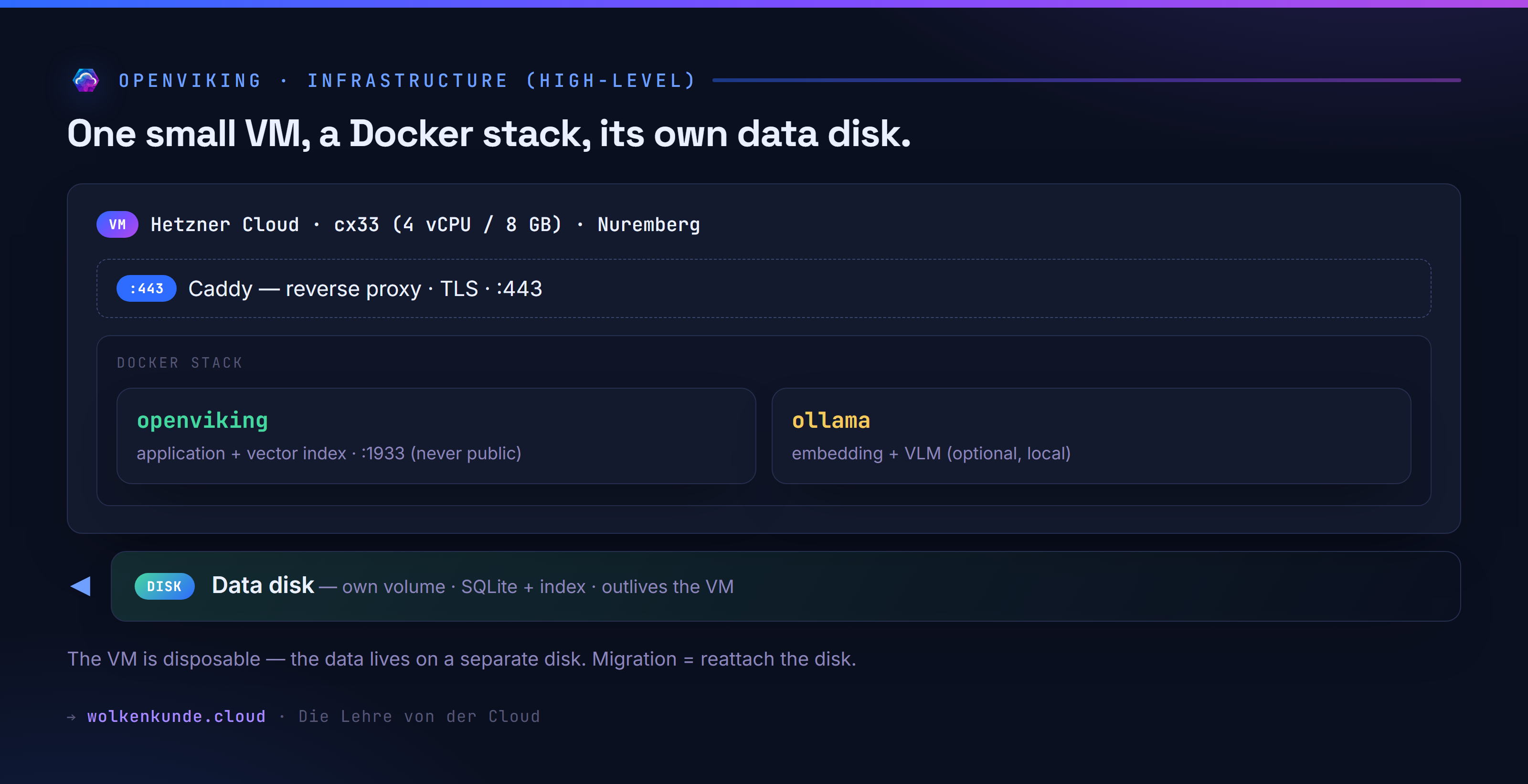
The building blocks:
- VM: a Hetzner
cx33(4 vCPU, 8 GB) in Nuremberg, provisioned via Terraform. Small, cheap, sufficient. - Containers:
openviking(the application plus vector index, port 1933), optionallyopenviking-ollama(embedding and vision model, when content should stay local) andopenviking-caddy(reverse proxy, TLS, ports 80/443). - Data disk: a separate volume with the SQLite database and the index.
The last decision is the most important: the VM is disposable, the data lives apart. Broken update, misconfigured Docker, Ubuntu upgrade gone wrong? Rebuild the VM, reattach the data disk, done. That’s also the migration path — even to a different provider. Without this separation, every VM problem would be a data problem, and losing it would mean losing years of insight.
Two deliberate non-choices, for honesty’s sake: no Kubernetes — a single container doesn’t need a cluster. And no serverless (Azure Container Apps): their economics come from scale-to-zero, which a knowledge base with a persistent index simply can’t do — it would have to run continuously and cold-start on every prompt.
Reachable from any device — three paths
The real promise: from anywhere. That’s no accident, but three deliberately separated access paths.
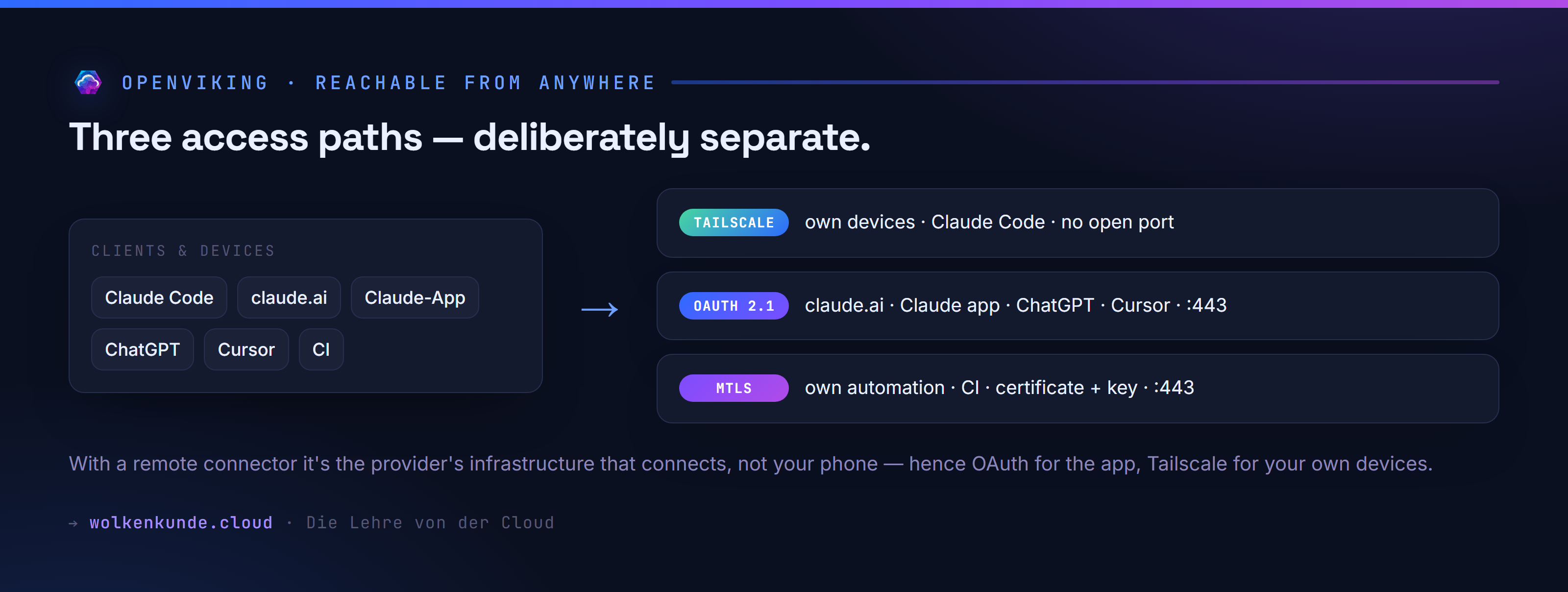
- Tailscale is the default path for your own devices (laptop, desktop, Claude Code). The service binds to a mesh address, no port is open to the internet.
- OAuth 2.1 on port 443 is for everything that comes from a data center: claude.ai, the Claude app, ChatGPT, Cursor. Sign-in via OAuth with PKCE and a consent dialog.
- mTLS on 443 is for your own automation and CI — secured by a client certificate plus API key.
Why three and not one? Because of a detail that’s easy to miss: with a remote MCP connector, it isn’t your device that connects to the server, but the provider’s infrastructure. So Tailscale on your phone doesn’t help the Claude app — its request comes from a data center, not the phone. Hence OAuth for the app, Tailscale for your own devices.
The proof: the same question, three clients
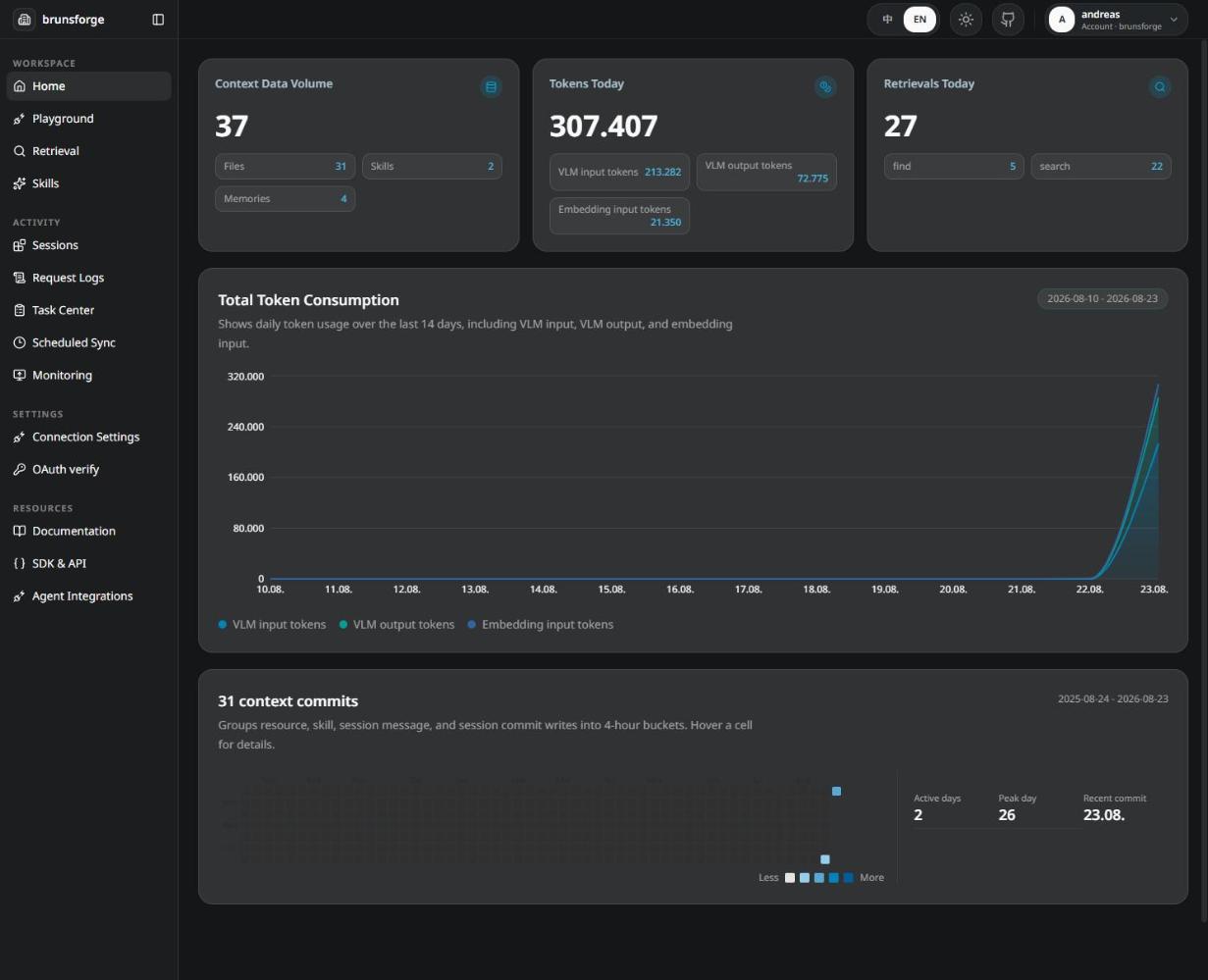
Talk is cheap — here it is in action. The same question (“What did I store in Viking as learnings today?”), asked from three different clients, each on its own access path, all with the same memory behind it.
Three devices, three paths, one knowledge base. That’s exactly what “operable from any device” means.
Security: five layers
A central knowledge base that feeds all projects demands care. Security sits on five levels — the last is the most important, because it can’t be technically enforced:
- Network — SSH only from a defined source, the application port 1933 is explicitly denied (not merely “not allowed”), plus
ufw,fail2ban, automatic security updates. - Transport — Tailscale is WireGuard-encrypted; the public fallback runs over TLS, mTLS only in
require_and_verifymode (any request without a valid certificate ends in the TLS handshake, the application never sees it). - Keys — split into a root key (account management only, no data APIs) and a user key (reads and writes content, one per device). A lost laptop means one key revoked, not all of them.
- Tenant isolation — one account per context. So a recall in project A never surfaces knowledge from project B — a matter of confidentiality and quality.
- What goes in — no customer or company names, no URLs, tenant IDs, secrets, personal data. A learning describes a mechanism, not a customer. No technology can enforce this layer — that’s what the diff review is for.
The honest part
No setup is free. What to know beforehand:
- No high availability. One VM, one location. If it goes down, the base is unavailable until recovery. Acceptable, because the server is the distributor, not the creator: learnings originate as Markdown in the project repos and can be re-imported.
- Cost. On Hetzner roughly €6/month (small, external embedding provider) up to ~€28/month (with local Ollama for confidential content). The same architecture on Azure would be 4–6× that — Azure runs the blog, the private knowledge base deliberately lives on Hetzner. The VPN costs nothing: Tailscale is free for individuals.
- The embedding provider is a trust decision. With an external provider, content leaves your own infrastructure. If you don’t want that, use the local backend or the
local-embedprofile with Ollama — then everything stays on the VM (note: the built-in default model is Chinese; set a suitable one explicitly for DE/EN). - Don’t forget backups.
backup.shdefaults to storing locally — that protects against operator error, not against losing the VM. For real protection, configure an off-site copy. - Deletion and retention are on you. Your own memory means your own lifecycle — not just what goes in, but what has to come back out. The agent can remove entries on demand via the MCP tools on the
viking://filesystem, provided the user key has the matching rights; the vector index drops with it. Two things you must carry through deliberately: delete git-based learnings at the source (the repo) — otherwise the next sync brings them back — and the backups, which age on their own. For the dynamicuser/layer (sessions, memories) a deliberate retention period is worth setting on top. Independence from the vendor also means you set the deletion rule yourself. - License. OpenViking is AGPLv3 (CLI parts Apache 2.0). Uncritical for internal operation; check when distributing a derived solution.
Is it worth it?
For a single chat: no. For someone who works with AI daily, across several tools and devices, and whose value lies in accumulated context: very much. The difference is between “the AI is a clever stranger, new every morning” and “the AI knows my rules, my decisions, my mistakes from last time”.
A personal RAG as its own layer makes exactly that permanent — and because it sits beneath the agents rather than inside one of them, it survives every tool switch. The infrastructure for it is modest: one small VM, three containers, one data disk, three access paths. The real effort isn’t in the technology but in the discipline of what goes in — and that’s precisely what keeps the store valuable over the years.
State: August 2026. Version in operation: OpenViking v0.4.16. Prices are approximations (Hetzner list prices, Azure retail API, West Europe) and should be checked in the configurator before deciding.
Sources
- OpenViking (upstream, volcengine) — AGPLv3 (main project), Apache 2.0 (CLI parts).
- Tailscale — the mesh VPN for the default path (free for individuals).
- Caddy — reverse proxy with automatic TLS and mTLS.
- Hetzner Cloud — the VM.
- Model Context Protocol (MCP) — the protocol the clients use to reach the memory.
See also
- Share skills and agents across your team — with your own Claude Code marketplace — the other half of a well-thought-out AI working environment: shared capabilities instead of shared memory.