
 Platform Engineering·22 September 2026·11 min read
 The release waves are ending. Where will the news be from November?
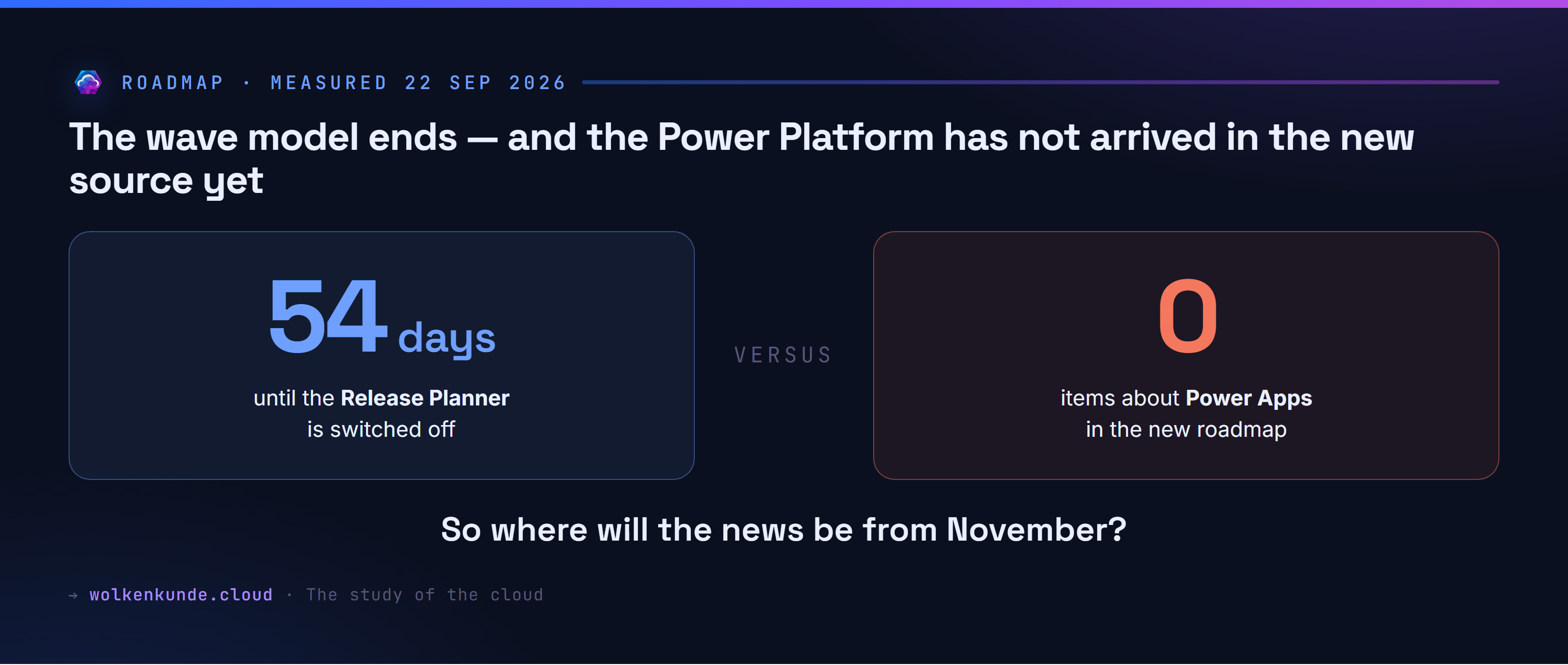
On 15 November 2026 the Release Planner is switched off. There is no release wave 2 for 2026, and no new release plans have been published on Learn since September. That is what message center post MC1461529 of 25 August 2026 says, and it is more than a rename: the model the Power Platform has announced itself by for years stops existing.
What replaces it is called the AI at Work roadmap — the renamed Microsoft 365 roadmap. Dynamics 365, the Power Platform and Dataverse are meant to live there alongside Microsoft 365 from now on.
Instead of retelling the announcement, I used the new source. It has an MCP server that answers without a sign-in and without a licence. So I pulled the whole inventory and counted what of the Power Platform is actually in there.
The answer is shorter than I would have liked.
What you see first
You go to the new roadmap, find the product filter and set it to Power Apps. Power Apps is not in the list. You try Dataverse — also missing. Power Pages, Power BI: nothing.
At that point you assume you are being clumsy. I was convinced the filter was broken.
What is actually going on
The inventory can be pulled in full, page by page, fifty items at a time. On 21 September 2026 there were 1,768 items. Of those, 32 belong to a product from the Business Apps world — 1.8 percent.
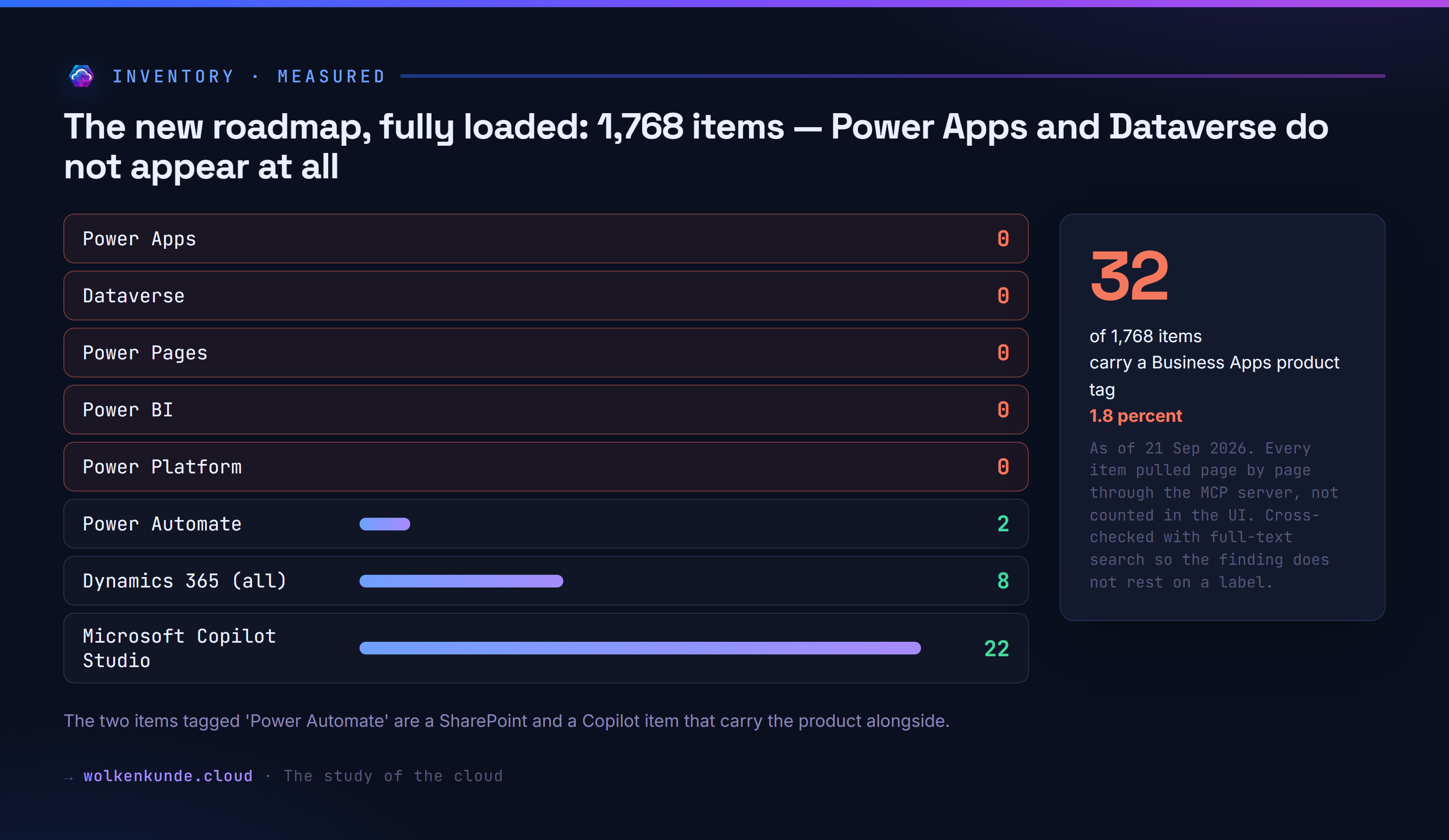
So the filter is not broken. There is simply nothing to filter.
The two items tagged “Power Automate” are not even their own topics: one is a SharePoint item about a trigger for forms, the other a Copilot item about document generation. Both merely carry Power Automate alongside.
To make sure the finding does not rest on a label, I asked the same question through full-text search: “Power Platform” zero hits, “Power Pages” zero. “Power Apps” returns two hits, but those are a Purview and a Microsoft 365 item that mention the name in their body text. “Dataverse” returns two Copilot items.
This is not sloppiness, it is the schedule. The post says: new items go straight to the new roadmap from September, existing ones dated 1 June 2026 or later move “in the fall”. The migration is still running — it has just reached exactly one product.
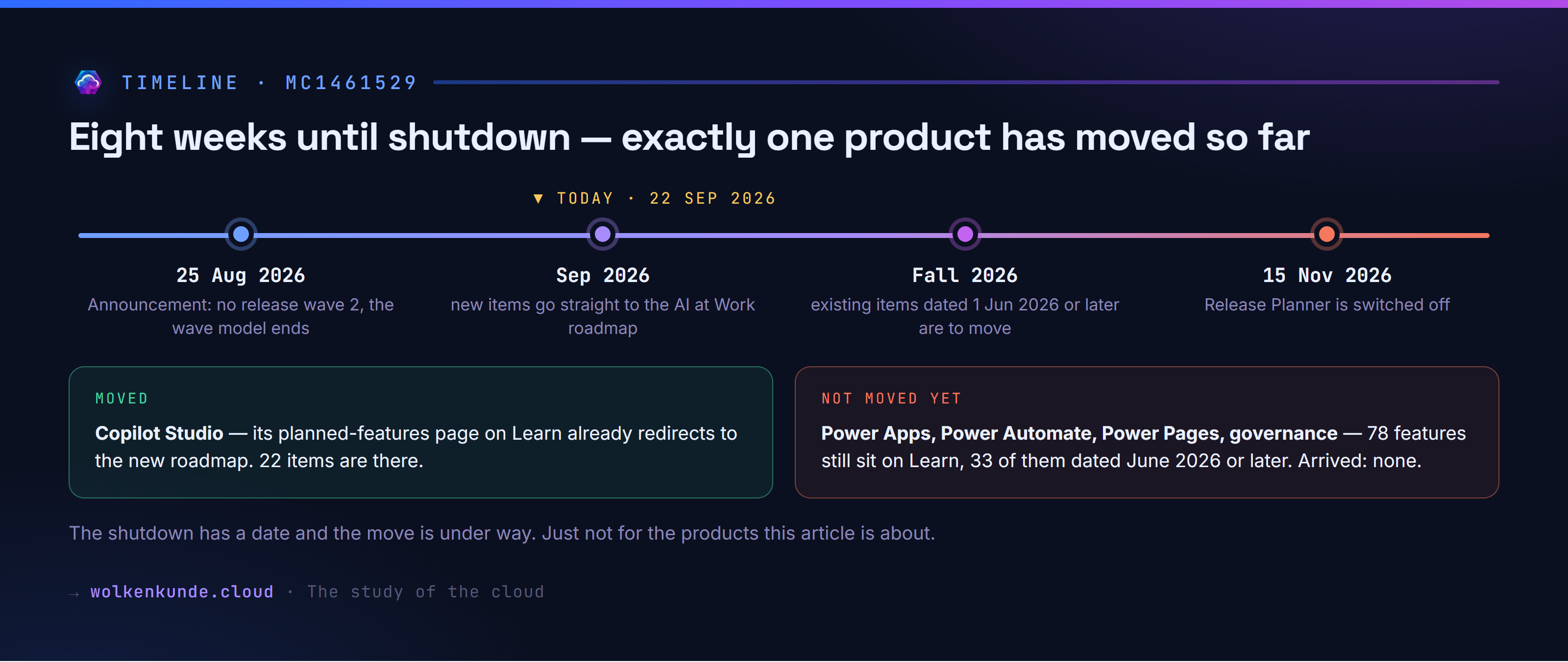
You can see it on the Learn pages themselves. The planned-features page for Copilot Studio already redirects to the new roadmap, with a filter pre-applied. The pages for Power Apps, Power Automate, Power Pages and governance still serve their own table:
power-apps        HTTP 200  -> learn.microsoft.com/.../2026wave1/power-apps/planned-features
power-automate    HTTP 200  -> learn.microsoft.com/.../2026wave1/power-automate/planned-features
power-pages       HTTP 200  -> learn.microsoft.com/.../2026wave1/power-pages/planned-features
copilot-studio    HTTP 200  -> microsoft.com/en-us/microsoft-365/roadmap?filters=...
Those four tables hold 78 features between them, 33 of which have an availability date of June 2026 or later. Those are exactly the ones the announcement says must move. So far, none of them has.
The obvious answer that does not work
First instinct: subscribe to the new roadmap’s feed and filter it down to your product. There is an RSS feed, it responds, and it is useless as a subscription.
It ignores every filter parameter. Whether you append ?product=, ?search= or ?filter= makes no difference — you always get the entire inventory back:
no parameters                                   1775 items
?product=Power%20Automate                       1773 items
?search=Copilot%20Studio                        1775 items
?filter=products/any(p: p eq 'Copilot Studio')  1775 items
Your feed reader ends up with 1,775 items going back to 2020. That is not something you can follow.
Second instinct: the search. That disappoints too, in a way you only understand after a few attempts. It cannot handle digits or hyphens:
search "Dynamics"        ->  8 hits
search "Dynamics 365"    ->  An error occurred invoking 'get_recent_m365_roadmaps'.
search "365"             ->  An error occurred invoking 'get_recent_m365_roadmaps'.
search "model driven"    ->  1 hit
search "model-driven"    ->  An error occurred invoking 'get_recent_m365_roadmaps'.
search "Field Service"   ->  5 hits
Type the full product name and you get no hint about the cause, just something that looks like an outage. The filter route, on the other hand, works reliably.
The answer that holds: the message center
If the roadmap does not carry the Power Platform, the real question follows: where do you find out that something has changed?
I measured the channels against each other. The result is clear — and it is not the roadmap.
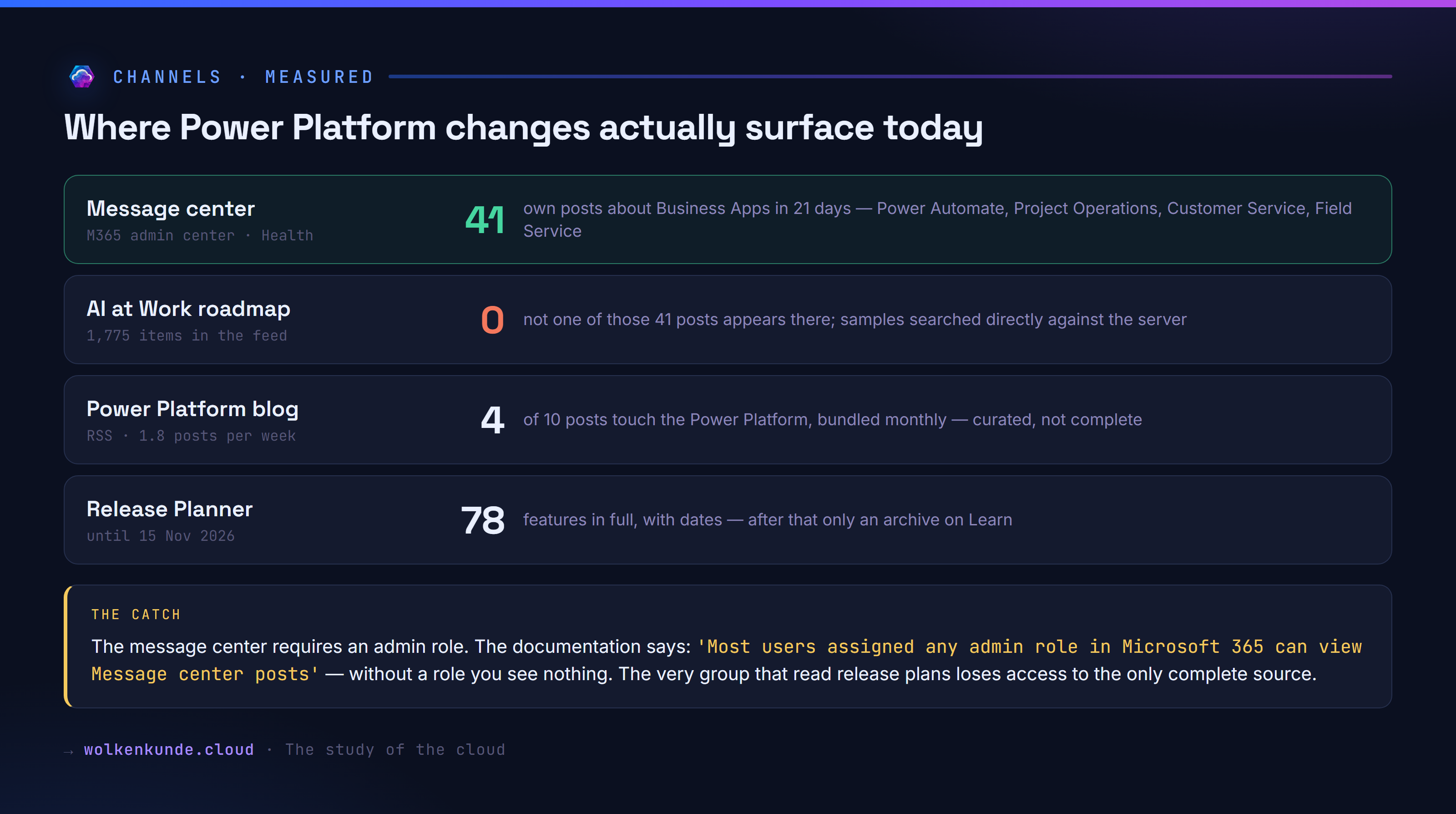
In 21 days, 41 posts about Business Apps landed in the message center: Power Automate, Project Operations, Customer Service, Field Service, Copilot Studio. Among them things a developer wants to know — “Power Automate: Create and manage custom dashboard tiles”, “View unattended run video logs in portal”.
Not one of those 41 posts is in the roadmap. I did not conclude that from comparing titles; I searched for samples directly against the server, using terms without digits or hyphens:
| Post | Search term | Hits |
|---|---|---|
| MC1472191 Power Automate | custom dashboard tiles | 0 |
| MC1465653 Power Automate | unattended run video logs | 0 |
| MC1472214 Project Operations | Change Order Management | 0 |
| MC1465523 Customer Service | Resolve customer emails autonomously | 0 |
| MC1476008 Field Service | Scheduling Operations Agent | 0 |
That makes the message center the only channel today that carries Power Platform changes in full. You find it in the Microsoft 365 admin center under Health → Message center, and for the Power Platform also in the Power Platform admin center.
And this is where the catch comes in, which I will come back to below.
Hands-on: query the inventory yourself
The MCP server behind the new roadmap is wide open: https://www.microsoft.com/releasecommunications/mcp, streamable HTTP, no sign-in, no licence. Four tools: get_recent_m365_roadmaps, get_m365_roadmap_by_id, get_recent_azure_updates, get_azure_update_by_id.
You can wire it into an agent as a connector. You can also just call it — which is all a measurement needs:
const URL = "https://www.microsoft.com/releasecommunications/mcp";
const H = { "Content-Type": "application/json", Accept: "application/json, text/event-stream" };

// The response comes back as an event stream; the payload sits in the data lines.
const call = async (body) => {
  const r = await fetch(URL, { method: "POST", headers: H, body: JSON.stringify(body) });
  const text = await r.text();
  let d = null;
  for (const line of text.split("\n")) if (line.startsWith("data:")) d = JSON.parse(line.slice(5).trim());
  return d;
};

const tool = async (name, args) => {
  const a = await call({ jsonrpc: "2.0", id: 1, method: "tools/call", params: { name, arguments: args } });
  return JSON.parse(a.result.content[0].text);
};

// Do not go through search - go through the filter, which actually works.
const res = await tool("get_recent_m365_roadmaps", {
  filter: "products/any(p: p eq 'Microsoft Copilot Studio')",
});
console.log(res.totalCount, "items");
for (const x of res.items) console.log(x.id, x.generalAvailabilityDate, x.status, x.title);
What comes back looks like this:
22 items
571196 2026-09 In development  Microsoft Copilot Studio: Cost visibility in Monitor tab
568929 2026-09 In development  Microsoft Copilot Studio: Dataverse integration on Copilot Studio
567894 2027-01 In development  Microsoft Copilot Studio: Share Autonomous Agents to End Users
...
Two things matter here. First, generalAvailabilityDate is month-level, never day-level — the same granularity the release plans gave. Second, there is include_facets: true, which hands you the product list, the status distribution and the platforms in a single call. That is exactly how the count above came about.
To get the full inventory, page through it with skip in steps of fifty. For 1,768 items that is 36 calls.
A checklist for the next eight weeks
- Until 15 November, keep using the Release Planner. All 78 features are there, with dates. Export whatever matters beyond that date now, not in November.
- Set up the message center as your main source. In the Microsoft 365 admin center under Health → Message center, set your product preferences so Business Apps do not drown in a stream of roughly 167 posts a week.
- Use the filter on the new roadmap, not the search.
products/any(p: p eq '<product name>')is reliable; the search breaks on digits and hyphens. - Check the status, not just the date. And remember that cancelled items are missing from the facet — for those you need
status eq 'Cancelled'. - Take the blog as a summary. The monthly bundled feature update on the Power Platform blog is curated and readable, but not complete.
- Review your own posts and notes that link to release plan pages. Those links survive as an archive, but they describe a model that no longer exists.
What gets lost
Start with what improves. The new source is open: no login, no licence, an interface you can wire into your own tooling. It is maintained — 305 of the 1,768 items were touched in the last 30 days, the most recent change dates from 18 September. And instead of two fixed dates a year, new things arrive continuously.
Against that stand four things worth knowing before you treat the roadmap as a planning basis.
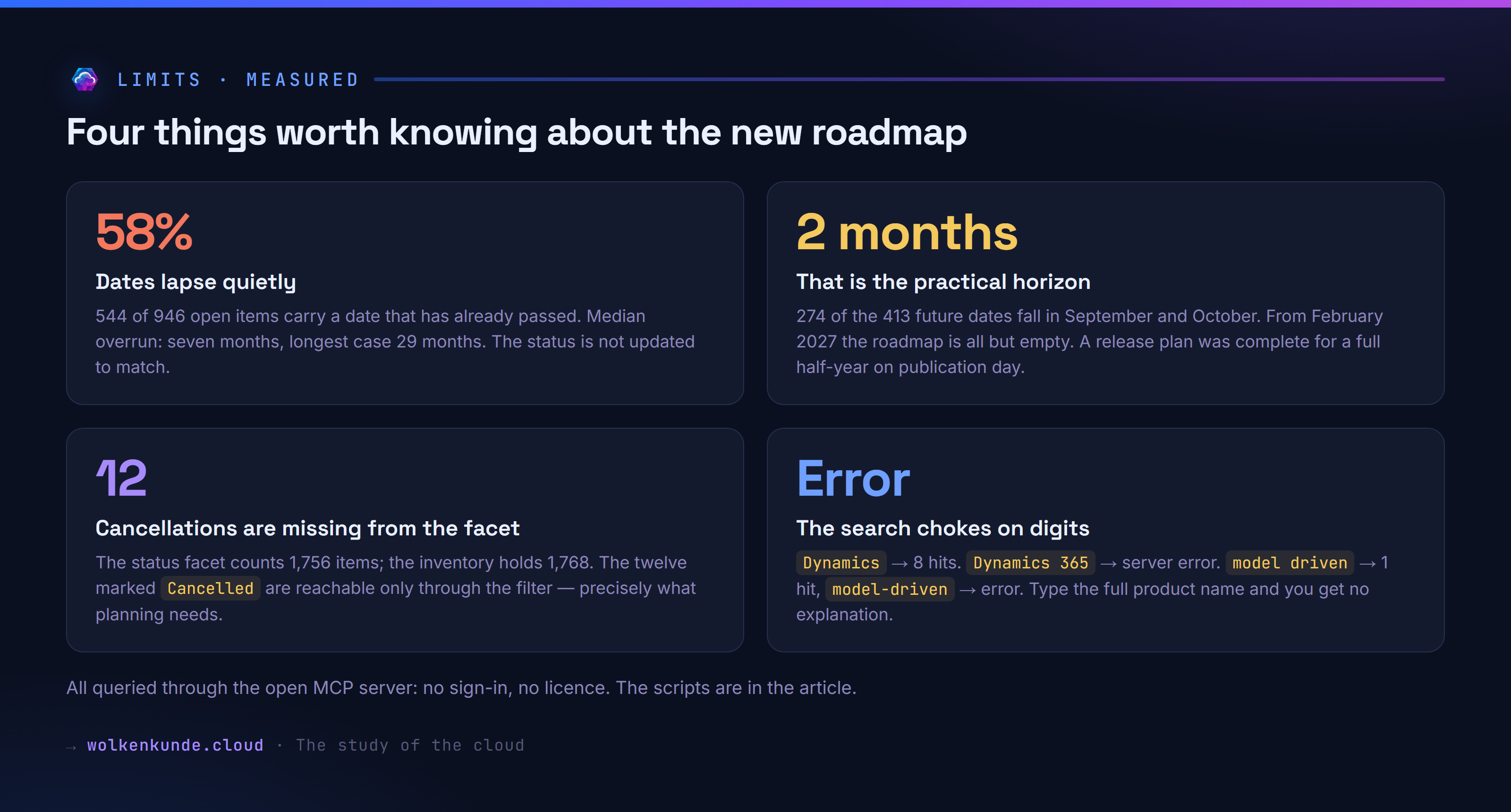
Dates lapse quietly. Of 946 open items, 544 carry an availability date that has already passed — 58 percent. Seven months past due at the median, 29 months in the worst case. The status is not updated to match; the date simply stays. An item from April 2024 still reads “Rolling out” today.
The view ahead is short. 274 of the 413 future dates fall in September and October. From February 2027 there are only isolated entries left. A release plan was complete for a full half-year on publication day, and that window was the actual value: you could read it front to back once and know what was coming. A continuous stream does not replace that.
Cancellations are hidden. The status facet counts 1,756 items; the inventory holds 1,768. The twelve marked Cancelled do not show up in the facet and are reachable only through the filter. Follow the UI and you miss precisely the information planning depends on.
And the most serious point: the channel that does carry the changes in full requires an admin role. The documentation says so plainly — “Most users assigned any admin role in Microsoft 365 can view Message center posts”. Without a role in the tenant, you see nothing. Release plans were public, no sign-in needed, readable by anyone. The message center is not.
So the group that needed it most loses access to the complete source: developers and makers without admin rights, consultants working in other people’s tenants, and everyone who advises customers without holding a role there.
For them what remains is the blog, the community, and workarounds such as the public message center archive at mc.merill.net, which shows the same posts without tenant access. It works, but it is a third-party offering, not a replacement for an open source.
Over to you
For this article I measured what is there, not what is customary. So here is the honest question: how do you find out today that something in the Power Platform has changed?
Message center, if you have a role? The blog? A community list, a newsletter, a script of your own? Or, honestly, only once something in the project looks different than it did yesterday?
I am certain there are routes I do not know about. Put them in the comments — I will add the good ones here and link them.
See also
- Does Power Fx replace the C# plug-in? A measurement across 1,000 rows — how to measure preview features yourself instead of trusting the documentation
- Canvas apps offline with Dataverse: the new online mode and the FetchXML editor — one of the articles still citing a release plan as its source
- The old grid is deprecated — what happens when you notice a deprecation too late
All figures come from my own queries on 21 and 22 September 2026, not from announcement texts. The inventory was pulled in full and evaluated locally; the cross-checks ran directly against the server. If you want to reproduce them, the route is in the hands-on section above.