
 AI & Agents·13 September 2026·16 min read
 Your Flow Is the Tool: Why Agent Tooling Belongs in the Power Platform, Not in Your Repo
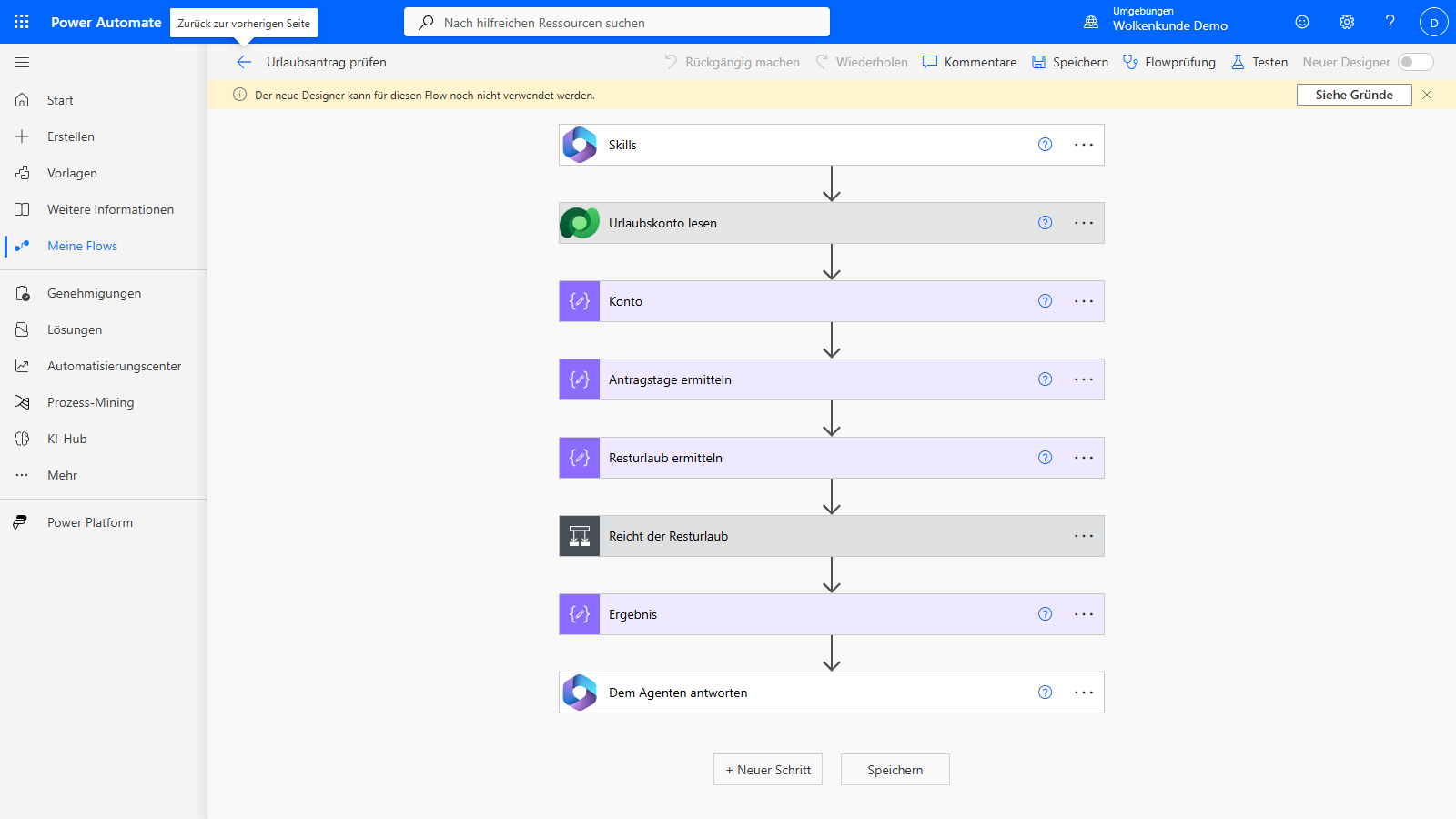
You have a flow that has been running reliably for two years. Check leave request: it pulls the remaining vacation days from Dataverse, checks them against the entitlement, writes the request away and sends a mail to the manager. Seven actions, deterministic, with vetted connections and a DLP policy on top.
Next to it stands your agent. It gets the same task and does it on foot: it queries Dataverse, receives raw data, does the arithmetic inside the model, drafts a mail. The result is usually correct. It costs more tokens, takes longer, and comes out slightly different every time.
The reflex in the agent world at this point: Then I’ll build the deterministic steps as a local skill in my repo. And the question this article is about is: why local? You are a Power Platform developer. The logic already exists, it lives in your environment, it is secured. It doesn’t need to be reinvented — it needs to be reachable.
Two things that get mixed up constantly
First we need to separate two cases, otherwise we talk past each other.
While building, an agent helps you create, change and repair flows. That exists, and you can use it today — the Power Automate plugin in the Power Platform skills marketplace brings cloud flows into the GitHub Copilot CLI and into Claude Code: create, edit, run, investigate failed runs, all in conversation. What that looks like in practice is in Power Automate without portal clicking (in German).
In production, the finished flow becomes a tool for an agent. You don’t call it — the agent decides on its own that it needs it.
This article is about the second case. The first one won’t come up again.
The direction flips
Here’s how it used to look: a flow starts, and somewhere in the middle it calls something intelligent — a prompt action, an AI connector, a model. The flow is in charge, the AI is one action among many.
before:  Trigger   →  Flow   →  [AI action]  →  Result
after:   Question  →  Agent  →  [Flow]       →  Result
Now it turns around. The agent is in charge, and the flow is the tool. The agent gets a list of available tools, reads their descriptions, and when one of them fits the task it calls it with typed parameters. It gets a clean, structured result back instead of piecing one together.
The gain isn’t in building something new. It’s that automation logic, connector governance and DLP rules that have been in place for years become reachable for agents without you copying them into a repo. How much rework that still takes is what the next section is about.
What works today — and where it’s documented
This isn’t a promise about the future. For agents on the GitHub Copilot harness in Copilot Studio, Microsoft describes exactly three kinds of tools you can attach: connectors, MCP servers and workflows.
The sentence about workflows is the one that matters. They let the agent run multi-step processes — approvals, data transformations, business logic — and according to the docs they are meant for repeatable, deterministic processes that your agent runs on demand. That is precisely this article’s thesis, in Microsoft’s own words.
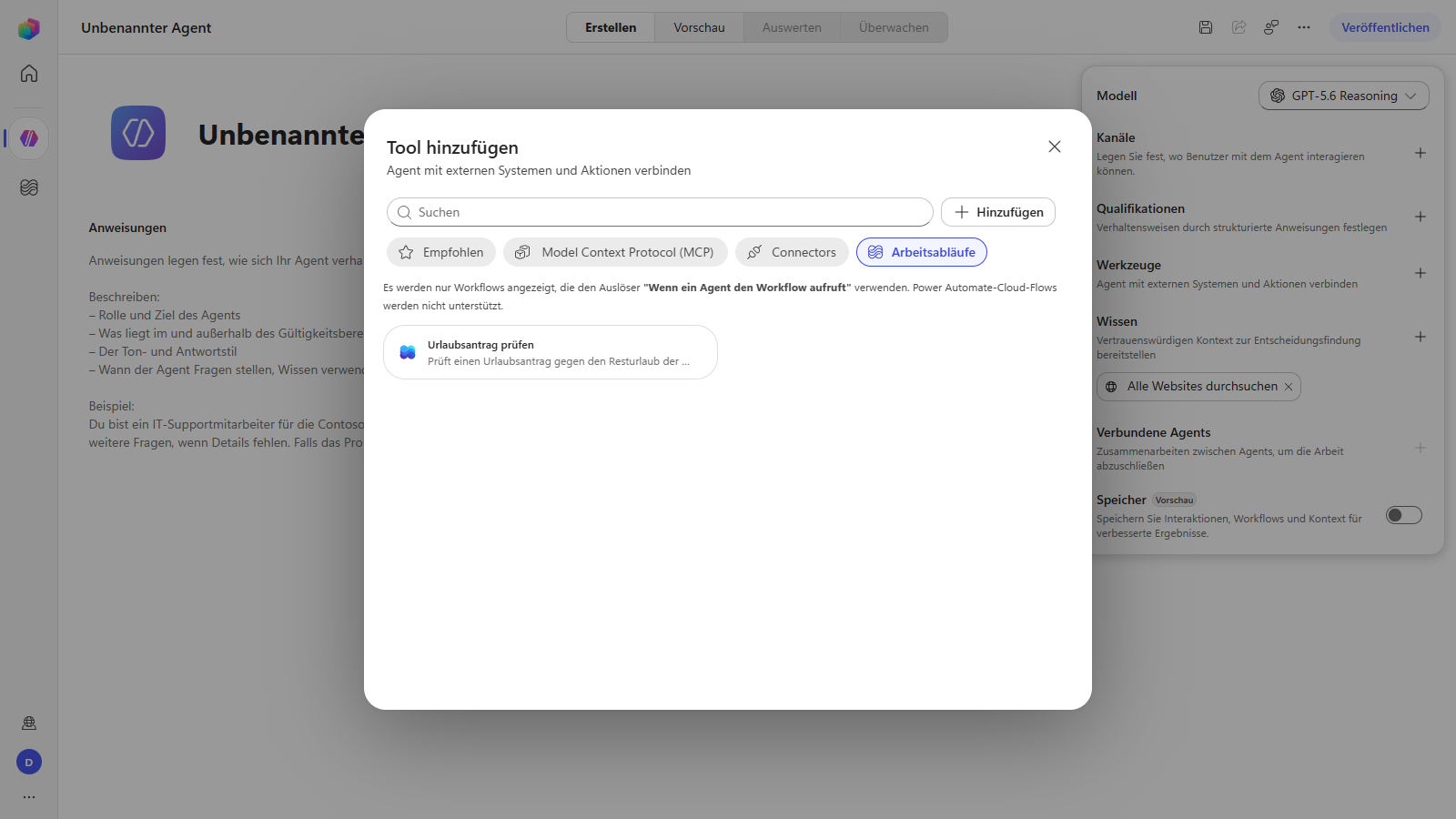
And now the part that isn’t in any documentation, verified in September 2026 in a freshly created Power Platform tenant: you cannot attach an existing cloud flow. The tool dialog says so itself, in the screenshot below: “Only workflows that use the trigger ‘When an agent calls the flow’ are shown. Power Automate cloud flows are not supported.” And that holds literally — even a cloud flow carrying exactly that trigger does not show up in the list.
What does work is three steps:
- Create the shell. In Copilot Studio under Workflows → New workflow, pick the trigger type “When an agent calls the flow”. The designer then automatically places the two nodes When an agent calls the flow and Respond to the agent — the same shape a cloud flow with a Skills trigger has.
- Define inputs and publish. Publishing is not optional and not cosmetic:
as long as the workflow is a draft, it does not exist for the Web API.
Queries against the
workflowtable don’t return it, and access by its ID ends in “Does Not Exist”. Only publishing actually creates the row. - Push the logic in. After that the workflow is an ordinary flow and shows up in Power Automate too. Its definition can be written through the regular flow API — so you drop in exactly the actions you already have instead of clicking them together.
The thesis holds, it just gets more precise: the logic stays in the Power Platform and does not move into the repo. You don’t get it for free, though — you have to touch it once. What you save is rebuilding the logic. What you pay for is a new shell around it.
Here’s how you attach it:
Path 1 — the workflow as a tool. In the agent, go to Tools → Add tool → Workflows, then pick the workflow. The agent sees name, description and parameters and calls it when the task fits. No endpoint of your own, no MCP needed. With the caveat just established: it has to be a Copilot Studio workflow, not a cloud flow.
Path 2 — an MCP server as a tool. Same place, Add tool → Model Context Protocol, then select the server. Copilot Studio takes name, description, inputs and outputs straight from the server and pulls in changes when something there changes. You can switch individual tools of a server off inside the agent — by default they’re all on. You can submit your own MCP servers to Microsoft for certification.
Both end at the same point: the agent discovers the tool itself and decides for itself when to use it.
The invisible star: the description
The field everything hinges on isn’t the flow. It’s its description.
The agent doesn’t see your flow. It sees a name, a description and a parameter schema — nothing else. From that alone it decides whether this tool fits the question. A description like “Checks requests” leads to the agent either never calling the tool or calling it wrongly all the time.
How literally that’s meant is visible in the screenshot above: in the tool dialog, there is nothing under the name but the description. It is everything standing between your flow and the agent’s decision.
What works:
- One sentence on what the flow does — in the language of the task, not the language of the implementation. Not “reads Dataverse and sends mail”, but “checks a leave request against remaining vacation days and notifies the manager”.
- When it is responsible — and, almost more important, when it isn’t. “Only for leave requests, not for sick notes.”
- Parameter names that speak.
employeeEmailinstead ofparam1. The agent fills the fields from the conversation — it can only fill what it understands.
This isn’t cosmetics. This is the step that decides whether the thing works. What the agent needs beyond that in terms of reliable context is its own topic — see Grounding Copilot agents properly.
The tool delivers
Which brings us to what counts: the result.
The workflow is created, published, attached to the agent as a tool — and it runs. Called with three typed parameters:
employeeEmail:  alex.beispiel@contoso.com
startDate:      2026-10-05
endDate:        2026-10-09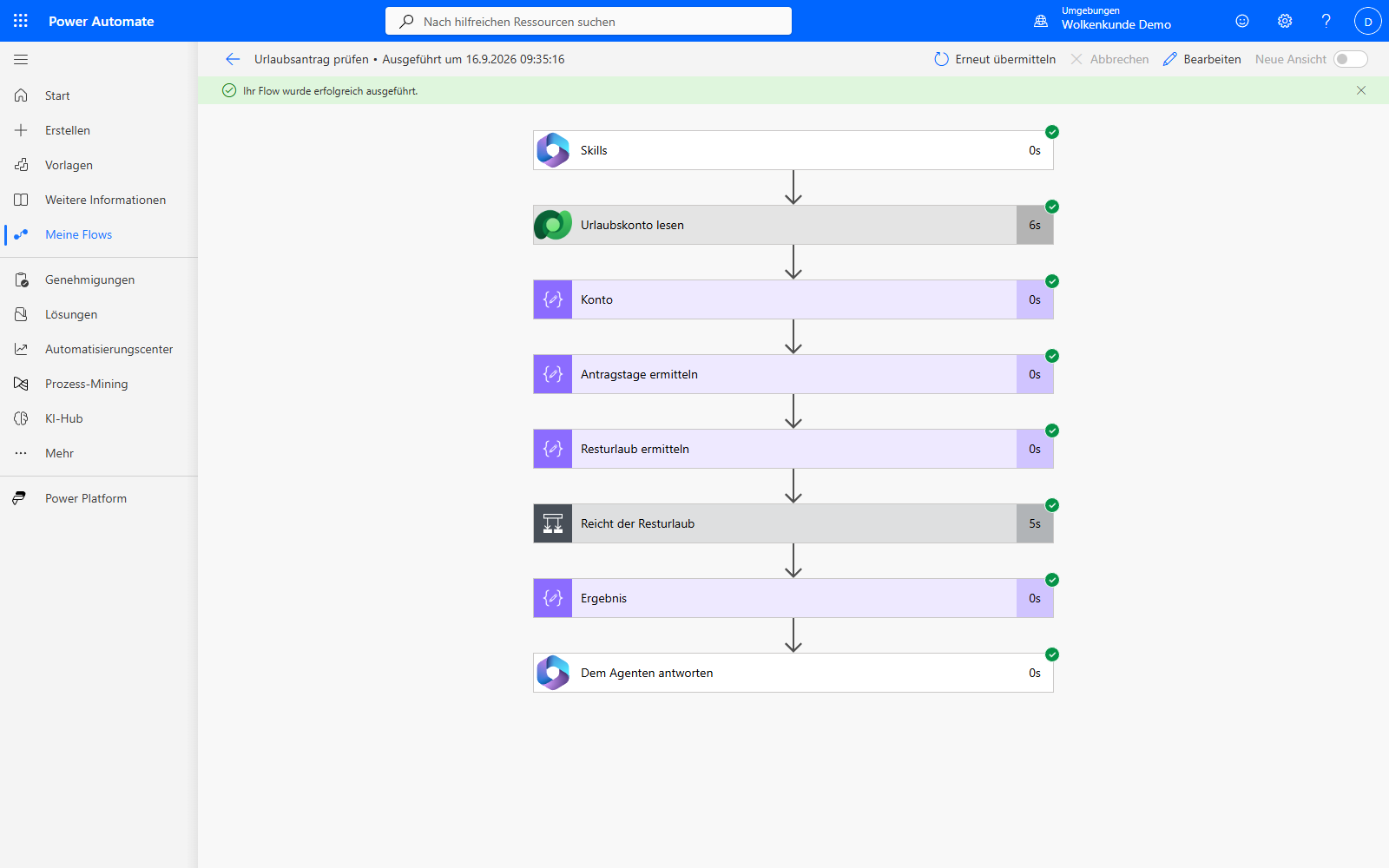
Eleven seconds, every action successful. And afterwards the result isn’t sitting in a model response you’d have to verify — it’s in Dataverse:
| before | after | |
|---|---|---|
| Leave request | none | 5–9 Oct 2026, 5 days, status approved |
| Remaining days, Alex | 12 | 7 |
Five days, not “about a week”. Seven days left, not “a few still”. The next call produces the same, and the one after that too — that is the entire difference between a tool and a language model that guesses well.
On top of that, something the screenshot only shows in passing: the run is in the history. With a timestamp, with the inputs, with the outcome of every single action. A skill in a local repo would have nothing to show here.
What’s still open belongs in here too: a token comparison between the free path and the tool call is outstanding. Both paths run by now, but the comparison needs two runs under equal conditions — and those haven’t been measured. Estimated numbers don’t belong here.
The hurdle nobody writes about
So far this sounds like an afternoon’s work. It isn’t, and the reason has nothing to do with technology.
Creating the workflow, publishing it, filling it with logic through the API and running it works in a Power Platform trial tenant without any trouble — how to get such a tenant is described in Which trial through which mailbox? (in German). Everything you’ve seen so far was built in one.
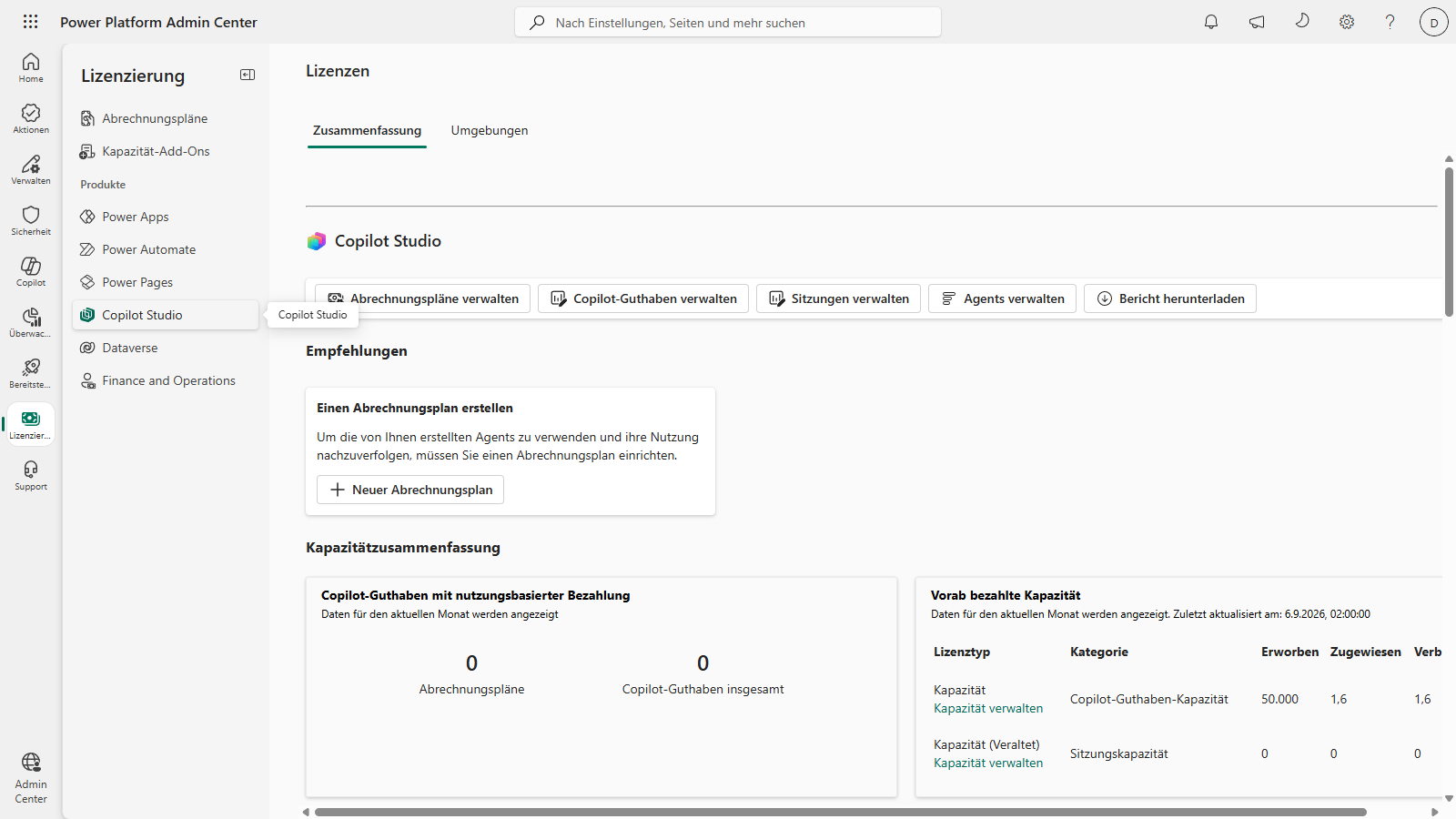
Creating an agent does not work. Copilot Studio aborts with “You don’t have permission to create agents … user license not found”. The message is misleading. No per-seat license is missing — a billing plan is. The Power Platform Admin Center says it plainly under Licensing → Copilot Studio: “To use the agents you create and track their usage, you need to set up a billing plan.” The new Copilot Studio bills against credits and wants to see a linked Azure subscription for that.
There is no shortcut via buying a license. The SKU that’s called “Microsoft Copilot Studio” in the product catalog and listed there as license-based actually applies to the whole tenant: all of its service plans are of type Company. It cannot be assigned to a user — not in the Admin Center, where it doesn’t even appear under “Licenses and apps”, and not through Graph, which rejects it with “cannot be assigned to a user”. It buys message capacity, not access.
So the line is clear: the tool is free. The agent in Copilot Studio is not. Anyone rebuilding this should know it beforehand — and should not make the mistake of taking the misleading license message at face value and buying licenses that unlock nothing.
The proof doesn’t need Copilot Studio
The agent there fails on the billing plan. This article’s thesis does not fail with it, because it doesn’t depend on one particular agent.
What an agent needs in order to use your flow is four things: a name, a
description, a parameter schema and a call. An MCP server delivers that in about
a hundred lines. It registers a single tool, check_leave_request, with exactly
the description from the section above — word for word, not paraphrased — and
three required fields. When the agent calls the tool, the server sends a POST to
the flow’s callback URL and hands its answer back.
For that, the trigger at the front has to be swapped. A flow with a Skills
trigger does not hand out its callback URL (ListCallbackUrlOperationBlocked);
a flow with an HTTP trigger does. Same actions behind it, same environment, same
connection references — just a different door.
The video shows the whole chain. The question names no email address, so the agent asks for one — not out of politeness, but because it reads in the description that the call actually creates the request. A plain “would that even work?” without side effects is not something this tool offers. After the answer it fills the schema from the conversation, calls the flow, and what comes back are typed fields rather than a formulation:
| Field | Value |
|---|---|
| Decision | approved |
| Period | 2–4 Nov 2026 |
| Days requested | 3 |
| Days left afterwards | 9 |
Eleven executed actions, one skipped branch action, a little over a second — that’s in the run history on the right, with duration and status. (The demo data is reset before every run, which is why Alex starts at twelve days again here.)
With that, the thesis is no longer just a claim: the agent calculated nothing. It used a tool that lives in the Power Platform.
Get the terms right, or it gets embarrassing
Three things that go wrong in almost every post on this topic.
MCP is not a Microsoft protocol. The Model Context Protocol is an open standard from Anthropic — the socket through which an agent reaches foreign systems. Microsoft ships MCP servers for it: Dataverse, Power Apps, Process Mining. That’s a difference like the one between HTTP and a web server. Anyone talking about “Microsoft’s MCP” hasn’t understood it. What such a server looks like from the inside — tools, resources, the return channel — is covered in more detail in UI components in chat.
Power Apps MCP is not Power Automate MCP. The Power Apps MCP server has been in public preview since 11 February 2026, at first only in US early-release environments, rolling out gradually. It lets agents handle recurring app tasks, filling in forms for instance, with human approval in the Agent Feed. It has nothing to do with cloud flows.
And the Power Automate MCP server? This is where it gets interesting. There
is one — but it does something other than the name suggests. The Process Mining
MCP server is the MCP server under the Power Automate umbrella: a prebuilt
Power Platform connector, listed in all regions, in preview and therefore not
cleared for production workloads. Its nine tools are called get_processes,
get_bottleneck_analysis, get_variants_with_metrics and the like. So it opens
up process analytics for agents — not your cloud flows.
If you come across a date or a preview status somewhere: check first which of these servers the source is talking about.
The trap when researching this
One pointer that saves you time. Search for “Power Automate MCP server” and you’ll largely land on FlowStudio — a third-party server that can create, debug and document flows. It’s a decent product, but it isn’t Microsoft, it helps while building, and it doesn’t fall under the same commitments. Several blog posts treat it as if it were a platform feature.
Check three things about every source: who operates the server? Does it help while building, or does the agent call it in production? And does the date given actually refer to this server?
The point is in the governance
The objection that always comes up here: and what about control?
This is exactly where the advantage over a skill in a local repo sits. A flow attached as a tool keeps running as a flow. It uses the same connections under a controlled identity — with everything that entails, see Connection references from dev to prod — it falls under the same DLP policies, and it lands in the same run history. That’s not theory: the run above sits exactly there, with inputs, duration and the outcome of every action.
A local skill in the repo has none of that. It has the credentials the developer gave it, and it leaves the traces the developer thought to leave.
One thing has to be said alongside: an identity is not a permission. The fact that an agent has its own Entra identity does not mean what it may do is governed through it — that’s covered in detail in Entra Agent ID. What the flow-as-a-tool path gives you is the connector and DLP layer. That is worth a lot, but it isn’t everything.
And a second limitation belongs to the MCP path: the HTTP trigger makes the flow reachable through a signed URL. Whoever holds it can start the flow. So it belongs in a secret store, not in the repo — and anyone wanting more protection puts authentication in front of it instead of relying on the signature.
Where things honestly stand
| What | Status |
|---|---|
| Workflow as a tool for agents (GitHub Copilot harness) | documented |
| MCP server as a tool in Copilot Studio | documented, certification possible |
| Attaching an existing cloud flow as a workflow tool | not possible — the tool dialog excludes cloud flows explicitly |
| Creating a workflow in Copilot Studio and filling it with logic via the flow API | works — publishing is mandatory, before that it’s invisible to the API |
| Running the workflow and getting a deterministic result | works — run successful, result verified in Dataverse |
| Creating an agent in Copilot Studio | needs a pay-as-you-go billing plan; without it, it aborts with a misleading license message |
| Flow as a tool for an agent without Copilot Studio — your own MCP server on the HTTP trigger | works — in the video above, result verified in Dataverse |
| Starting a Skills flow from outside via API with parameters | blocked (ListCallbackUrlOperationBlocked); through the designer and through an HTTP trigger it works |
| Process Mining MCP server (Power Automate) | preview, all regions, not for production workloads — analytics, not flows |
| Power Apps MCP server | public preview since 11 Feb 2026, US early release first |
| Power Automate plugin (CLI, helps while building) | available, not an MCP server |
| An MCP server that publishes your cloud flows | not evidenced by Microsoft; third parties like FlowStudio fill the gap |
If you try this: check availability live in your tenant, not in the docs. Preview features roll out region by region, and the documentation regularly runs ahead of the tenant or behind it.
What you can do now
- Find an existing flow that does one clearly bounded job and is deterministic. The leaner the better.
- Rewrite its description — along the three points above. That’s the actual work.
- Pick a door. Copilot Studio: create a workflow with the agent trigger, publish it, push your flow’s definition in through the API — and set up a billing plan. Without Copilot Studio: a copy of the flow with an HTTP trigger and an MCP server in front of it.
- Run it once and look at what comes back. If there’s a number there instead of a formulation, you’ve built a tool.
- Attach it as a tool to your agent and ask a question without mentioning the flow. Does it call it? If not, that’s on the description, not on the agent.
The point isn’t that MCP is new. The point is that the logic your agent needs has been lying around at your place all along — secured, tested, in production. It doesn’t belong copied into a repo. It belongs unlocked. Three days of leave, nine days left: no model worked that out, your flow delivered it.